📖 About this Domain
This domain covers the configuration of Microsoft Teams Phone for Public Switched Telephone Network (PSTN) connectivity. You will manage phone numbers, voice policies, and call routing components. It is a critical part of enabling enterprise voice in Microsoft Teams.
🎓 What You Will Learn
- Learn to acquire and manage phone numbers for users and services using Calling Plans, Direct Routing, or Operator Connect.
- Understand how to configure calling policies, caller ID policies, and dial plans to control user voice capabilities.
- Learn to implement and manage Auto Attendants and Call Queues for automated call handling and distribution.
- Discover how to configure Session Border Controllers (SBCs) and PSTN gateways for Direct Routing and integrate with third-party operators.
🛠️ Skills You Will Build
- You will build the skill to provision and assign phone numbers to users, resource accounts, and voice applications.
- You will be able to implement complex call routing logic using Auto Attendants, Call Queues, and resource accounts.
- You will gain proficiency in configuring and troubleshooting PSTN connectivity via Direct Routing, including SBC configuration and health checks.
- You will develop the ability to enforce granular control over user calling features through the creation and assignment of custom calling policies.
💡 Top Tips to Prepare
- Gain hands-on experience in the Teams admin center by creating and assigning various voice policies and number types.
- Master PowerShell cmdlets for Teams Phone management, as they are essential for bulk operations and advanced configurations.
- Understand the key differences and use cases for Calling Plans, Direct Routing, and Operator Connect for PSTN connectivity.
- Practice troubleshooting common voice issues, such as call quality problems, call routing failures, and SBC connectivity errors.
📖 About this Domain
This domain covers the deployment, configuration, and management of Microsoft Teams Rooms (MTR) systems and certified Teams devices. It focuses on creating resource accounts, applying configuration profiles, and monitoring device health. This area represents 15-20% of the exam.
🎓 What You Will Learn
- You will learn to deploy Microsoft Teams Rooms on Windows and Android, including the creation and configuration of resource accounts.
- You will learn to manage device settings and peripherals by creating and assigning configuration profiles in the Teams admin center.
- You will learn to use the Teams Rooms Pro Management portal for device monitoring, update management, and incident resolution.
- You will learn to provision and manage Teams Phones, Teams displays, and common area phones, including various user sign-in modes.
🛠️ Skills You Will Build
- You will build proficiency in provisioning resource accounts for MTR systems using PowerShell cmdlets and admin center interfaces.
- You will build the ability to enforce standardized device settings across your MTR fleet using configuration profiles.
- You will build skills in proactive monitoring and lifecycle management of MTR devices using the Teams Rooms Pro Management service.
- You will build expertise in administering the full lifecycle of Teams-certified IP phones, panels, and displays.
💡 Top Tips to Prepare
- Master the PowerShell cmdlets for creating and configuring MTR resource accounts and assigning required licenses.
- Gain hands-on experience creating and applying configuration profiles in the Teams admin center to understand their impact.
- Familiarize yourself with all dashboards and features within the Teams Rooms Pro Management portal, especially incident management.
- Understand the key configuration and management differences between MTR on Windows and MTR on Android platforms.
📖 About this Domain
This domain focuses on maintaining the operational health of Microsoft Teams and related collaboration services. You will leverage built-in monitoring tools, generate usage and quality reports, and apply systematic troubleshooting methodologies for common issues.
🎓 What You Will Learn
- Use the Teams Admin Center and Microsoft 365 admin center to monitor service health and analyze usage reports.
- Diagnose and resolve call quality problems using the Call Quality Dashboard (CQD) and per-user call analytics.
- Troubleshoot external access and federation configuration issues with other Microsoft 365 tenants and Skype for Business.
- Identify and resolve common integration problems between Microsoft Teams, SharePoint Online, and OneDrive for Business.
🛠️ Skills You Will Build
- Analyze Teams usage reports and Microsoft 365 adoption metrics to assess service utilization.
- Interpret Call Quality Dashboard (CQD) data and call analytics to pinpoint network and device-related call failures.
- Validate DNS records and external access policies to resolve federation and guest access connectivity issues.
- Troubleshoot file sharing and permissions by examining SharePoint site and OneDrive configurations linked to Teams.
💡 Top Tips to Prepare
- Gain hands-on experience with the Call Quality Dashboard (CQD) to differentiate between poor and good call streams.
- Practice interpreting Microsoft Teams client logs to identify root causes for sign-in, media, and connectivity problems.
- Master the Microsoft 365 Service Health dashboard for tracking service incidents and advisories.
- Utilize diagnostic tools in the Teams Admin Center, like the Network testing companion, for proactive issue identification.
📖 About this Domain
This domain covers the foundational planning and design of a Microsoft Teams environment. You will focus on translating business needs into technical specifications for governance, security, and network readiness. It establishes the architectural blueprint for a successful Teams deployment.
🎓 What You Will Learn
- Plan and design governance for Teams, including naming conventions, lifecycle management, and guest access policies.
- Design security and compliance solutions by configuring sensitivity labels, retention policies, and data loss prevention (DLP).
- Assess network readiness for Teams voice and video by using the Network Planner tool and configuring Quality of Service (QoS).
- Develop a deployment strategy for Teams clients and manage Teams-certified devices and endpoints.
🛠️ Skills You Will Build
- Architecting a comprehensive Teams governance model that includes team creation, expiration, and access reviews.
- Implementing security controls like Conditional Access policies and information barriers to secure Teams communications.
- Optimizing network infrastructure for real-time media traffic to ensure high-quality Teams calls and meetings.
- Managing the end-to-end lifecycle of Teams clients and devices, from deployment to updates and retirement.
💡 Top Tips to Prepare
- Master the use of the Network Planner and Call Quality Dashboard (CQD) for network assessment and troubleshooting.
- Deeply understand the interaction between Teams and other Microsoft 365 services like SharePoint, OneDrive, and Azure AD.
- Focus on governance controls in the Teams admin center, including policies for messaging, meetings, and app permissions.
- Practice designing security solutions by applying sensitivity labels and DLP policies to Teams chats and channel messages.
📖 About this Domain
This domain covers the configuration of meeting experiences within the Microsoft Teams admin center. It focuses on policies, settings, and templates for meetings, webinars, and large-scale town halls to manage the entire event lifecycle.
🎓 What You Will Learn
- You will learn to configure meeting policies to control features like recording, transcription, and content sharing for users.
- You will learn to manage settings for webinars, including registration forms, presenter roles, and attendee reporting.
- You will learn to set up and manage town halls, focusing on producer roles, Q&A moderation, and event management.
- You will learn to create and apply meeting templates and customization policies to standardize meeting experiences.
🛠️ Skills You Will Build
- You will build the skill to implement granular control over meeting features using the Teams Admin Center and PowerShell cmdlets.
- You will build the skill to manage the end-to-end lifecycle of webinars, from setup and registration to post-event analytics.
- You will build the skill to orchestrate large-scale broadcast events like town halls, managing production and attendee interaction.
- You will build the skill to configure audio conferencing and PSTN integration for dial-in capabilities in Teams meetings.
💡 Top Tips to Prepare
- Gain hands-on experience in the Teams Admin Center by creating and modifying meeting, webinar, and town hall policies.
- Understand the distinct capabilities and configuration options for standard meetings, webinars, and town halls.
- Practice using PowerShell cmdlets like Get-CsTeamsMeetingPolicy and Set-CsTeamsMeetingPolicy for policy management.
- Review official Microsoft Learn documentation on meeting templates, customization, and event lifecycle management.

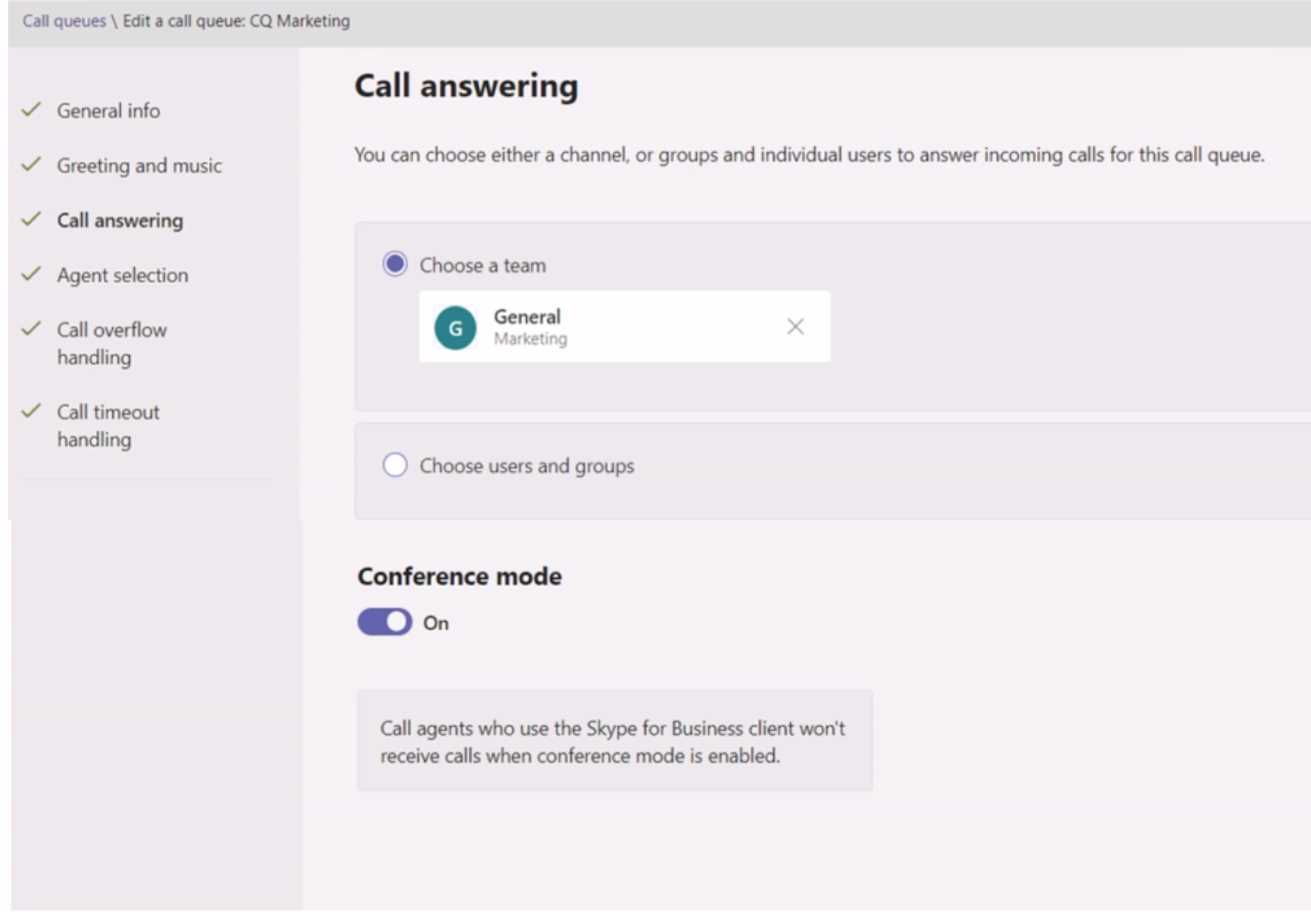
 The Call answering settings are configured as shown in the Call answering exhibit. (Click the Call answering tab.)
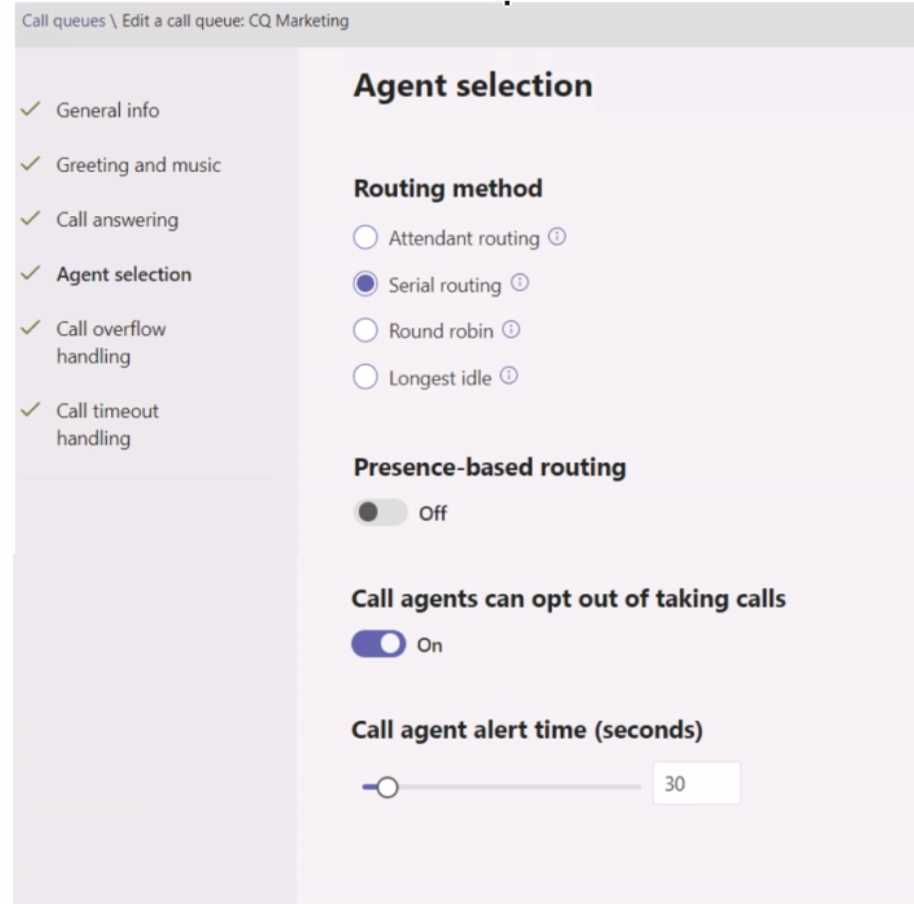
  The Agent selection settings are configured as shown in the Agent selection exhibit (Click the Agent selection tab.)
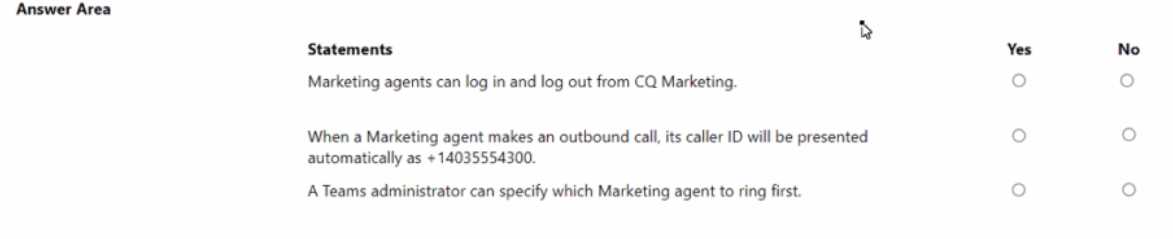
  For each of the following statements, select Yes if the statement is true. Otherwise, select No.