
Q: 8
HOTSPOT You have an Azure subscription and an on-premises Active Directory domain. The domain contains 50 computers that run Windows 10. You need to centrally monitor System log events from the computers. What should you do? To answer, select the appropriate options in the answer area. NOTE: Each correct selection is worth one point. 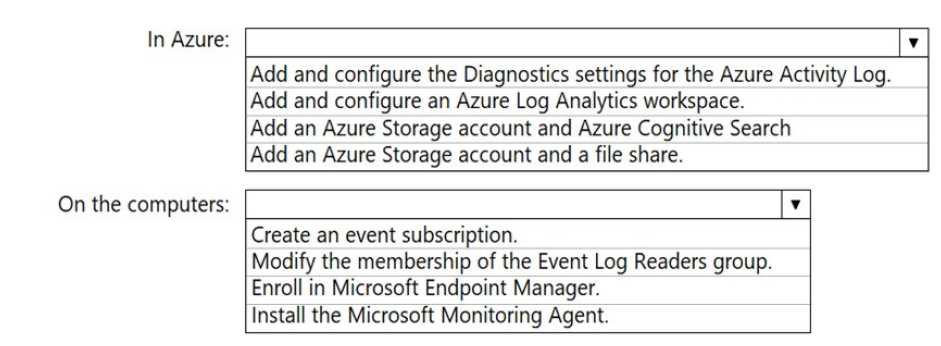
Your Answer
Discussion
Log Analytics workspace in Azure and install Microsoft Monitoring Agent on each Windows 10 machine is the way to do it.
Log Analytics workspace in Azure and install Microsoft Monitoring Agent on each Windows 10 machine.
Log Analytics workspace in Azure and install the Microsoft Monitoring Agent on each Windows 10 computer. That’s what links the on-prem logs to the cloud dashboard for central monitoring. I think that’s what they want unless I’m missing some new agent support.
Log Analytics workspace in Azure, plus install Microsoft Monitoring Agent on each machine. Some pick Azure Monitor only but that's not enough for on-prem devices.
Nah, just setting up Azure Monitor by itself doesn't work here-must be Log Analytics workspace in Azure plus the Monitoring Agent installed on each Windows 10 PC.
Log Analytics workspace in Azure, plus install Microsoft Monitoring Agent on the Windows 10 machines.
Makes sense to use Log Analytics workspace in Azure for the central spot, and then install the Microsoft Monitoring Agent on each Windows 10 box. Pretty sure that's the combo they're after, matches what I've seen in practice. Agree?
I don’t think you need the Monitoring Agent if you just set up Windows Event Forwarding from each computer to a central server, then connect that server to Azure Log Analytics. That’s what I’d pick since event forwarding is built in and less overhead. Unless the question specifically wants all endpoints linked directly? Feel like that’s a trap here.
Add and configure Log Analytics workspace in Azure, then put the Microsoft Monitoring Agent on each Windows 10 computer. That's what I've seen on similar questions, but not 100% sure if there's a newer method now. Anybody disagree?
Create a Log Analytics workspace in Azure and install the Microsoft Monitoring Agent on each on-prem Windows 10 box. Needed for centralized log collection from non-cloud devices. Pretty sure that’s the combo MS expects here, but open to other ideas.
Be respectful. No spam.
