
Case Study
Your organization is deploying Microsoft Intune to manage mobile devices and ensure corporate data security. The company wants to automatically enroll all Windows, iOS, and Android devices used by specific users into Intune as soon as they sign in with their Microsoft 365 credentials.
The IT department has already created Azure AD user groups and device groups to organize users and assets. According to the technical requirements, only selected users from a specific Azure AD group should be targeted for automatic enrollment in Intune. Other users should remain unaffected until the next phase of rollout.
To achieve this, you must configure the correct Intune setting that controls automatic enrollment behavior and then assign it to the appropriate Azure AD group.
HOTSPOT You need to configure automatic enrollment in Intune. The solution must meet the technical requirements. What should you configure, and to which group should you assign the configurations? To answer, select the appropriate options in the answer area. NOTE: Each correct selection is worth one point. 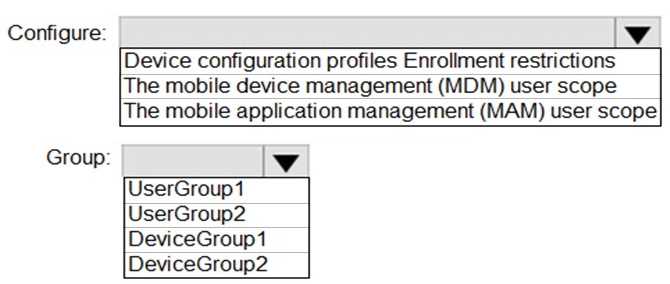
MDM user scope, UserGroup1
Configure the MDM user scope and assign it to UserGroup1. Only user groups can be set for automatic Intune enrollment, device groups won’t work here. That matches what I’ve seen on recent test runs, but feel free to chime in if there’s been a change.
If the users already have devices joined before you configure MDM user scope, would they still auto-enroll after the policy is set, or does it only apply to new joins? Just wondering how timing impacts enrollment behavior here.
