
Q: 12
HOTSPOT You have a Microsoft 365 E5 subscription linked to an Azure Active Directory (Azure AD) tenant. The tenant contains a group named Group1 and the users shown in the following table: 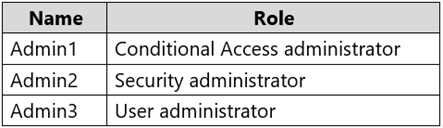 The tenant has a conditional access policy that has the following configurations: Name: Policy1 Assignments: - Users and groups: Group1 - Cloud aps or actions: All cloud apps Access controls: Grant, require multi-factor authentication Enable policy: Report-only You set Enabled Security defaults to Yes for the tenant. For each of the following settings select Yes, if the statement is true. Otherwise, select No. NOTE: Each correct selection is worth one point.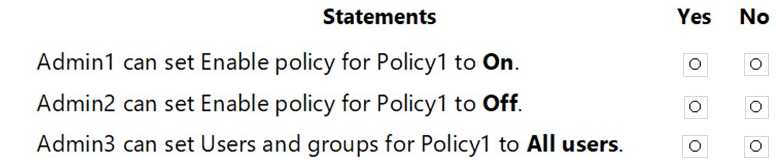
Your Answer
Discussion
Makes sense, since both Conditional Access admin and Security admin have full CA policy rights. Only User admin gets blocked from changing CA assignments. So it should be YES, YES, NO here. Open to correction if I missed something.
Yep, looks right to me. YES, YES, NO
Pretty sure it's YES, YES, NO here. Conditional Access admin and Security admin can handle all CA policy changes, but User admin can't change CA assignments. Seen similar trap with User admin on other practice sets, so that's probably what catches folks here. Let me know if there's an odd edge case I'm missing.
Why doesn't the User admin get CA assignment rights if Security defaults are off? Isn't this an exception in some exam reports?
Don’t think it’s YES, YES, NO. I’d say YES, NO, NO since User admin is a trap here.
So for this one, I think it's YES, YES, NO. Conditional Access admin and Security admin both have the needed permissions to edit CA policies, including toggling report-only status. User admin can manage users and groups but can't touch assignments on CA policies. Pretty sure that's what tripped people up here but let me know if I'm missing anything.
Not sure that's how it works, I think it's YES, NO, NO. From what I remember in the official guide and some practice questions, User admin shouldn't be able to manage CA policy assignments at all. Correct me if I'm wrong.
Be respectful. No spam.
