I was thinking A could work since Lambda is serverless and SageMaker has solid integration for ML models, so less ops to manage overall. Not totally sure since Macie seems more tailored for S3, but SageMaker plus Lambda still feels pretty light-touch to me. Anyone else think A is a close second?
Had something really similar in a mock, picked D. Invocations metric gives you exactly the API call counts, and CloudWatch alarms let you alert right away when it hits the threshold. Way more straightforward than using CloudTrail or Debugger for this use case. Pretty sure that's what AWS expects here, but happy to hear other takes.
Looks like C could help if you want things to converge faster. Sometimes increasing the learning rate fixes slow training, but here the losses are oscillating. I think I'd still try C before anything else though, since D feels a bit too safe for speed. Disagree?
A company is building a web-based AI application by using Amazon SageMaker. The application will provide the following capabilities and features: ML experimentation, training, a central model registry, model deployment, and model monitoring. The application must ensure secure and isolated use of training data during the ML lifecycle. The training data is stored in Amazon S3. The company needs to use the central model registry to manage different versions of models in the application. Which action will meet this requirement with the LEAST operational overhead?
I figured D since unique tags seem like a quick way to handle versions per model, especially if you just care about simple tracking and not strict organization. Not sure if it's the cleanest for larger setups but it does the job. If I'm off, let me know.
Yeah, C makes sense since SageMaker Model Registry with model groups is specifically built for managing versions centrally. Tags in D can help for custom metadata, but they don't organize versions as cleanly or automatically. I think C keeps things simple and integrates better with SageMaker's ML workflow out of the box. Let me know if I'm missing a nuance, but pretty confident it's C.
A imo. Automating this with Flink's built-in Random Cut Forest on managed service is less ops than setting up SageMaker/Lambda or EC2. B adds too much maintenance risk in practice, I think. Disagree?
Option D here. Data Wrangler's balance data is specifically designed for quick class balancing and sits right inside SageMaker, so fewer steps needed than Glue or Athena. Small catch: if the source data wasn't S3 or SageMaker, setup could be more involved, but in this scenario it's the fastest. Pretty sure that's why D wins.
I’d say this is same as a common exam questions on practice tests and D is usually the right move. SageMaker Data Wrangler has that balance data operation built in, so oversampling takes just a couple clicks. The workflow stays in SageMaker too, so it's definitely less effort than using Glue or Athena. I think D but let me know if you disagree.
Option A matches what I had in a mock. Setting Firehose buffer interval to zero is the only way here to cut batch delay, so you get almost instant updates in OpenSearch. None of the other options really get true sub-second unless you change the buffer itself. Pretty sure it's A, but lmk if you see it differently.
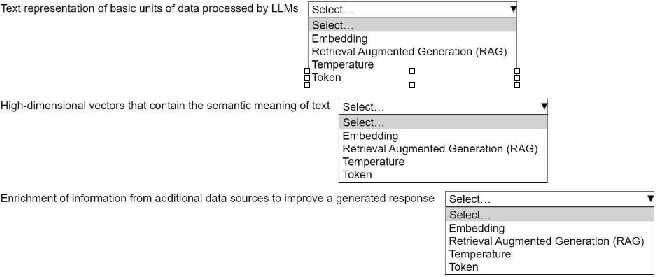
?Embedding, Retrieval Augmented Generation (RAG), Temperature
These match the AWS generative AI patterns in official docs and labs. Used similar terms in practice tests too. I think this is what they're after, but open to other takes if someone disagrees!
Yeah, I'd pick Embedding, Retrieval Augmented Generation (RAG), and Temperature. Embedding is about turning text into vectors, RAG mixes in fresh external data, and Temperature tweaks the randomness in generated responses. Pretty sure that's what AWS expects here, but let me know if you see it differently.
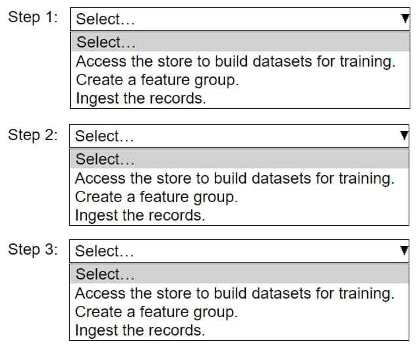
HOTSPOT An ML engineer needs to use Amazon SageMaker Feature Store to create and manage features to train a model. Select and order the steps from the following list to create and use the features in Feature Store. Each step should be selected one time. (Select and order three.) • Access the store to build datasets for training. • Create a feature group. • Ingest the records.
Doesn't it have to be create the feature group first? You can't ingest records if the schema isn't there yet. I think people might confuse this with updating or using existing groups, but "create" comes first in this context.
Yeah, the right flow is create the feature group, then ingest records, finally access the store for training datasets. You need that structure before you can put any records in, and you can’t build a dataset until the features are there. Pretty sure this matches how SageMaker expects you to use Feature Store. Let me know if anyone sees it differently.