
Q: 9
DRAG DROP
A company uses Dynamics 365 Business Central.
The company plans to automatically create vendor payments based on posted purchase invokes. The
payments should be summarized based on the vendor invoices.
You need to configure the vendor payments.
Which three actions should you perform in sequence? To answer, move the appropriate actions from
the list of actions to the answer area and arrange them in the correct order.

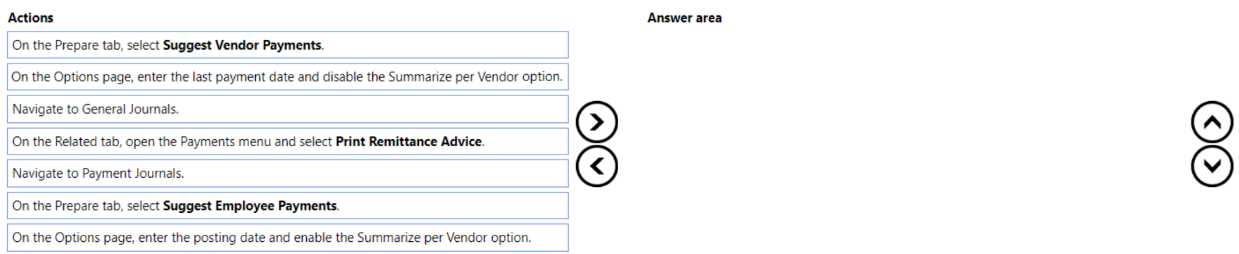
Your Answer
Discussion
C . Summarize per invoice is the key, not vendor like the usual trap in this drag drop.
B
C or D? I've seen questions where you start with setting the 'summarize per vendor' option, then run 'suggest vendor payments', then post. But depends on how the steps are worded in the drag drop. Not fully sure if it's always that order, anyone got confirmation from live BC environment?
B tbh, similar sequences show up in official practice and the main guide explains this workflow.
I’d say B. Setting "summarize per vendor" before "suggest vendor payments" makes sense for how BC groups payments. Seen exam reports mention this sequence too, but open if someone thinks another order fits better.
B tbh
Don’t think it should be set to summarize per vendor if the question says payments summarized by invoice. That trap always comes up in these drag drops. I think you pick the option for invoice-level summarization before you run Suggest Vendor Payments. Not totally certain, but pretty sure grouping by vendor is wrong here-anyone disagree?
Ugh this drag drop always feels weird, I’m picking B tbh.
Probably D. You need to set the 'summarize per vendor' option before running Suggest Vendor Payments, then post the payment journal last. That keeps the payments grouped by invoice correctly. Fairly sure that's how it's done in BC.
Not B, it's C. The steps are easy to mix up since the 'summarize per vendor' is a key trap. Practice exams and docs both point to C as the right order.
Be respectful. No spam.
