
Q: 2
DRAG DROP
You are setting up new customers and items in Dynamics 365 Business Central.
You need to configure the system.
Which posting group should you use? To answer, drag the appropriate posting groups to the correct
use cases. Each posting group may be used once, more than once, or not at all. You may need to drag
the split bar between panes or scroll to view content.
NOTE: Each correct selection is worth one point.

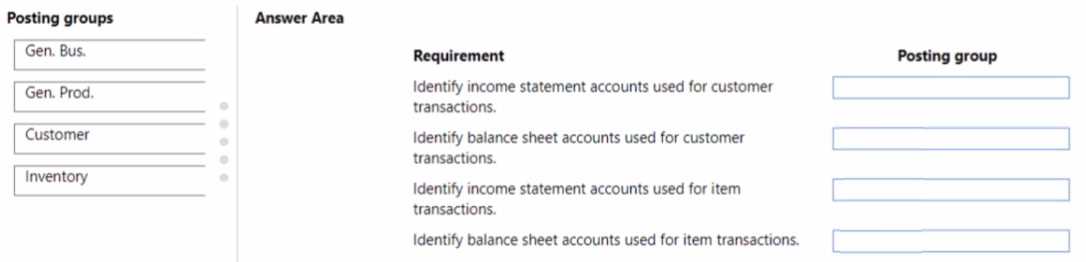
Your Answer
Discussion
Are you all using the official lab materials for these drag drops, or do practice exams cover the posting group mapping better?
D imo. If you have inventory posting setup enabled, mapping customer and item posting groups properly is required or transactions will fail. Standard config expects that, so D fits unless they specifically want a shortcut.
Had this in a mock and D was correct. Customer posting groups go with customers, item posting groups go with items, that's the normal BC setup. Keeps everything mapped clean for transactions. Pretty sure D's right but shout if you've seen a legit reason to pick C.
D because using customer posting groups for customers and item posting groups for items is the default approach in Business Central. Keeps everything organized for financial posting. Not 100% sure if they're sneaking in a question about quick config, but standard mapping says D.
D imo, since you need customer posting groups for customers and item posting groups for items in BC. It can get confusing with the general vs specific groups, but from what I’ve seen D is the fit here. If anyone has a different approach, I’m curious.
Probably C. For new customer and item setup, you match the posting group to how revenue or inventory is categorized in the chart of accounts. Seen similar logic in other questions, but let me know if you disagree.
D for this one, fits standard setup in BC. Keeps postings mapped right. Pretty sure that's what they want here.
Its D for standard config in BC, since using customer posting groups for customers and item posting groups for items lines up with best practice. Makes it easy to track postings. Pretty sure, but if they meant fastest setup, maybe C.
Had something like this in a mock, and D worked because setting up customer posting groups for customers and item posting groups for items is standard in BC. Keeps mapping clear between sales and inventory. Pretty sure D, but open if someone has a different config.
Nah, it's D. C misses the separate mapping for customers vs items, which can throw people off.
Be respectful. No spam.
