
Q: 18
DRAG DROP
You are implementing Dynamics 365 Business Central for a client.
You need to ensure that the user interface (UI) meets the client's requirements.
Which approach should you use? To answer, drag the appropriate approaches to the correct
requirements. Each approach may be used once, more than once, or not at all. You may need to drag
the split bar between panes or scroll to view content.
NOTE: Each correct selection is worth one point.

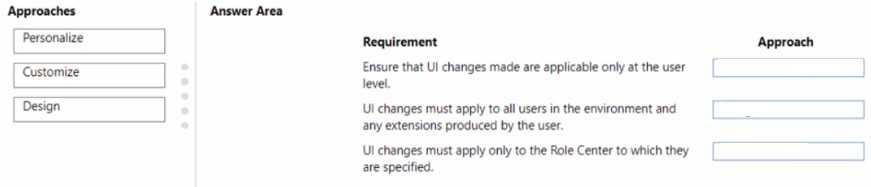
Your Answer
Discussion
D for anything that needs to hit every user, C if it's just a personal tweak.
Option D is right for system-wide UI updates like profiles, while C just handles personal user tweaks. Pretty sure the exam likes to trip people up here since both sound similar. If requirement says all users, it's D. Agree?
C/D? Had something like this in a mock and picked C for user-specific UI tweaks, D for applying changes across profiles. Could be mixing it up though, since some requirements are worded close. Anyone pick differently?
C or D depending on if the UI change is for all users (then use a profile/role center) or just individual customization. If the requirement says company-wide, D's more likely right. Seen similar asks in practice sets. Not 100% sure given no screenshot but that's my logic.
A is wrong, D. If you want the UI changes to show for everyone, you go with profiles or role centers. C is just user-level tweaks, not global. Pretty sure that's what the question's getting at.
C/D? From what I've seen on similar questions, C works for user-specific UI changes, but D is usually the one for company-wide updates using role centers or profiles. Easy to mix up if the question wording isn't clear.
D imo. System-wide UI requirements in Business Central usually need profiles or role centers set up instead of user personalization. Saw a similar scenario in a practice test and that was the expected answer, but open if somebody can confirm.
I've seen drag and drop UI mapping like this in some official practice tests. Usually, if the UI need is for the whole company, setting up role centers or profiles is best. For individual tweaks, user personalization fits. Done a few labs on this topic so pretty confident. C for single-user changes, D when it’s system-wide - agree?
Option C, I think it fits better with the UI needs but could be missing something.
B/C? No way to be sure from the screenshot, but I've seen similar split between these two in other exam reports.
Be respectful. No spam.
