
DRAG DROP A manufacturer uses Dynamics 365 Business Central. The company has the following item types:
• Raw Materials
• Work-in-progress (WIP)
• Finished Goods
Different prefixes are used for item numbers to identify these item types. The company requires the following system setup:
• Use a unique number series for each item type.
• No. Series must be selectable when creating manual items.
• Implement automatic number assignment
You need to configure the system. In which order should you perform the actions? To answer, move all actions from the list of actions to the answer area and arrange them in the correct order. NOTE: More than one order of answer choices is correct. You will receive credit for any of the correct orders you select. 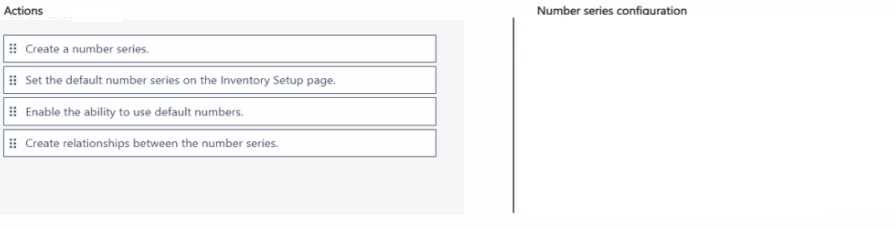
Looks right to me: first create unique number series for each item type, then assign them accordingly, then enable Manual Nos. That lets you have both auto and manual assignment like the scenario wants. Pretty sure this is how Business Central expects it, but open if anyone has a different sequence.
Create separate number series for Raw Materials, WIP, and Finished Goods first. Assign each number series to the correct item type in Item Templates or Item setup. Then make sure "Manual Nos." is enabled so you can pick the series when adding items manually. Pretty sure that's the flow based on how BC handles numbering. Someone correct me if that's off!
