📖 About this Domain
This domain covers the core case management process within Dynamics 365 Customer Service. It focuses on the case entity lifecycle, from creation and routing to resolution. The domain also integrates knowledge management to empower agents and enable customer self-service.
🎓 What You Will Learn
- You will learn to create and manage cases, including configuring parent/child case hierarchies and merging case records.
- You will learn to implement automatic case creation from emails and configure routing rule sets to assign cases to queues and users.
- You will learn the complete knowledge article lifecycle, from creating articles using templates to publishing and versioning them.
- You will learn to configure Dataverse search and embed the knowledge search control on forms for contextual article suggestions.
🛠️ Skills You Will Build
- You will build skills to configure the case entity, define case resolution types, and manage case relationships.
- You will build proficiency in creating and managing queues, routing rules, and automatic record creation rules for case automation.
- You will build the ability to administer the knowledge base, including managing article templates and search settings.
- You will build skills to integrate the knowledge base with the case management process to improve first-call resolution rates.
💡 Top Tips to Prepare
- Practice configuring parent and child case settings as this hierarchy is a key concept for complex service scenarios.
- Gain hands-on experience with routing rule sets and queues in a sandbox environment to understand case assignment logic.
- Memorize the different states of a knowledge article (Draft, Approved, Published) and the actions available in each state.
- Focus on configuring Dataverse search and adding the knowledge search pane to the case form for practical application.
📖 About this Domain
This domain covers the configuration of entitlements to specify customer support terms. It focuses on implementing Service Level Agreements (SLAs) to track and manage service timelines for cases. You will learn to define KPIs and actions to ensure service consistency.
🎓 What You Will Learn
- You will learn to create and manage entitlement templates and apply entitlements to customer records.
- You will learn to configure standard and enhanced SLAs, including setting up SLA KPIs for time tracking.
- You will learn to define success, warning, and failure actions within an SLA to automate case management processes.
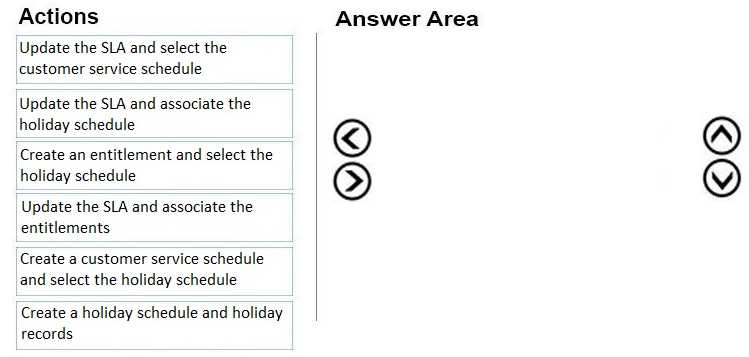
- You will learn to configure customer service schedules and holiday schedules to ensure accurate SLA time calculations.
🛠️ Skills You Will Build
- You will build the skill to define specific support contracts using entitlement terms and allocation types.
- You will be able to implement automated service level tracking by configuring SLA KPIs and timers on case forms.
- You will gain proficiency in associating SLAs with entitlements to automatically apply service terms to new cases.
- You will learn to manage business hours and closures to ensure SLA calculations reflect operational availability.
💡 Top Tips to Prepare
- Gain hands-on experience by creating entitlements and different SLA types in a Dynamics 365 Customer Service trial environment.
- Master the distinction between standard and enhanced SLAs, particularly the pause and resume functionality available in enhanced SLAs.
- Understand the lifecycle and statuses of an SLA KPI Instance, such as Nearing Noncompliance and Succeeded.
- Review the official Microsoft Learn modules on entitlements and SLAs to understand their relationship and configuration dependencies.
📖 About this Domain
This domain focuses on configuring the Omnichannel for Customer Service solution. You will learn to integrate various communication channels and manage the flow of work items to agents. The core is setting up workstreams, queues, and unified routing to create a seamless customer engagement hub.
🎓 What You Will Learn
- You will learn to configure core Omnichannel components, including enabling channels like chat, voice, and social media.
- You will learn to create and manage workstreams, context variables, and queues for different channels.
- You will learn to implement unified routing by creating classification rulesets and assignment rulesets for work items.
- You will learn to configure the agent experience using agent scripts, macros, smart assist, and session templates.
🛠️ Skills You Will Build
- You will build the skill to deploy and configure a live chat widget on a portal.
- You will build the ability to design and implement skill-based routing and capacity profiles for agents.
- You will build proficiency in customizing the agent application using the App Profile Manager and session templates.
- You will build the capability to automate agent actions and provide guidance using macros and agent scripts.
💡 Top Tips to Prepare
- Gain hands-on experience in a trial environment by configuring a workstream from start to finish.
- Master the differences between basic routing and unified routing, focusing on classification and assignment rules.
- Practice configuring at least two different channels, such as chat and a social channel, to understand their specific settings.
- Review the official Microsoft Learn path for MB-230, specifically the modules on Omnichannel implementation and configuration.
📖 About this Domain
This domain covers the initial discovery phase of a Dynamics 365 Customer Service implementation. It focuses on understanding client needs, mapping business processes, and performing a fit/gap analysis. Success here dictates the foundation for the entire solution architecture.
🎓 What You Will Learn
- You will learn to identify key stakeholders and document their existing customer service business processes.
- You will learn to gather and define functional requirements for case management, knowledge management, and SLAs.
- You will learn to perform a fit/gap analysis to determine where out-of-the-box (OOB) functionality meets requirements versus needing customization.
- You will learn to define the overall solution scope and identify components for the Dynamics 365 Customer Service implementation.
🛠️ Skills You Will Build
- You will build skills in business process mapping for customer service operations like case routing and escalation.
- You will build the ability to conduct effective requirements gathering workshops with business decision-makers.
- You will build proficiency in performing a fit/gap analysis against the Dynamics 365 Customer Service application.
- You will build the skill to create high-level solution proposals that align with customer business objectives.
💡 Top Tips to Prepare
- Deeply understand the core entities in the Common Data Model for Customer Service, including Case, Entitlement, and SLA KPI Instance.
- Focus on the Microsoft Learn path for MB-230, specifically the modules on discovery and analysis.
- Practice analyzing business scenarios to identify pain points and map them to specific Dynamics 365 Customer Service features.
- Familiarize yourself with the roles and responsibilities within a typical customer service department to better understand process ownership.
📖 About this Domain
This domain covers the configuration and management of service scheduling in Dynamics 365 Customer Service. You will focus on setting up resources, services, and using the schedule board to manage service activities and operational capacity.
🎓 What You Will Learn
- Configure core scheduling entities including services, facilities, equipment, and resource groups.
- Manage bookable resources by defining work hours, skills, and assigning them to resource groups.
- Utilize the schedule board to manually schedule service activities and use the schedule assistant for automated recommendations.
- Implement business closures and organizational units to accurately reflect service availability and operational structure.
🛠️ Skills You Will Build
- Defining and configuring services with specific resource requirements for fulfillment.
- Creating and managing bookable resources, their characteristics, and capacity models.
- Scheduling and rescheduling service activities directly on the interactive schedule board.
- Setting up organizational units and business closure calendars to manage operational availability.
💡 Top Tips to Prepare
- Gain hands-on experience by creating and manipulating bookings on the schedule board.
- Understand the data model and relationships between service, resource requirement, and service activity entities.
- Practice the end-to-end process of creating a service, defining requirements, and scheduling it for a customer.
- Explore the scheduling parameters within system settings to understand how they impact the scheduling engine.