1. Salesforce Lightning Web Components Dev Guide: In the "Share JavaScript Code" section, under "JavaScript Modules," the documentation explicitly differentiates between named and default exports. It states, "To import the default export, don’t use curly braces." It provides an example: import util from 'c/utils';, which directly matches the syntax used in the correct answer.
Reference: Lightning Web Components Dev Guide > Developer Tools > Share JavaScript Code > JavaScript Modules.
2. MDN Web Docs (Mozilla): The official Mozilla documentation for JavaScript provides a definitive guide on import and export syntax.
For import, it specifies the syntax for importing defaults as: import defaultExport from "module-name";. This confirms that a custom name can be assigned to the default export without using curly braces.
Reference: MDN Web Docs, import statement, "Importing defaults" section.
3. Exploring ES6 (by Dr. Axel Rauschmayer): This peer-reviewed book on JavaScript features is a highly respected academic resource.
In Chapter 17, "Modules," Section 17.3.2, "Default exports (one per module)," it explains that a default export is imported with the syntax import myIdentifier from 'src/mylib';. This directly supports the structure of the correct answer.
Reference: Rauschmayer, A. (2015). Exploring ES6. Chapter 17, Section 17.3.2.

 B)
B)
 B)
B)
 C)
C)
 D)
D)

 What is the output of the code execution?
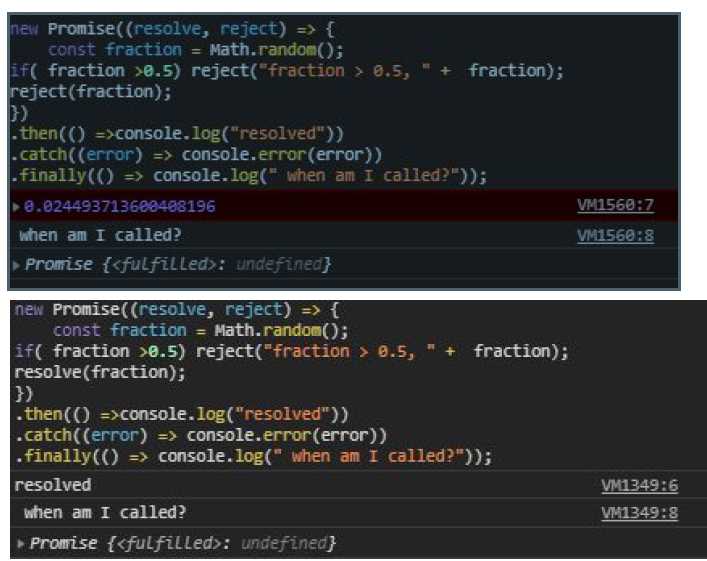 When does Promise.finally on line 08 get called?
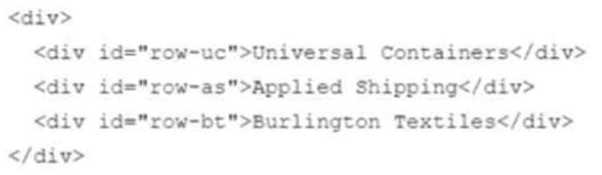 Which statement adds the priority-account CSS class to the Universal Containers row?