To follow best security practices for 802.1X authentication settings in Windows domain clients:
Specify at least two server names under "Connect to these servers":
Admins should explicitly list trusted RADIUS server names (e.g., radius.example.com) to prevent the
client from connecting to unauthorized or rogue servers.
This mitigates man-in-the-middle (MITM) attacks where an attacker attempts to present their own
RADIUS server.
Select the desired Trusted Root Certificate Authority and "Don't prompt users":
Select the Trusted Root CA that issued the RADIUS server's certificate. This ensures clients validate
the correct server certificate during the EAP-TLS/PEAP authentication process.
Enabling "Don't prompt users" ensures end users are not confused or tricked into accepting
certificates from untrusted servers.
Why the other options are incorrect:
Option C: Incorrect. Wildcards in server names (e.g., *.example.com) weaken security and allow
broader matching, increasing the risk of rogue servers.
Option D: Incorrect. Clearing "Use simple certificate selection" requires users to select certificates
manually, which can lead to errors and usability issues. Simple certificate selection is recommended
when properly configured.
Recommended Settings for Best Security Practices:
Server Validation: Specify the exact RADIUS server names in the "Connect to these servers" field.
Root CA Validation: Ensure only the correct Trusted Root Certificate Authority is selected.
User Prompts: Enable "Don't prompt users" to enforce automatic and secure authentication without
user intervention.

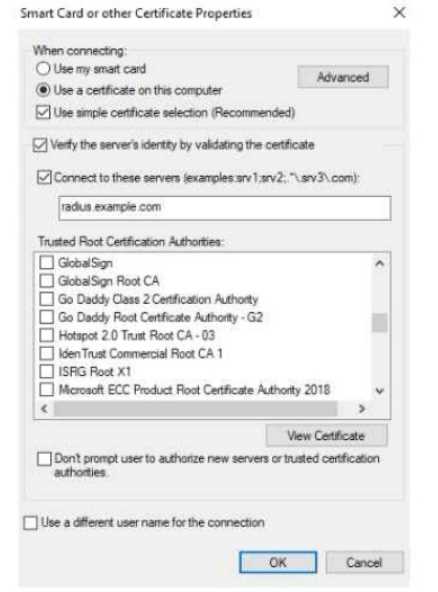 The exhibit shows the 802.1X-related settings for Windows domain clients. What should admins
change to make the settings follow best security practices?
The exhibit shows the 802.1X-related settings for Windows domain clients. What should admins
change to make the settings follow best security practices?