
Q: 8
A system engineer needs to preconfigure several Aruba CX 6300 switches that will be sent to a
remote office An untrained local field technician will do the rollout of the switches and the mounting
of several AP-515s and AP-575S. Cables running to theAPs are not labeled.
The VLANs are already preconfigured to VLAN 100 (mgmt), VLAN 200 (clients), and VLAN 300 (guests)
What is the correct configuration to ensure that APs will work properly?
A)
 B)
C)
D)
B)
C)
D)
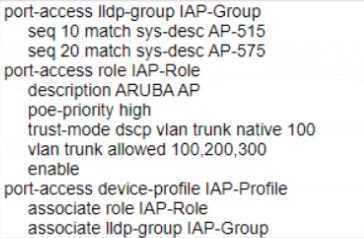 B)
B)
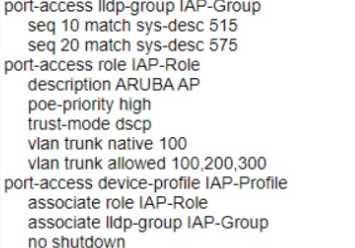 C)
C)
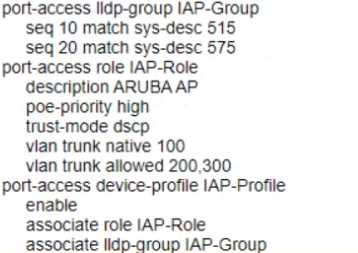 D)
D)
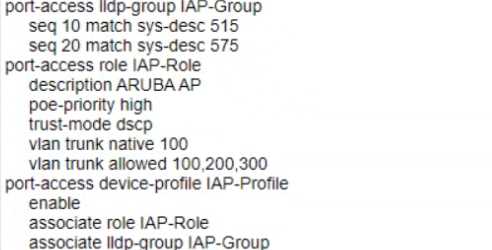
Options
Discussion
Option C is the right config for this scenario. Trunk mode lets the APs handle tagged client and guest VLANs as well as untagged management, which is what Aruba expects. D looks tempting but that one’s access mode so it’d break multi-VLAN support. Pretty sure C is the only one that works here, unless I’m missing something obvious. Agree?
Option C B is a trap since it doesn't cover all VLANs correctly for AP traffic.
C. Access mode (like D) is a trap here-the APs need to trunk guest and client VLANs, not just mgmt. C uses trunk with native VLAN 100, so mgmt is untagged and others are tagged. I think that's correct but open to other takes.
C. Has to be trunk mode with native vlan 100 so APs get mgmt untagged and client/guest tagged. D wouldn't let clients/guests connect through, only mgmt. If that's not right, let me know.
I don’t think D fits if the APs need tagged VLANs. C is closer since trunk mode allows mgmt, client, and guest.
D . Access mode with VLAN 100 seems fine if the APs only need management and no client or guest tagging. If the scenario doesn't require APs to trunk multiple VLANs, D looks reasonable. Maybe I'm missing something about how Aruba handles client traffic, but trunking feels unnecessary for just mgmt. Correct me if I'm off.
C tbh, trunk + native for mgmt and covers all VLANs.
Honestly, I thought D could work because it looks like an access port setup, which is usually simpler for field installs. But the APs need to support multiple VLANs for client and guest traffic, so just using access mode might not be enough here. Pretty sure that's the trap in D. Anyone else see it differently?
C vs D for me. C looks solid since it's using a trunk with native VLAN 100 for management and allows all needed VLANs, but I could see D if field techs only needed simple access ports. Not 100% sure though, anybody disagree?
C
Be respectful. No spam.
