
Q: 11
The two commonly used units to describe antenna gain are dBi and dBd , The conversion relationship
between them is: dBi=dBd+2.14 .
Options
Discussion
No comments yet. Be the first to comment.
Be respectful. No spam.
Q: 12
display ap all Command can be viewed AP of MAC ,Type And running status.
Options
Discussion
No comments yet. Be the first to comment.
Be respectful. No spam.
Q: 13
Huawei eSight Network management wizard-style configuration WLAN Business needs to be added
in the network management first AC equipment.
Options
Discussion
No comments yet. Be the first to comment.
Be respectful. No spam.
Q: 14
create radio-profile Must be bound wmm-profile Only possible, otherwise there will be configuration
errors.
Options
Discussion
No comments yet. Be the first to comment.
Be respectful. No spam.
Q: 15
The distance between the center frequencies of the two channels is less than or equal to
In order to avoid adjacent channel interference during domain channel planning, the same channel is
not allowed to be used.
25MHz When there is an overlapping area between the channels, there will be some interference, so
in the adjacent area
Options
Discussion
No comments yet. Be the first to comment.
Be respectful. No spam.
Q: 16
Spread spectrum ( spread-spectrum ) Technology is to use ISM The basis of frequency band
transmission of wireless data.
Options
Discussion
No comments yet. Be the first to comment.
Be respectful. No spam.
Q: 17
Metal objects have a greater attenuation effect on wireless signals, AP Or the antenna should not be
placed behind a metal ceiling, etc.
Options
Discussion
No comments yet. Be the first to comment.
Be respectful. No spam.
Q: 18
A company wants to deploy WLAN, the company has purchased a batch of wireless APs that support
802.11n, when WLAN is deployed, only support Only 802.11n wireless clients can connect to the
company's WLAN
Options
Discussion
No comments yet. Be the first to comment.
Be respectful. No spam.
Q: 19
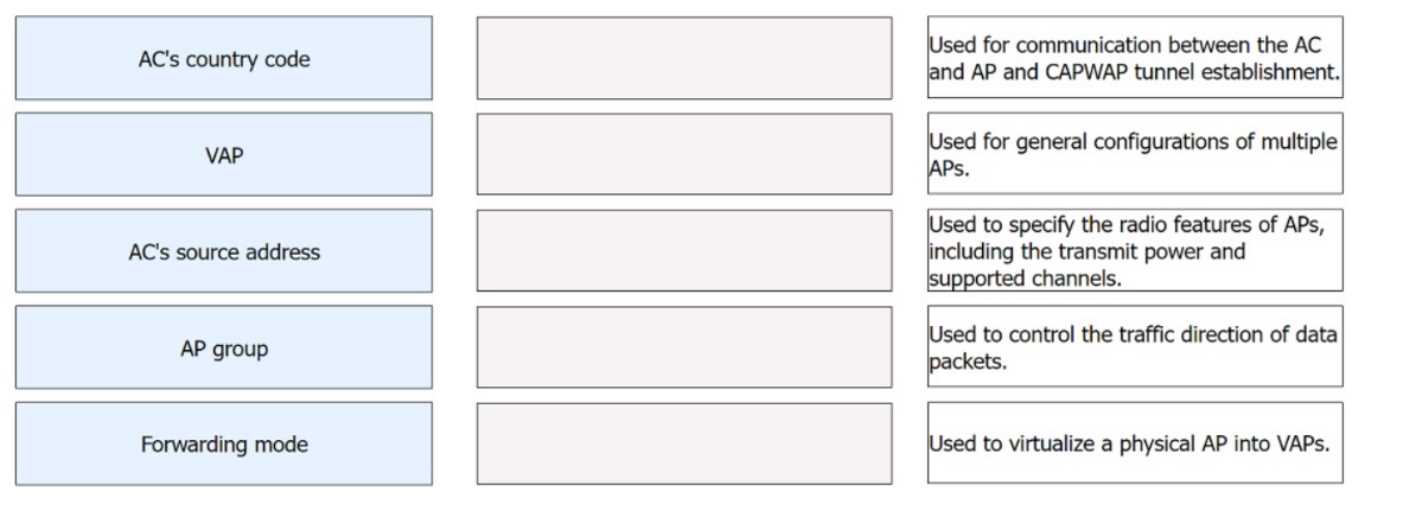
DRAG DROP Drag WLAN concepts on the left to their corresponding descriptions on the right.
Drag & Drop
Discussion
No comments yet. Be the first to comment.
Be respectful. No spam.
Q: 20
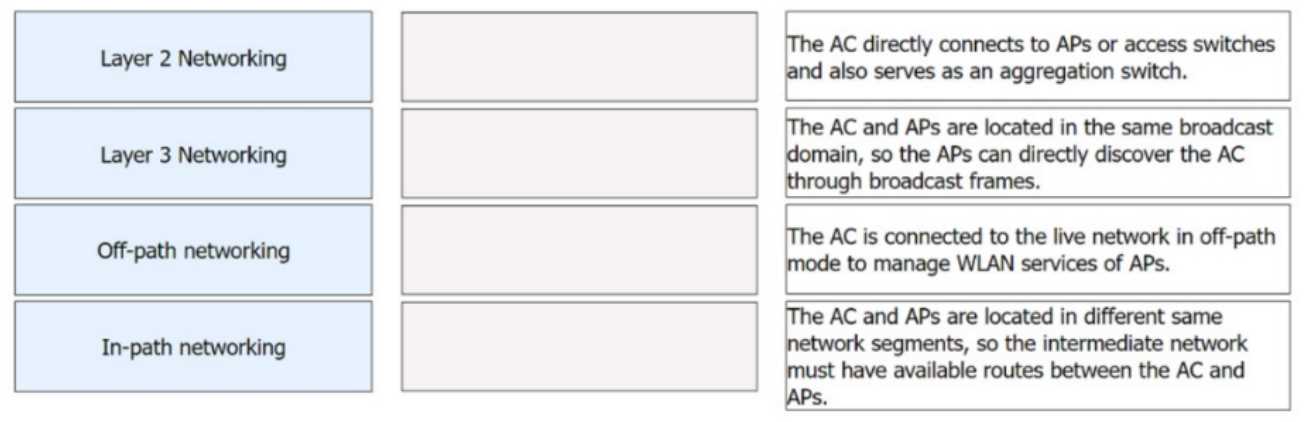
DRAG DROP Drag the networking modes on the left to their corresponding characteristics on the right.
Drag & Drop
Discussion
No comments yet. Be the first to comment.
Be respectful. No spam.
Question 11 of 20 · Page 2 / 2

