1. Fortinet Docs | FortiSASE 23.3 Administration Guide
LAN Extension > Deployment workflow.
This section explicitly outlines the two deployment methods: "You can deploy a FortiExtender as a FortiSASE LAN extension using one of the following methods: Zero-touch provisioning (ZTP) deployment... Manual deployment..." This directly supports options A and C.
2. Fortinet Docs | FortiSASE 23.3 Administration Guide
LAN Extension > Manual deployment.
This section details the manual process: "In the FortiExtender GUI
go to Settings > Management. For Discovery Type
select Static. For Static Server Address
enter the FortiSASE domain name..." This provides the specific steps for option C.
3. Fortinet Docs | FortiSASE 23.3 Administration Guide
LAN Extension > Deployment workflow > Step 4.
This step clarifies the role of the IPsec tunnel: "FortiSASE pushes the configuration to the FortiExtender
which includes creating an IPsec VPN tunnel between the FortiExtender and FortiSASE." This confirms that the tunnel is a result of deployment
making option D incorrect.

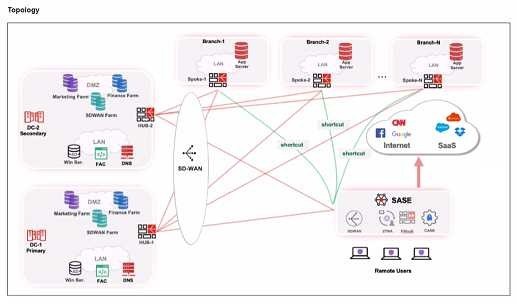
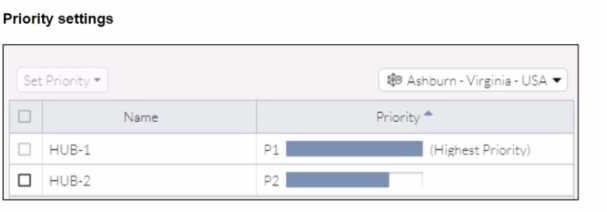 When remote users connected to FortiSASE require access to internal resources on Branch-2. how
will traffic be routed?
When remote users connected to FortiSASE require access to internal resources on Branch-2. how
will traffic be routed?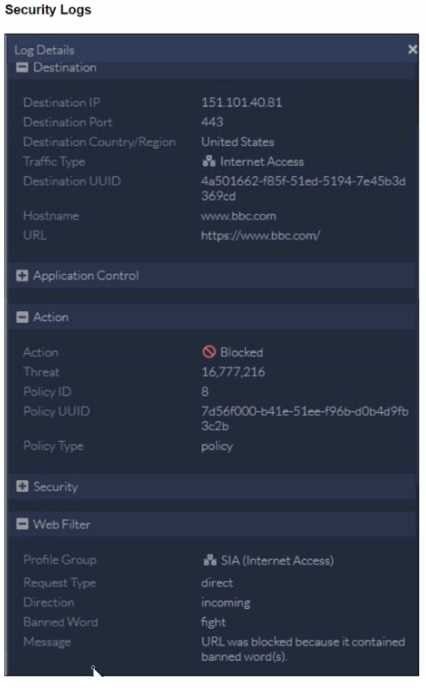 To allow access, which web tiller configuration must you change on FortiSASE?
E
To allow access, which web tiller configuration must you change on FortiSASE?
E