To meet the requirements of implementing device posture checks for remote endpoints and ensuring
that TCP traffic between the endpoints and protected servers is processed by FortiGate, the following
three setups are necessary:
Configure ZTNA tags on FortiGate (Option A):
ZTNA (Zero Trust Network Access) tags are used to define access control policies based on the
security posture of devices. By configuring ZTNA tags on FortiGate, administrators can enforce
granular access controls, ensuring that only compliant devices can access protected resources.
Configure FortiGate as a zero trust network access (ZTNA) access proxy (Option B):
FortiGate can act as a ZTNA access proxy, which allows it to mediate and secure connections
between remote endpoints and protected servers. This setup ensures that all TCP traffic passes
through FortiGate, enabling inspection and enforcement of security policies.
Configure ZTNA servers and ZTNA policies on FortiGate (Option C):
To enable ZTNA functionality, administrators must define ZTNA servers (the protected resources) and
create ZTNA policies on FortiGate. These policies determine how traffic is routed, inspected, and
controlled based on device posture and user identity.
Here’s why the other options are incorrect:
D . Configure private access policies on FortiSASE with ZTNA: While FortiSASE supports ZTNA, the
requirement specifies that TCP traffic must be processed by FortiGate. Configuring private access
policies on FortiSASE would route traffic through FortiSASE instead of FortiGate, which does not meet
the stated requirements.
E . Sync ZTNA tags from FortiSASE to FortiGate: Synchronizing ZTNA tags is unnecessary in this
scenario because the focus is on FortiGate processing the traffic. The tags can be directly configured
on FortiGate without involving FortiSASE.
Reference:
Fortinet FCSS FortiSASE Documentation - Zero Trust Network Access (ZTNA) Deployment
FortiGate Administration Guide - ZTNA Configuration
================


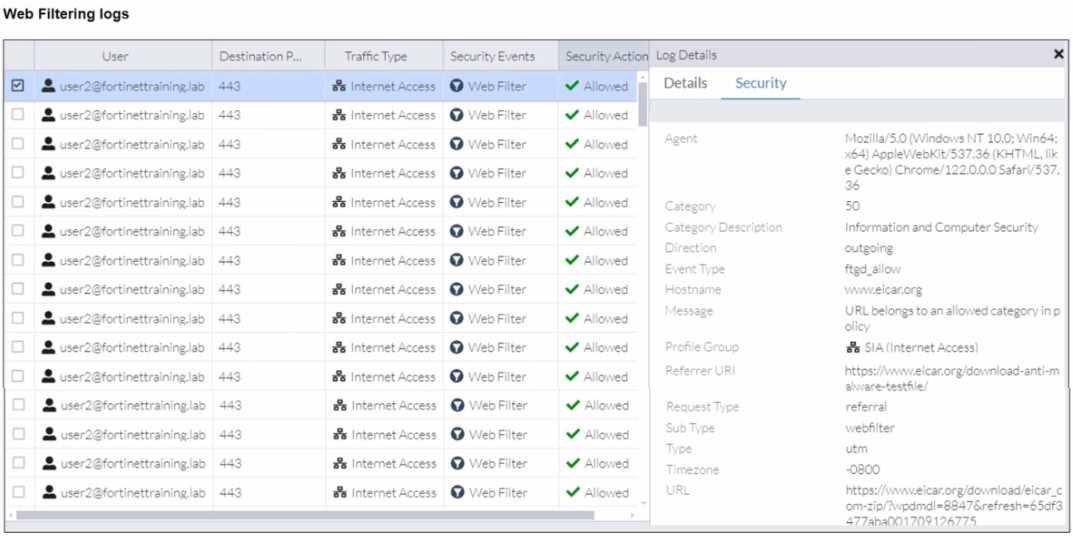
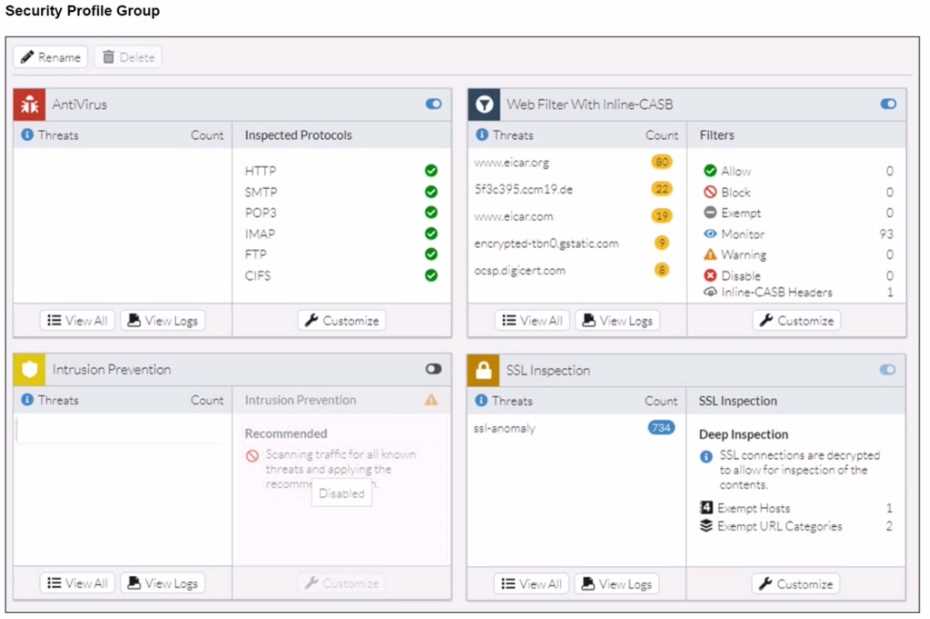
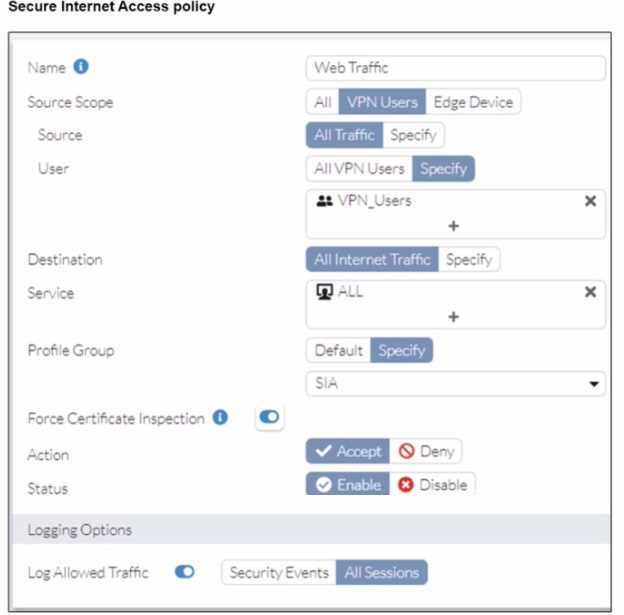 A FortiSASE administrator has configured an antivirus profile in the security profile group and applied
it to the internet access policy. Remote users are still able to download the eicar.com-zip file from
https://eicar.org. Traffic logs show traffic is allowed by the policy.
Which configuration on FortiSASE is allowing users to perform the download?
A FortiSASE administrator has configured an antivirus profile in the security profile group and applied
it to the internet access policy. Remote users are still able to download the eicar.com-zip file from
https://eicar.org. Traffic logs show traffic is allowed by the policy.
Which configuration on FortiSASE is allowing users to perform the download?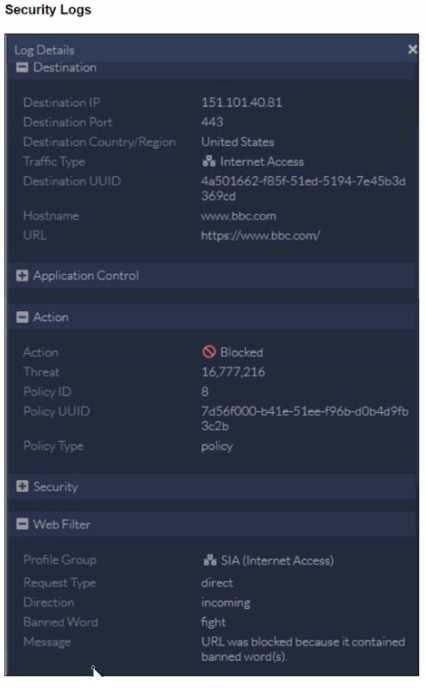 To allow access, which web tiller configuration must you change on FortiSASE?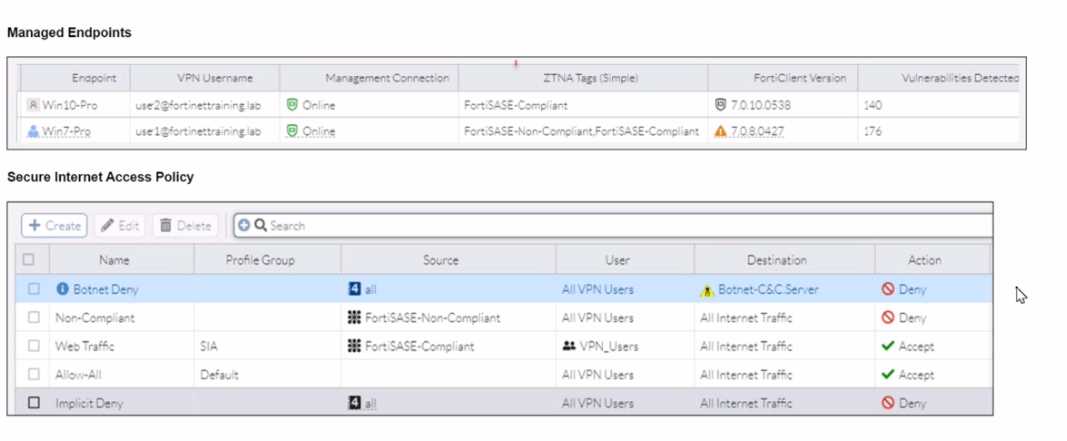
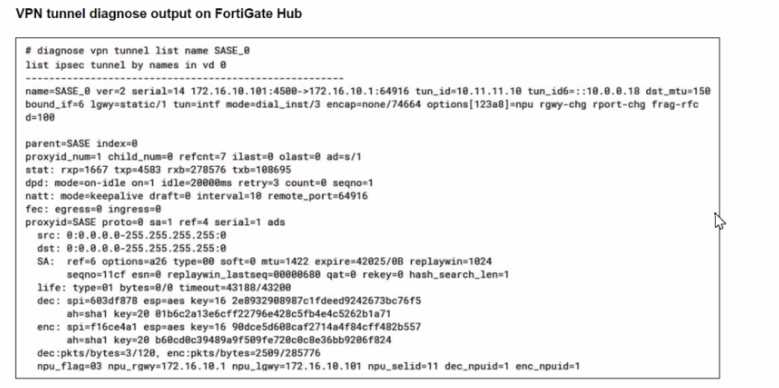
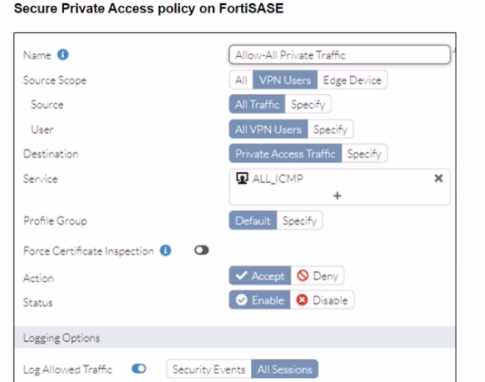
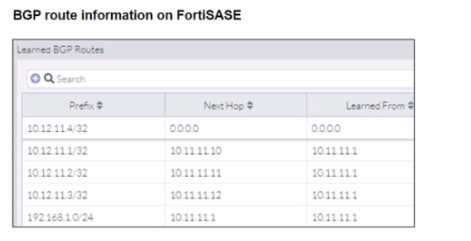
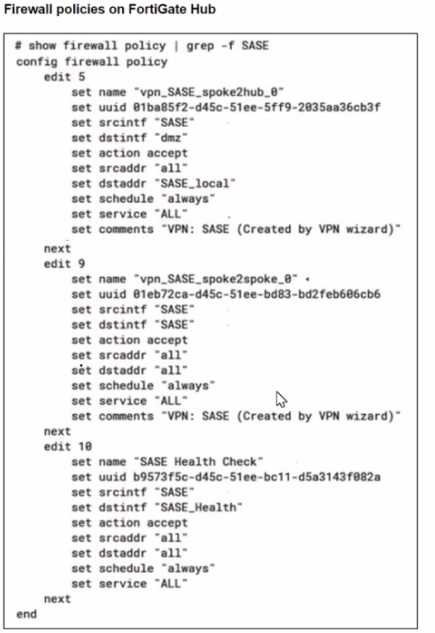 A FortiSASE administrator is trying to configure FortiSASE as a spoke to a FortiGate hub. The tunnel is
up to the FortiGale hub. However, the administrator is not able to ping the webserver hosted behind
the FortiGate hub.
Based on the output, what is the reason for the ping failures?
A FortiSASE administrator is trying to configure FortiSASE as a spoke to a FortiGate hub. The tunnel is
up to the FortiGale hub. However, the administrator is not able to ping the webserver hosted behind
the FortiGate hub.
Based on the output, what is the reason for the ping failures?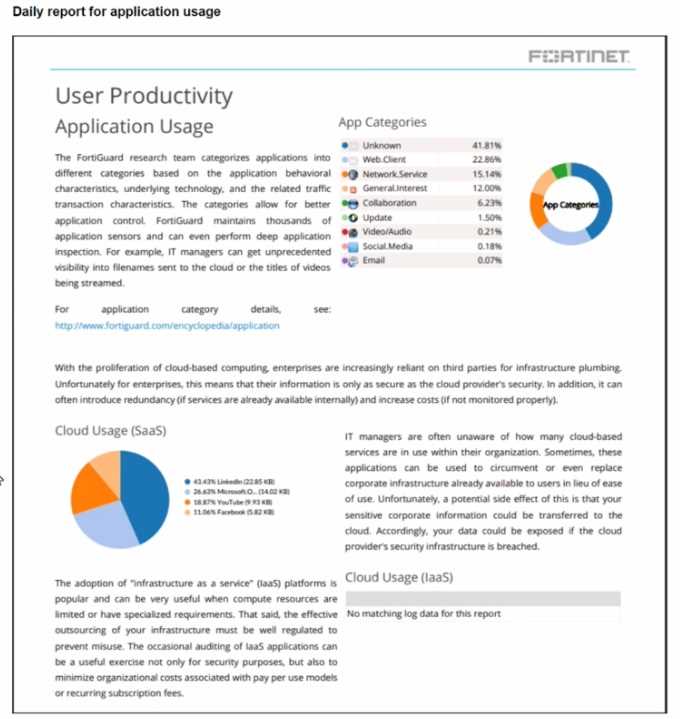 The daily report for application usage shows an unusually high number of unknown applications by
category.
What are two possible explanations for this? (Choose two.)
The daily report for application usage shows an unusually high number of unknown applications by
category.
What are two possible explanations for this? (Choose two.)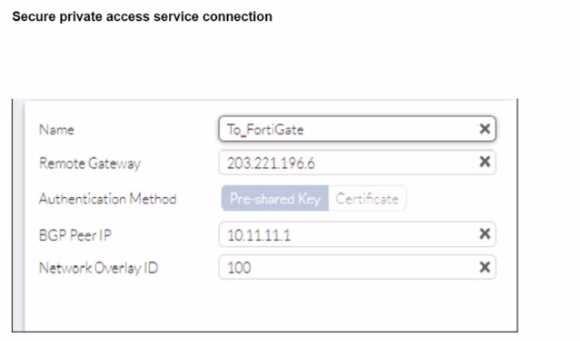
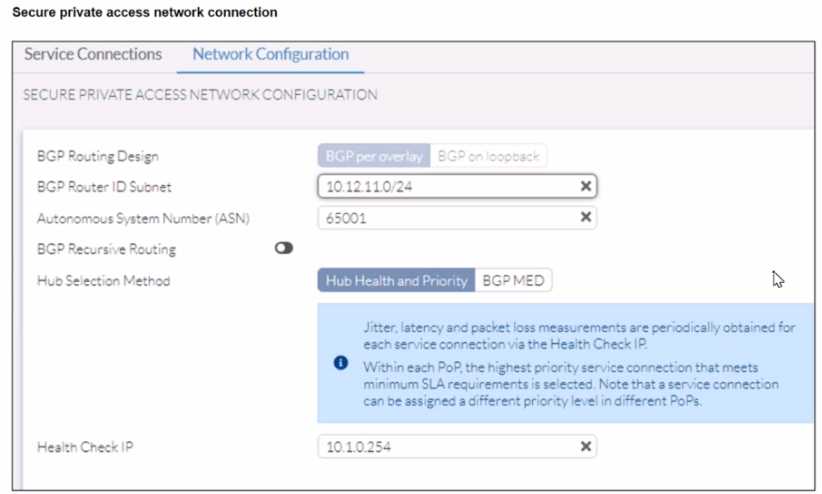
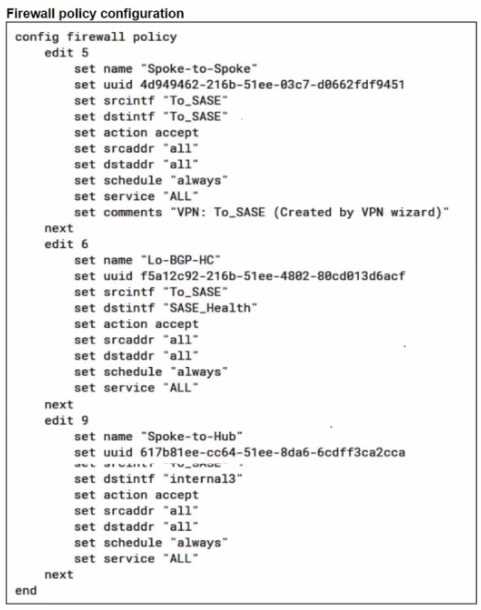
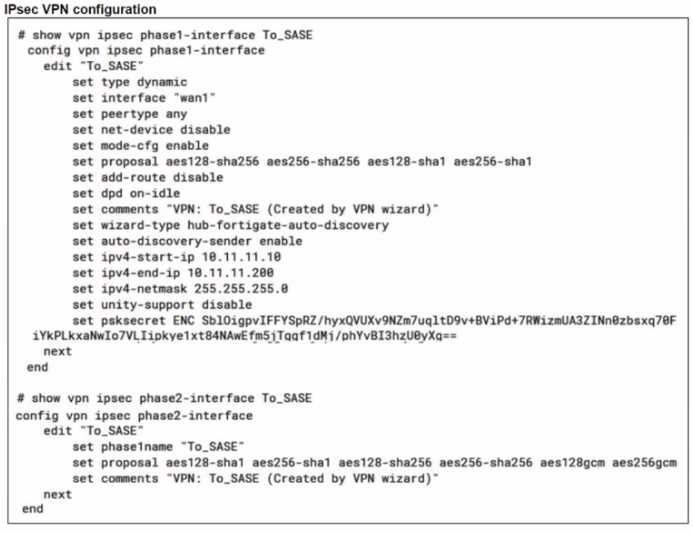
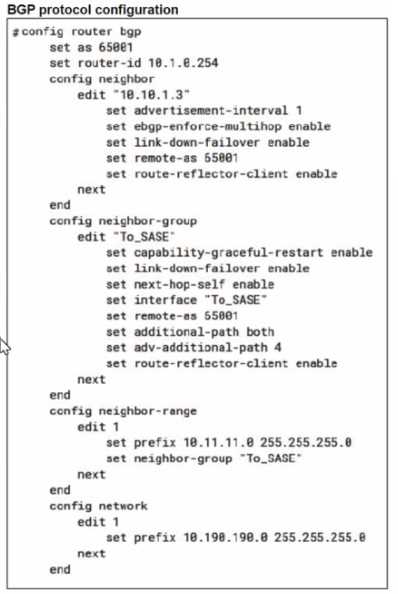 A FortiSASE administrator is trying to configure FortiSASE as a spoke to a FortiGate hub. The VPN
tunnel does not establish
Based on the provided configuration, what configuration needs to be modified to bring the tunnel
up?
A FortiSASE administrator is trying to configure FortiSASE as a spoke to a FortiGate hub. The VPN
tunnel does not establish
Based on the provided configuration, what configuration needs to be modified to bring the tunnel
up?