
Q: 4
Refer to the exhibit, which contains a partial command output.
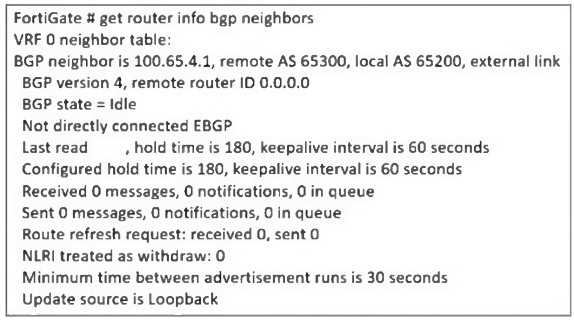 The administrator has configured BGP on FortiGate. The status of this new BGP configuration is
shown in the exhibit.
What configuration must the administrator consider next?
The administrator has configured BGP on FortiGate. The status of this new BGP configuration is
shown in the exhibit.
What configuration must the administrator consider next?
The administrator has configured BGP on FortiGate. The status of this new BGP configuration is
shown in the exhibit.
What configuration must the administrator consider next?Options
Discussion
Option D since eBGP by default doesn't allow multihop. Here the peer isn't directly connected, so enabling ebgp-enforce-multihop should fix it. Pretty common BGP issue on FortiGates, but let me know if I'm missing a detail.
I gotta say B here. Local AS config can cause sessions not to establish, so that's what I'd check before tweaking multihop.
Yeah, D here. The scenario needs ebgp-enforce-multihop for non-directly connected eBGP neighbors.
Probably D, since static route (A) is a common trap here, but "next" points to enabling multihop for eBGP neighbors not directly connected.
C/D? I keep second-guessing since the static route could also help, but multihop is usually the key for eBGP with indirect neighbors.
You sure it's not just D? Without ebgp-enforce-multihop, FortiGate won't let that BGP session establish if the peer's more than one hop away.
I don't think it's A, since a static route might help reachability but won't solve the BGP session not forming when the neighbor isn't directly connected. D makes sense here because FortiGate defaults block multihop eBGP. Pretty sure that's what the output is showing, unless I missed another config clue.
B , because local AS is often missed as a misconfig, but maybe that's not the real issue here if eBGP multihop is needed.
Its D. The common trap is A but since the neighbor isn't directly connected, ebgp-enforce-multihop is the necessary next step. Pretty sure that's what FortiGate expects in this config, but open to other takes.
D , trap is A since static routes matter for initial reachability, but the question asks what's needed next. Pretty sure enabling ebgp-enforce-multihop is required when the neighbor isn't directly connected. Disagree?
Be respectful. No spam.
