1. Microsoft Azure Documentation on Default Security Rules: "By default, security groups have a
set of default rules... The AllowVnetInBound rule... allows traffic originating from any IP address in
the address space of the virtual network." This rule permits all protocols, including ICMP.
Source: Microsoft Learn, "Network security groups," Default security rules section.
URL: https://learn.microsoft.com/en-us/azure/virtual-network/network-security-groups-overview#d
efault-security-rules
2. Microsoft Windows Documentation on Firewall Behavior: "By default, Windows Firewall blocks
incoming ICMP echo requests, which is the network traffic sent by the Ping tool." To allow it, a
specific firewall rule must be enabled.
Source: Microsoft Learn, "Allow ICMP traffic."
URL: https://learn.microsoft.com/en-us/windows/security/operating-system-security/network-secur
ity/windows-firewall/allow-icmp-traffic
3. Fortinet Documentation on Azure Troubleshooting: Fortinet's Azure troubleshooting guides
frequently point to checking both Azure NSGs and the guest OS firewall as primary steps for
resolving connectivity issues.
Source: Fortinet Docs, "FortiGate Public Cloud for Azure 7.4.2 Administration Guide,"
Troubleshooting section.
URL: https://docs.fortinet.com/document/fortigate-public-cloud/7.4.2/azure-administration-guide/5
82526/troubleshooting

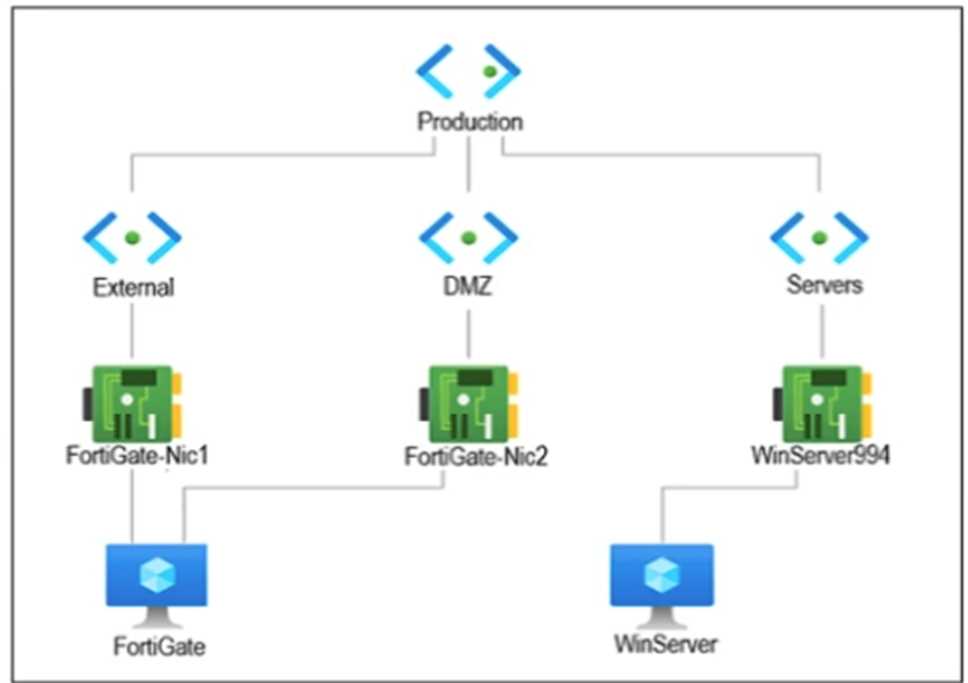 You are troubleshooting a network connectivity issue between two VMs that are deployed in Azure. One VM is a FortiGate that has one interface in the DMZ subnet, which is in the Production VNet. The other VM is a Windows Server in the Servers subnet, which is also in the Production VNet. You cannot ping the Windows Server from the FortiGate VM. What is the reason for this?