1. Microsoft Azure Documentation, Virtual network traffic routing: "You can create custom routes,
or user-defined routes (UDRs) in Azure to override Azure's default routing... You can specify a
next hop of Virtual appliance to route traffic to a network virtual appliance (NVA)."
URL: https://learn.microsoft.com/en-us/azure/virtual-network/virtual-networks-udr-overview
2. Microsoft Azure Documentation, Route network traffic with a route table using the Azure portal:
"For the virtual appliance to be able to forward traffic, the IP forwarding feature must be enabled
for the network interface attached to the VM." This confirms the setting in the exhibit is correct,
making option D incorrect.
URL: https://learn.microsoft.com/en-us/azure/virtual-network/tutorial-create-route-table-portal#cre
ate-a-route-table
3. Fortinet Document Library, FortiGate-VM on Azure deployment guide 7.4.0, Section:
"Configuring a user-defined route to route all traffic through the FortiGate": "To route traffic from
the protected subnet through the FortiGate-VM, you must create a routing table with a UDR... Set
Next hop type to Virtual appliance and Next hop address to the FortiGate-VM's private IP
address."
URL: https://docs.fortinet.com/document/fortigate-public-cloud/7.4.0/azure-administration-guide/5
23940/configuring-a-user-defined-route-to-route-all-traffic-through-the-fortigate

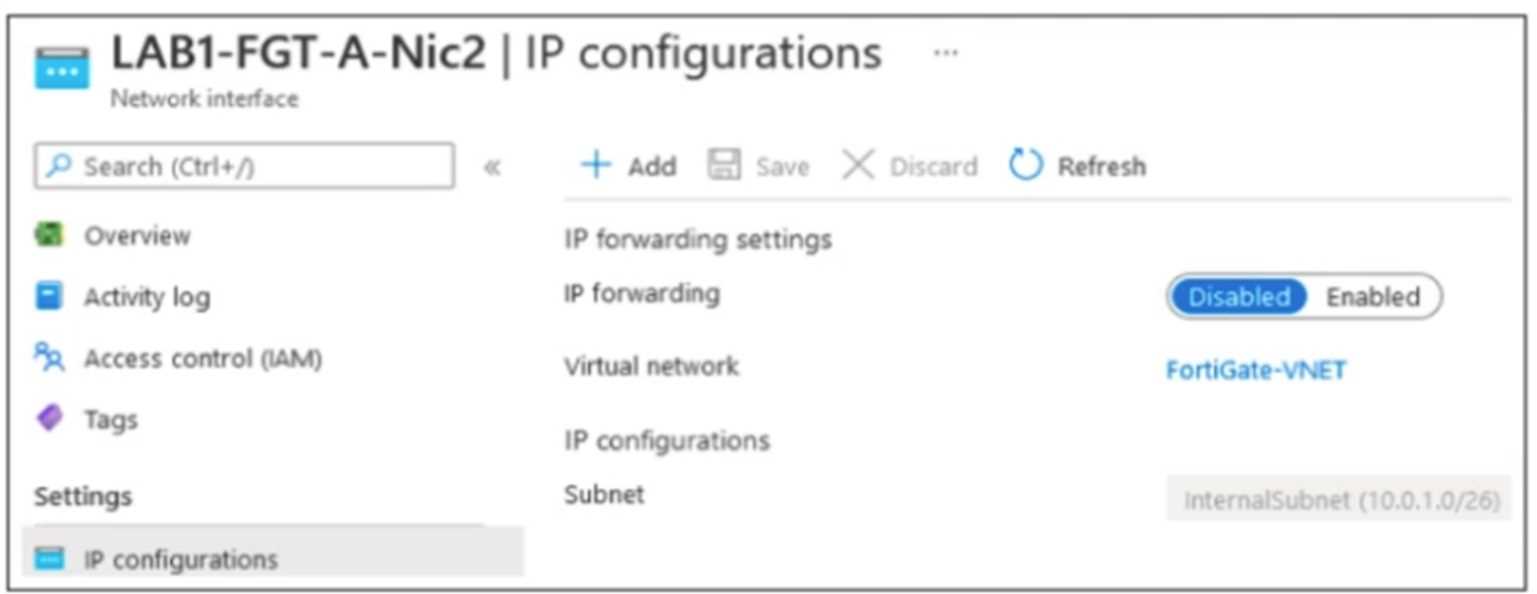 The exhibit shows some of the properties of a virtual NIC that is used by a FortiGate VM deployed in Azure. The virtual NIC shown is connected to a subnet (10.0.1.0/26) with several VMs that will be accessing the internet through the FortiGate VM. Which statement is true for this scenario?