
Q: 1
While attempting to push a NetFlow configuration script through the FortiManager policy package:
an administrator encounters an error stating that an object is unrecognized in line 4.
 What must the administrator do to successfully apply the NetFlow configuration script and avoid the
object unrecognized error?
What must the administrator do to successfully apply the NetFlow configuration script and avoid the
object unrecognized error?
What must the administrator do to successfully apply the NetFlow configuration script and avoid the
object unrecognized error?Options
Discussion
C. not D this time. The error comes from using a VDOM name as an IP address variable and only custom metadata with the actual IP will work for source-ip. If we were talking interface names, D might fit, but that's not what this script is doing. Makes sense?
C . The key is that $(vdom) just gives you the VDOM name, not a real IP, so using custom metadata variables to assign the correct source IP per VDOM fixes it. Not 100% if there's a sneaky scenario but that's how it usually works.
I don't think it's D, pretty sure C is right here. D's a trap if you assume it's interface related but the issue is with variable resolution for the IP. If anyone disagrees, let me know.
Its D in some cases if the object was an interface, not a variable.
C for this one. The main problem is the variable type in the script, since using $(vdom) won't work as an IP address. You need a metadata variable mapped to the actual IP for each VDOM to avoid the unrecognized object error. Pretty sure that's what it's getting at, but correct me if you see it differently.
If the script referenced an interface name instead of source-ip, wouldn't D actually be right for that scenario since the metadata IP variable fix in C wouldn't help?
C tbh, I've seen similar NetFlow config issues in practice exams where using the wrong metadata variable gives that unrecognized error. Official Fortinet docs and lab work help here if you're not sure about metadata types.
C
Yeah, it's C here.
C , since the script needs a metadata variable for the actual IP.
Be respectful. No spam.
 Which two statements about the output are true? (Choose two.)
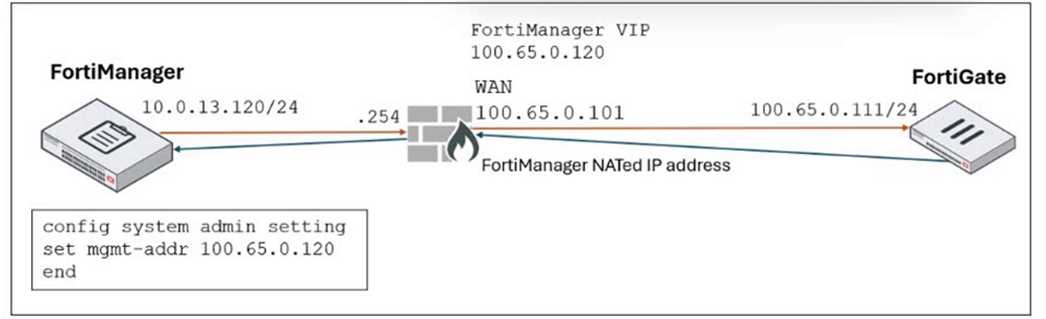 FortiManager is operating behind a network address translation (NAT) device, and the administrator
configured the FortiManager NATed IP address under the FortiManager system administration
settings.
What is the expected result during discovery?
FortiManager is operating behind a network address translation (NAT) device, and the administrator
configured the FortiManager NATed IP address under the FortiManager system administration
settings.
What is the expected result during discovery?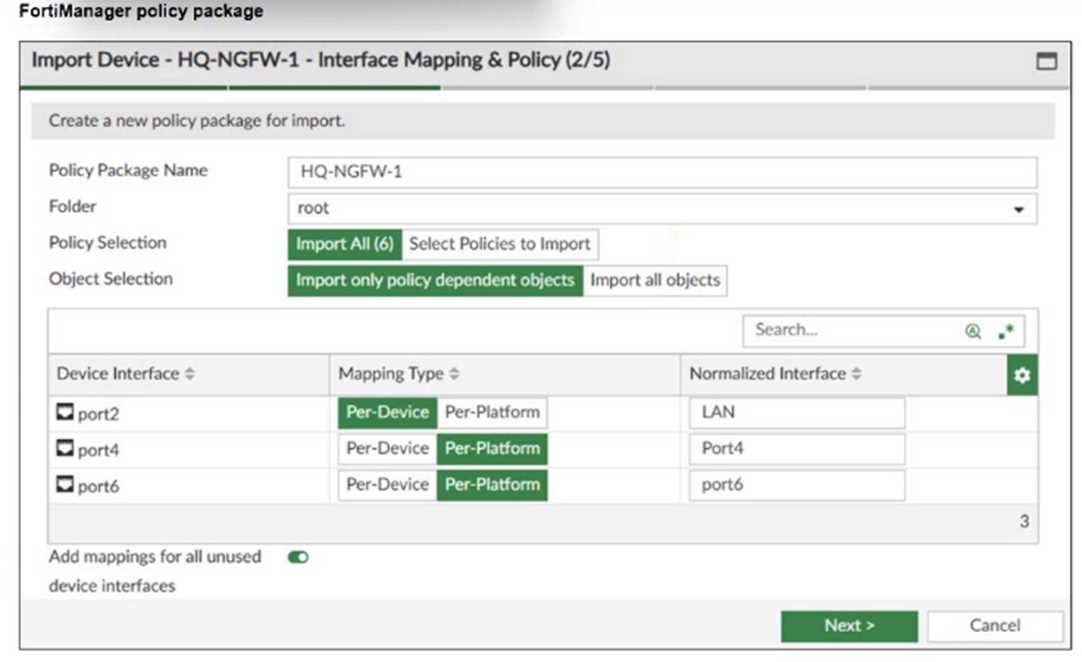 An administrator added a FortiGate device to FortiManager with the default object settings at the
ADOM layer.
What can you conclude from the import policy package process of the HQ-NGFW- 1 device?
An administrator added a FortiGate device to FortiManager with the default object settings at the
ADOM layer.
What can you conclude from the import policy package process of the HQ-NGFW- 1 device?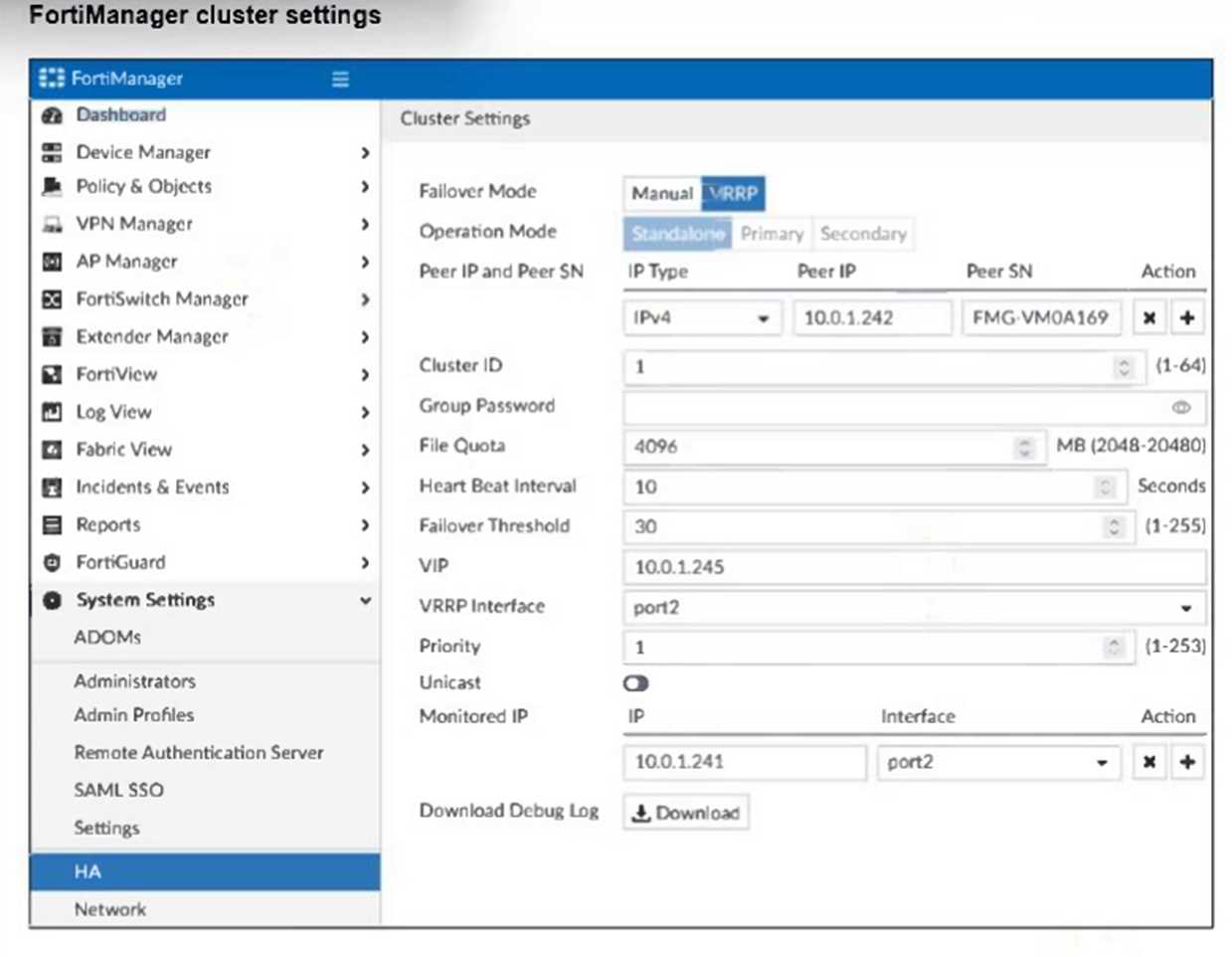 If the monitored interface for the primary FortiManager device fails, what must you do to maintain
high availability (HA)?
If the monitored interface for the primary FortiManager device fails, what must you do to maintain
high availability (HA)?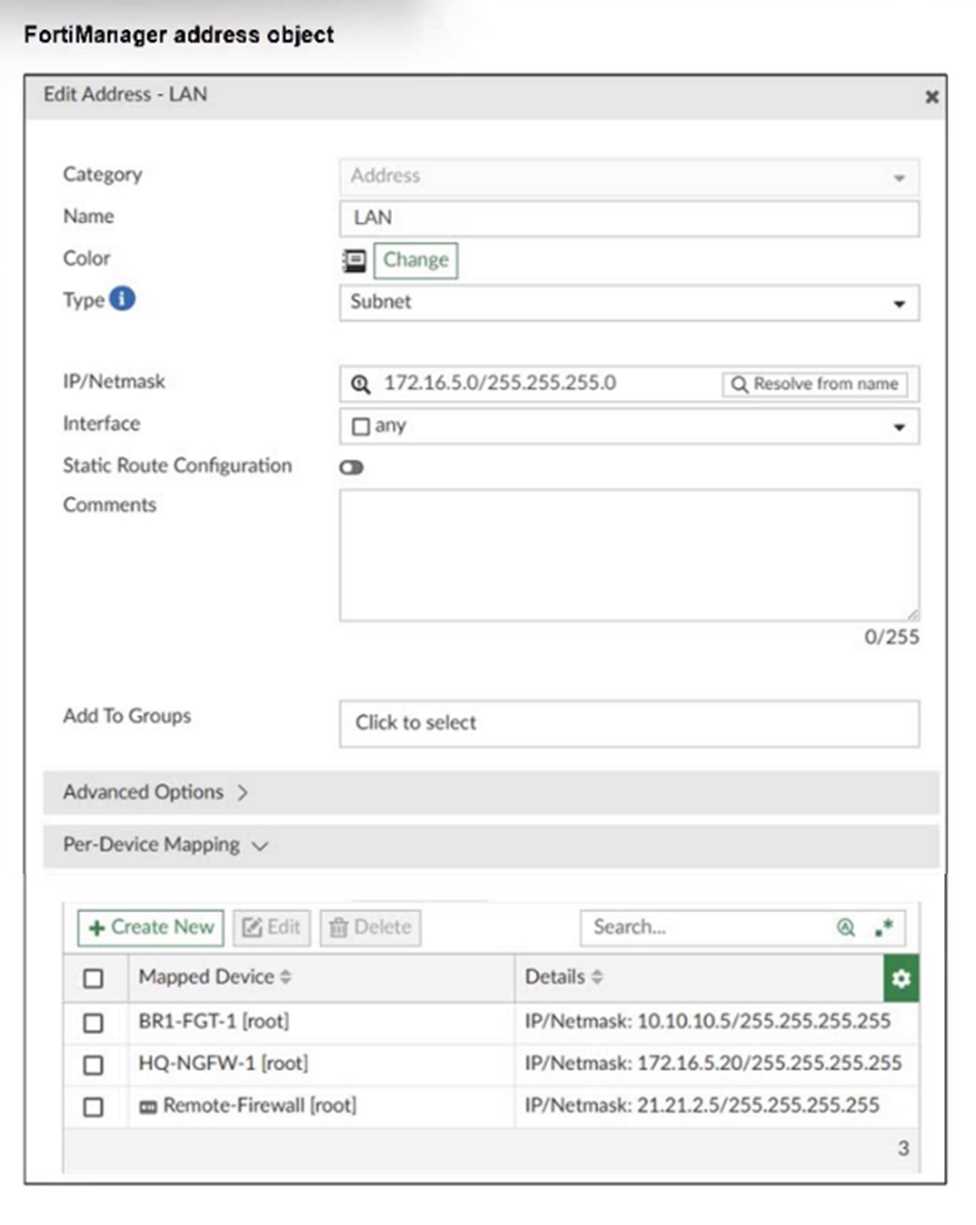 An administrator has created a firewall address object that is used in multiple policy packages for
multiple FortiGate devices in an ADOM.
After the installation operation is performed, which IP/netmask will be installed on Remote-Firewall
[VDOM1] for the LAN firewall address object?
An administrator has created a firewall address object that is used in multiple policy packages for
multiple FortiGate devices in an ADOM.
After the installation operation is performed, which IP/netmask will be installed on Remote-Firewall
[VDOM1] for the LAN firewall address object?