
Q: 3
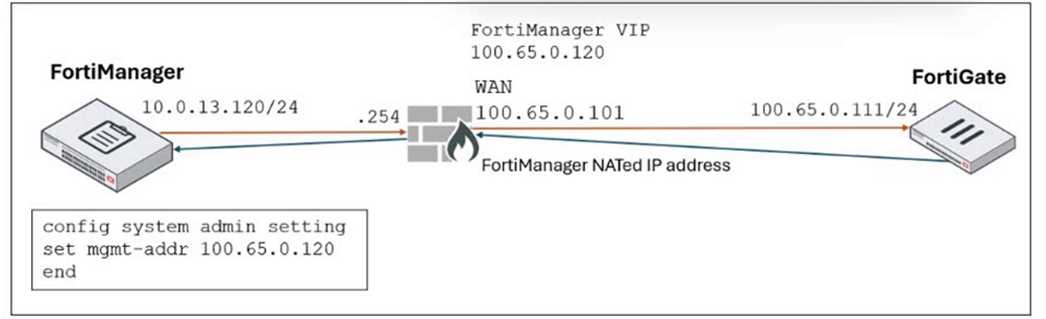
Refer to the exhibit.
 FortiManager is operating behind a network address translation (NAT) device, and the administrator
configured the FortiManager NATed IP address under the FortiManager system administration
settings.
What is the expected result during discovery?
FortiManager is operating behind a network address translation (NAT) device, and the administrator
configured the FortiManager NATed IP address under the FortiManager system administration
settings.
What is the expected result during discovery?
 FortiManager is operating behind a network address translation (NAT) device, and the administrator
configured the FortiManager NATed IP address under the FortiManager system administration
settings.
What is the expected result during discovery?
FortiManager is operating behind a network address translation (NAT) device, and the administrator
configured the FortiManager NATed IP address under the FortiManager system administration
settings.
What is the expected result during discovery?Options
Discussion
Always with the NAT questions... D is what matches similar practice exams. When a NATed IP is set in FortiManager, FortiGate learns that public 100.65.0.120 for central management-not both, not internal. Pretty sure that's right, correct me if you see it working differently.
C . Sometimes FortiManager just pushes the internal IP (100.65.0.101), especially if something about the NAT config isn't synced right. Not totally sure, but that's what I've seen in labs.
C tbh
Pretty sure D is correct here. FortiManager behind NAT gives the FortiGate its configured NATed IP (100.65.0.120), not both internal and external addresses. Option B is a trap since you only get the NATed one.
Why do they still make us memorize NAT behavior, it barely changes. D
Had something like this in a mock, is D correct for just the NATed management IP during discovery?
D imo, it's a trap to pick A. Only the NATed IP goes on FortiGate during discovery stage.
Its D here, since FortiManager behind NAT sets the public 100.65.0.120 on FortiGate for management.
Maybe C. The private IP sometimes sticks around in config after discovery, so I could see FortiManager setting just 100.65.0.101 on FortiGate, especially if NAT rules aren't mapped right.
This just comes down to which address FortiGate will use after discovery. Since FMG is behind NAT, only the NATed IP (100.65.0.120) gets pushed to the FortiGate, not both public and private. So D makes sense here. If I'm missing something subtle in the exhibit, let me know.
Be respectful. No spam.
