
Q: 3
DRAG DROP You are creating a dataflow in Fabric to ingest data from an Azure SQL database by using a T-SQL statement. You need to ensure that any foldable Power Query transformation steps are processed by the Microsoft SQL Server engine. How should you complete the code? To answer, drag the appropriate values to the correct targets. Each value may be used once, more than once, or not at all. You may need to drag the split bar between panes or scroll to view content. NOTE: Each correct selection is worth one point. 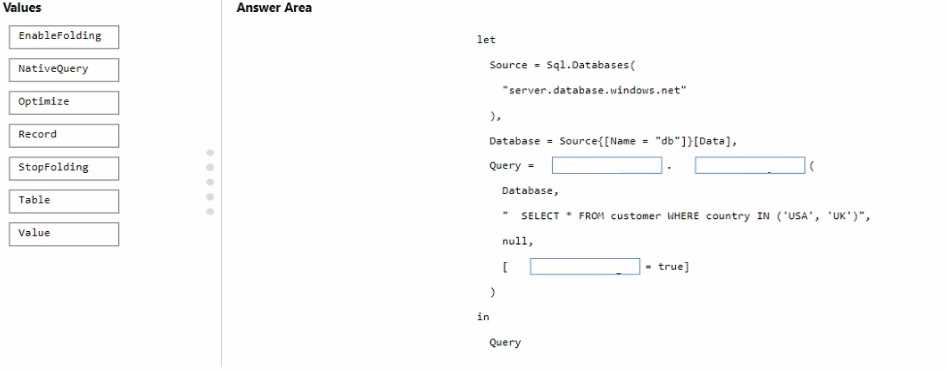
Drag & Drop
Discussion
Option A
Distinct count for pickupLongitude is less than total rows, so A fits because that means duplicates exist. Pretty sure that's the intent, since D would only work if they asked for the exact number of unique values. Agree?
A
Probably A, since the distinct count is less than the total so definitely some values repeat here.
D tbh
D not A. Had something like this in a mock and picked D because the unique count matched what's described for values that occur only once.
Its D, saw a similar question on a practice set where the unique value count pointed to that option.
Pretty sure it’s A. Distinct count is lower than total rows, so duplicate values must be present in pickupLongitude. D looks tempting, but the numbers don’t match up exactly in the stats.
Yeah, A lines up. In Power Query, if the distinct count is less than the row count, it means there are repeated (duplicate) values in that column. The numbers in the stats confirm this for pickupLongitude. Unless the question wanted missing/nulls specifically (then C), but nothing suggests that here. Close call but I think A is correct-agree?
C or A. I get why A makes sense (distinct count < total), but if the question's focused on missing values, sometimes that's shown as well in column profiling. Not totally sure here, leaning toward A for duplicates.
Be respectful. No spam.
