
Q: 10
HOTSPOT You have a Microsoft Power BI project that contains a file named definition.pbir. definition.pbir contains the following JSON. 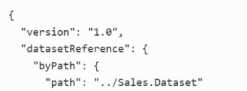
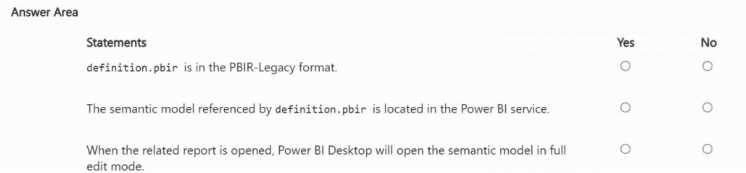
Your Answer
Discussion
NO
NO
YES
NO, NO, YES (Statements 1-3). First two are common traps about formats and paths. Similar to what I've seen in practice sets.
B , GitHub is the only one with native Fabric support right now afaik.
B tbh, this lines up with the official docs and practice test stuff. GitHub integration is highlighted as native for version control in Fabric.
I don't think D is right because Azure Repos isn't natively integrated into Fabric the way GitHub is. The question doesn't mention anything about using Azure DevOps either, so I'm pretty sure the answer should be B. GitHub fits the version control requirement directly for Fabric workspaces. Picking B unless they specify a different repo type.
B
Probably B here, since GitHub is natively supported for version control in Fabric workspaces. Azure Repos (D) could work too but not as directly connected unless specified. Not 100% though, open to other takes.
Honestly a bit unsure but I think it's B. Anyone else get that on their exam?
B , kind of annoying how Fabric only supports GitHub for this and not Azure Repos directly. Native Git integration to GitHub is the cleanest way to add version control here. Someone correct me if I'm missing another route but pretty sure that's what Microsoft expects.
Maybe D for this, since Azure Repos is also a form of version control and could be configured in workspace settings. I might be off but the question didn’t say it has to be GitHub.
Be respectful. No spam.
