= This strategy will not successfully accomplish this. A PersistentVolumeClaim (PVC) is a request for
storage by a user that is automatically bound to a suitable PersistentVolume (PV) by Kubernetes1. A
PV is a piece of storage in the cluster that has been provisioned by an administrator or dynamically
provisioned using StorageClasses1. A hostPath is a type of volume that mounts a file or directory
from the host node’s filesystem into a pod2. It is mainly used for development and testing on a
single-node cluster, and not recommended for production use2.
The problem with this strategy is that it assumes that the hostPath /data on the node is the same as
the /data directory on your laptop. This is not necessarily true, as the node may be a different
machine than your laptop, or it may have a different filesystem layout. Also, the hostPath volume is
not portable across nodes, so if your pod is scheduled on a different node, it will not have access to
the same /data directory2. Furthermore,the storageClass parameter is not applicable for hostPath
volumes, as they are not dynamically provisioned3.
To mount the /data directory on your laptop into a container, you need to use a different type of
volume that supports remote access, such as NFS, Ceph, or GlusterFS4. You also need to make sure
that your laptop is accessible from the cluster network and that it has the appropriate permissions to
share the /data directory. Alternatively, you can usea tool like Skaffold or Telepresence to sync your
local files with your cluster56. Reference:
Persistent Volumes | Kubernetes
Volumes | Kubernetes
Storage Classes | Kubernetes
Kubernetes Storage Options | Kubernetes Academy
Skaffold | Easy and Repeatable Kubernetes Development
Telepresence: fast, local development for Kubernetes and OpenShift microservices

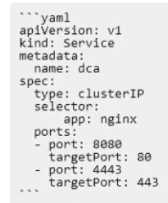 Is this a correct statement about how this service routes requests?
Solution: Traffic sent to the IP of any pod with the label app: nginx on port 8080 will be forwarded to
port 80 in that pod.
Is this a correct statement about how this service routes requests?
Solution: Traffic sent to the IP of any pod with the label app: nginx on port 8080 will be forwarded to
port 80 in that pod.