
Q: 11
A dataset has been defined using Delta Live Tables and includes an expectations clause:
CONSTRAINT valid_timestamp EXPECT (timestamp > '2020-01-01') ON VIOLATION FAIL UPDATE
What is the expected behavior when a batch of data containing data that violates these constraints is
processed?
Options
Discussion
A Option C is actually a trap here, since 'FAIL UPDATE' should cause the job to fail, not just drop invalid records.
C
Be respectful. No spam.
Q: 12
Which file format is used for storing Delta Lake Table?
Options
Discussion
Option A. Under the hood Delta Lake tables are stored as Parquet files, just with extra metadata and transaction log. Pretty sure about this, seen it in official guide and labs.
A tbh, Delta Lake adds features but the actual files on storage are still Parquet. The "Delta" part is mostly about the transaction log and metadata. Anyone disagree or see a case where that's not true?
Wow Databricks and their naming, always trips people up. It's actually A, since Delta Lake tables store data as Parquet files under the hood. Makes sense if you've looked at the filesystem. But I get why B looks tempting.
Its A, the trap here is B since you work with 'Delta' tables in Databricks but the underlying storage is Parquet files. I've seen similar wording in practice exams, always points to Parquet as actual file type. Could be confusing if you only think about what users see. Let me know if anyone thinks otherwise!
Be respectful. No spam.
Q: 13
Which of the following describes a scenario in which a data team will want to utilize cluster pools?
Options
Discussion
A . B is tempting if you're only thinking about reproducibility, but pools are really for speed (minimizing cluster startup time). If the report needs to run ASAP, A makes sense here.
C or D? I remember a similar question from the official practice test, and both testing (C) and versioning (D) come up a lot. Might be missing something but the guide wasn't super clear here.
Its B. Saw a similar question in practice sets, and the wording on this one is super clear.
Be respectful. No spam.
Q: 14
Identify how the count_if function and the count where x is null can be used
Consider a table random_values with below data.
What would be the output of below query?
select count_if(col > 1) as count_
a. count(*) as count_b.count(col1) as count_c from random_values col1
0
1
2
NULL -
2
3
Options
Discussion
C/D? I feel like it's one of those, mainly because count_if can be tricky if the example data includes NULLs. My guess is D since usually count(*) covers all and count(col1) skips NULLs, but not totally sure if there are three or four hits for col > 1. If I'm missing a detail in the sample table let me know.
D imo
Its A. The trap here is thinking count_if counts NULLs, but it doesn't-it only counts where the condition is true. Also, count(*) includes nulls, while count(col1) skips those. So if there are three values >1, six total rows, and five non-null col1 entries, A matches up. Pretty sure this lines up based on Databricks docs but happy to hear other takes.
B or D. I thought count_if(col > 1) would give 4 because I assumed there are four values greater than 1 in the example data, not three. The count(*) and count(col1) totals make sense for 6 and 5, but that first number keeps tripping me up. Maybe I'm missing a NULL trap in the sample? Let me know if anyone reads it differently.
Is this in the official practice set or only in the exam guide? Want to check details.
Option D for me, since count_if(col > 1) should count rows where the value is above 1, and I figured that plus standard counts would match up. It looks like 4 for the first one fits if there are four values greater than 1. Not totally sure on the rest but D seems close.
Be respectful. No spam.
Q: 15
Which of the following is stored in the Databricks customer's cloud account?
Options
Discussion
D imo. Saw similar question in practice exams, data is the only thing actually in the customer's cloud account.
Probably D since customer data stays in their own cloud storage like S3 or ADLS. The rest (web app, notebooks, etc.) are on Databricks managed infra. Pretty sure that's how it's designed.
Pretty sure it's D. Only the data itself sits inside the customer's cloud account, like S3 or Azure Data Lake. The rest of those options are managed by Databricks. Someone correct me if you’ve seen different behavior?
I’d say D is correct. Only "Data" sits in the customer's own cloud account (like S3 or ADLS), rest like notebooks and cluster configs stay with Databricks infra. I saw something like this on a practice test, but happy to be corrected if I'm missing any edge case.
Be respectful. No spam.
Q: 16
Which of the following Git operations must be performed outside of Databricks Repos?
Options
Discussion
Option E
E . Merge can’t be done inside Databricks Repos, the rest are supported. Clone is a trap here.
Clone is doable but merging definitely isn't supported directly in Databricks Repos. E, not D.
Be respectful. No spam.
Q: 17
A data engineer needs to determine whether to use the built-in Databricks Notebooks versioning or
version their project using Databricks Repos.
Which of the following is an advantage of using Databricks Repos over the Databricks Notebooks
versioning?
Options
Discussion
B vs C, but B fits best since Repos lets you use multiple branches. That's something the old Notebooks versioning doesn't offer.
Be respectful. No spam.
Q: 18
Which of the following commands can be used to write data into a Delta table while avoiding the
writing of duplicate records?
Options
Discussion
C is the one that handles deduplication since MERGE lets you match on keys and only updates or inserts if needed. APPEND or INSERT could just write duplicates straight in. Pretty sure C is right here, but curious if anyone sees a use case I missed.
Merge is the way to avoid dups since it does upserts based on match conditions. C here, since things like APPEND or INSERT just slam new rows in without checking. Almost positive C, unless someone knows a weird edge case.
Not A, C here. MERGE lets you match and update or insert only if not present, so it avoids duplicates. The rest just add or drop data without checking for existing rows, at least from what I've seen in exam dumps.
Be respectful. No spam.
Q: 19
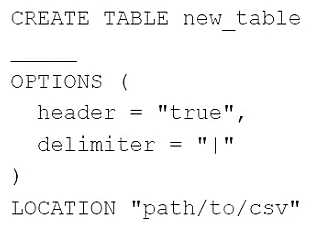
A data engineer needs to create a table in Databricks using data from a CSV file at location
/path/to/csv.
They run the following command:
Which of the following lines of code fills in the above blank to successfully complete the task?
Which of the following lines of code fills in the above blank to successfully complete the task?Options
Discussion
B , Databricks SQL expects USING CSV to define the file format when creating an external table. FROM is for specifying the path but not the format, so using FROM CSV wouldn't make sense syntactically. Seen this in practice tests too, but open to correction if I'm missing something.
Its C, this one is super straightforward compared to similar questions I’ve seen.
Had something like this in a mock, pretty sure it's B. In Databricks SQL, you use
USING CSV to specify the file format when creating the table.Be respectful. No spam.
Q: 20
Which of the following statements regarding the relationship between Silver tables and Bronze
tables is always true?
Options
Discussion
I remember a similar scenario from labs, and D was always the correct pick there.
Pretty sure it's D. Silver tables always have cleaner and more refined data compared to Bronze, that's the main idea behind medallion architecture. The other options talk about size or aggregation, but only D is always true.
C or D
Option C is tempting since sometimes Silver could have more rows if there are joins or enrichment, but that's not guaranteed. D is always true because Silver is always more refined/cleaner than Bronze in the medallion setup. I think D is the safest, but if we're talking row counts, C could trip you up. Agree?
D always. Silver tables get cleaned up data from Bronze, that's basic medallion architecture. Haven't seen any Databricks docs contradict this.
Probably C, saw a similar question and got tripped up by that. Seemed like Silver could sometimes have more data after joins.
D imo. Silver tables are always more refined than Bronze, that’s the core of medallion architecture. Option A is a common trap since it flips the true relationship. Pretty sure D is always right for Databricks.
D
Really clear options on this one, nice question format!
Be respectful. No spam.
Question 11 of 20 · Page 2 / 2