1. Apache Spark 3.5.1 Official Documentation
pyspark.sql.DataFrame.dropDuplicates:
Reference: "Return a new DataFrame with duplicate rows removed
optionally only considering certain columns. For a static batch DataFrame
it keeps the first row for each set of duplicates." The function signature is DataFrame.dropDuplicates(subset=None)
where subset is an "optional list of column names to consider."
Location: Apache Spark API Docs > pyspark.sql > DataFrame API > pyspark.sql.DataFrame.dropDuplicates.
2. Databricks Official Documentation
"Duplicate records":
Reference: "You can use dropDuplicates to remove duplicate rows from a DataFrame
optionally considering only a subset of columns... The following code drops duplicate rows from a DataFrame
considering only the columns 'name' and 'gender'."
Location: Databricks Documentation > Apache Spark > DataFrames > Transformations > Duplicate records.
3. University of California
Berkeley - CS 194
Data Science Courseware:
Reference: Lecture materials on Spark DataFrames often explain that df.dropDuplicates(['col1'
'col2']) is the standard method for removing duplicate records based on a subset of columns
contrasting it with df.distinct() which operates on all columns.
Location: Found in typical course materials for data engineering with Spark
such as UC Berkeley's Data Science curriculum resources.

 event_ts TIMESTAMP,
sensor_id STRING,
metric_value LONG,
ingest_ts TIMESTAMP,
source_file_path STRING
The goal is to deduplicate based on: event_ts, sensor_id, and metric_value.
Options:
event_ts TIMESTAMP,
sensor_id STRING,
metric_value LONG,
ingest_ts TIMESTAMP,
source_file_path STRING
The goal is to deduplicate based on: event_ts, sensor_id, and metric_value.
Options: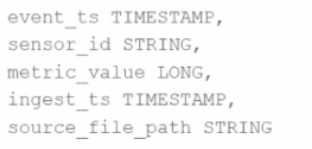 event_ts TIMESTAMP,
sensor_id STRING,
metric_value LONG,
ingest_ts TIMESTAMP,
source_file_path STRING
The goal is to deduplicate based on: event_ts, sensor_id, and metric_value.
Options:
event_ts TIMESTAMP,
sensor_id STRING,
metric_value LONG,
ingest_ts TIMESTAMP,
source_file_path STRING
The goal is to deduplicate based on: event_ts, sensor_id, and metric_value.
Options: