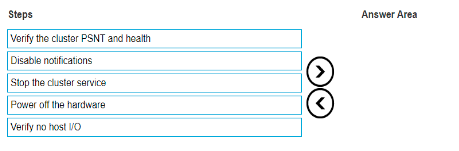
Verify no host I/O: Ensure that there are no active I/O operations from the hosts connected to the XtremIO array. This is crucial to avoid data loss or corruption. Verify the cluster PSNT and health: Check the Primary Serial Number Tag (PSNT) and the health status of the cluster to ensure everything is functioning properly before proceeding with the shutdown. Disable notifications: Temporarily disable any notifications to avoid unnecessary alerts during the shutdown process. Stop the cluster service: Gracefully stop the cluster service to ensure that all processes and services are properly terminated. Power off the hardware: Finally, power off the hardware to complete the planned shutdown of the XtremIO X2. Reference: [Dell EMC XtremIO X2 Planned Shutdown Procedure] Below is the sequence arranged correctly as per the steps: Verify no host I/O Verify the cluster PSNT and health Disable notifications Stop the cluster service Power off the hardware

 .
.