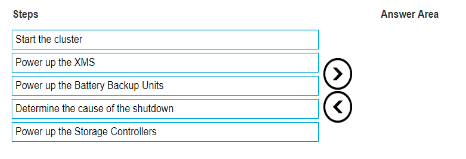
The correct sequence of steps to power up an XtremIO X1 cluster after an emergency shutdown is as follows: Determine the cause of the shutdown Power up the Battery Backup Units Power up the XMS Power up the Storage Controllers Start the cluster Detailed Explanation with Reference: Determine the cause of the shutdown: Before powering up the system, it is essential to understand why the emergency shutdown occurred to prevent reoccurrence. Power up the Battery Backup Units: The BBUs provide the necessary power to the storage controllers during power-up. Power up the XMS: The XtremIO Management Server must be powered up to manage and monitor the storage system. Power up the Storage Controllers: Once the BBUs and XMS are operational, power up the storage controllers. Start the cluster: Finally, start the cluster to bring the XtremIO system back online and resume normal operations. Reference: Dell XtremIO Power Up Procedures.

 .
.