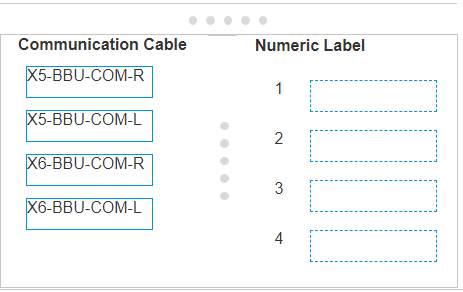
The image provided shows the back of an XtremIO X1 storage system with numeric labels next to the communication cable ports. To ensure the correct communication cables are connected: Locate the ports on the back of the X-Bricks corresponding to the numeric labels. Match each communication cable to its respective port based on the numeric label: The right-side Battery Backup Unit (BBU) communication cable for X-Brick 5 (X5-BBU-COM-R) connects to port labeled 3. The left-side BBU communication cable for X-Brick 5 (X5-BBU-COM-L) connects to port labeled 1. The right-side BBU communication cable for X-Brick 6 (X6-BBU-COM-R) connects to port labeled 4. The left-side BBU communication cable for X-Brick 6 (X6-BBU-COM-L) connects to port labeled 2. After connecting the cables as per the matching, verify the connections according to the Official Dell XtremIO Deploy Achievement document to ensure they are correct and secure1. For the most accurate and up-to-date information, please refer to the latest Official Dell XtremIO Deploy Achievement documents or consult with Dell support.

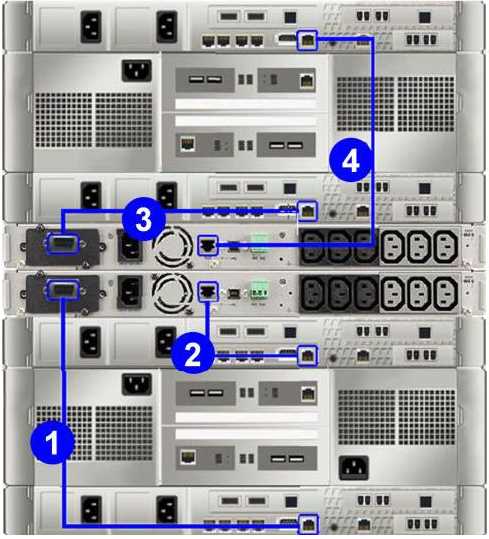 You need to install an XtremlO X1 at a customer's location and want to ensure the correct communication cables are connected to the back of the X- Bricks. Match the cables to their numeric label shown in the exhibit.