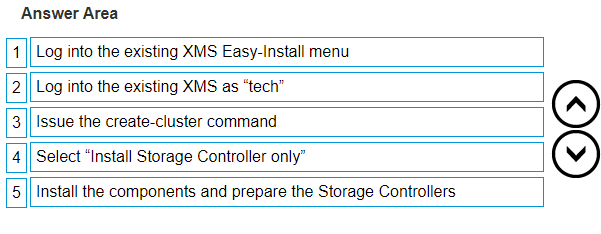
Creating a new XtremIO X1 cluster from an existing XMS involves a specific sequence of steps. Based on the information available, here is a streamlined process you can follow: Log into the existing XMS using the credentials provided for administrative access. Navigate to the Easy-Install menu to initiate the setup process. Log in as “tech” to gain the necessary technical privileges for cluster creation. Issue the create-cluster command to start the creation of the new cluster. During the setup, select the option to “Install Storage Controller only” if you’re only setting up the storage controller without the full cluster. Install the components required for the Storage Controllers. Prepare the Storage Controllers for integration into the new cluster. Please ensure that you have all the necessary permissions and follow the detailed instructions provided by the manufacturer or in the official documentation. If you encounter any issues or need further assistance, it’s recommended to consult with Dell EMC support or a certified professional123. Remember, handling such operations requires careful attention to detail to avoid any configuration or data integrity issues.