for all
step by step solution
with all explanation.
Explanation:
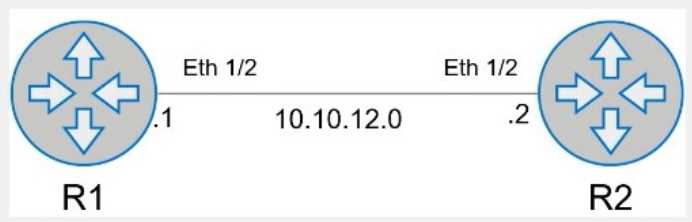
Here is the step-by-step configuration for R1:
Enter BGP Configuration Mode:
R1# configure terminal
R1(config)# router bgp 1
Configure the BGP Neighbor:
R1(config-router)# neighbor 10.10.12.2 remote-as 2
Redistribute Connected Routes into BGP:
R1(config-router)# redistribute connected
Exit BGP Configuration Mode and Save the Configuration:
R1(config-router)# end
R1# write memory
Comprehensive Detailed Step by Step Explanation with Reference:
Enter BGP Configuration Mode:
To configure BGP on R1, you need to enter global configuration mode and then enter BGP
configuration mode with the AS number. Since R1 is in AS 1, you use the command router bgp 1.
Configure the BGP Neighbor:
BGP neighbors must be manually specified. In this case, R1's neighbor is R2, which has an IP address
of 10.10.12.2 and resides in AS 2. The command neighbor 10.10.12.2 remote-as 2 establishes this
relationship.
Redistribute Connected Routes into BGP:
To ensure that all connected routes on R1 are advertised via BGP, you use the redistribute connected
command. This ensures that any connected IPv4 routes are redistributed into BGP, meeting the
requirement to advertise current and future connected routes.
Exit BGP Configuration Mode and Save the Configuration:
Once the configuration is complete, you exit BGP configuration mode by typing end and then save
the configuration with the write memory command. This ensures that the changes persist after a
reboot.
Reference:
Cisco BGP Configuration Guide
Dell Technologies Networking - SONiC
Dell Enterprise SONiC Deployment Guide
These steps provide a comprehensive guide to configure R1 to meet the specified requirements for
BGP peering and route redistribution.