When the “Test a Copy” wizard is in progress in a Dell RecoverPoint environment, it temporarily
disconnects the local copy from the production and remote copies to allow testing of the data at a
specific point in time without affecting the ongoing replication and production operations. The steps
involved are:
Initiate Test a Copy: The administrator starts the “Test a Copy” wizard from the RecoverPoint
management interface.
Disconnect Local Copy: The wizard disconnects the local copy from the production and remote copies
to isolate it for testing.
Perform Testing: The administrator or users perform necessary tests on the local copy, which is now
in an isolated state.
Reconnect Local Copy: Once testing is complete, the wizard will reconnect the local copy to resume
normal replication and protection operations.
This process ensures that testing can be conducted on a consistent dataset without impacting the
production environment or replication processes1.

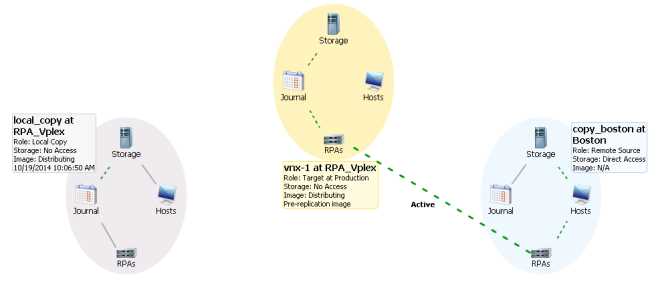 Based on the Consistency Group status shown in the exhibit, why is the local copy not connected to
the production and remote copy?
Based on the Consistency Group status shown in the exhibit, why is the local copy not connected to
the production and remote copy?