
Q: 7
HOTSPOT Computers in a small office are unable to access companypro.net. You run the ipconfig command on one of the computers. The results are shown in the exhibit. You need to determine if you can reach the router. 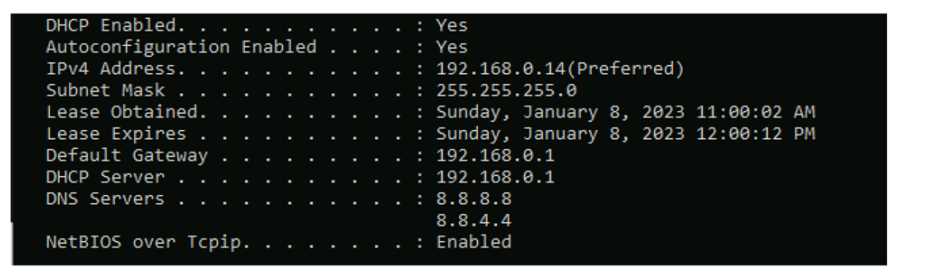 Which command should you use? Complete the command by selecting the correct options from each drop-down lists.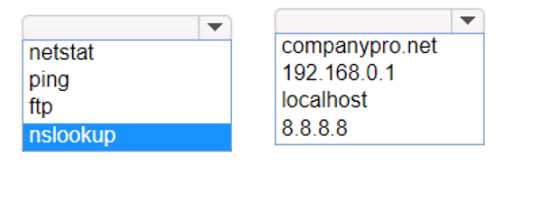
Your Answer
Discussion
ping 192.168.0.1
Had something like this in a mock, just need to ping the default gateway to check router reachability.
Had something like this in a mock, just need to ping the default gateway to check router reachability.
ping 192.168.0.1
This checks if you have basic IP connectivity to the gateway router, ignoring any possible DNS issues. Pretty sure that's the intent since reaching the default gateway rules out a local network problem first. Agree with others here but open to other views.
This checks if you have basic IP connectivity to the gateway router, ignoring any possible DNS issues. Pretty sure that's the intent since reaching the default gateway rules out a local network problem first. Agree with others here but open to other views.
ping 192.168.0.1 Had something like this in a mock, always ping the default gateway first in these scenarios.
Not router or hostname, the trap is DNS relying on a name. ping 192.168.0.1
ping 192.168.0.1
This checks direct Layer 3 connectivity to the router, not just DNS. Pretty sure that's what the question is asking for since ipconfig shows default gateway, but open to corrections if I missed something.
ping 192.168.0.1
Pretty sure that's it. Sometimes people pick hostname or DNS but for reachability the gateway IP avoids that trap.
Pretty sure that's it. Sometimes people pick hostname or DNS but for reachability the gateway IP avoids that trap.
ping 192.168.0.1
The trap is pinging a hostname like companypro.net, which could fail if DNS is broken even if the router's up. Going direct to the default gateway tests L3 connectivity. Pretty sure that's what they're after here, feel free to push back if you think differently.
The trap is pinging a hostname like companypro.net, which could fail if DNS is broken even if the router's up. Going direct to the default gateway tests L3 connectivity. Pretty sure that's what they're after here, feel free to push back if you think differently.
ping 192.168.0.1
Not router or hostname, using DNS here would be a trap, safer to go with the gateway IP.
Not router or hostname, using DNS here would be a trap, safer to go with the gateway IP.
ping 192.168.0.1
Encountered exactly similar question in my exam, checking the default gateway with ping tells you if routing works between PC and router. Pretty sure this is the go-to choice here unless someone sees a catch.
Saw something like this on a practice test. ping 192.168.0.1
Be respectful. No spam.
