
Not seeing why A would be right here. SAP moved to 500 mentors and 500 mentees for supervised mentoring, so C is the correct cap. A is outdated info, easy trap for those using older guides. I think it's C but happy if someone has more recent docs to share.
Q: 11
What is the limit to the number of employees that can be added to a supervised mentoring
program?
Options
Discussion
C . Saw a similar question on a practice test and the cap was 500 mentors/500 mentees for supervised mentoring. SAP bumped it up from older limits, but pretty sure this is still current. Disagree?
Its C, SAP has the supervised mentoring limit at 500 mentors and 500 mentees. Never seen 3000 as the cap here.
B , since it says 3000 mentors and 3000 mentees, which matches the total of 6000. I think SAP increased the limits recently so C might be outdated. Anyone else see new docs on this?
C tbh, SAP updated the supervised mentoring limits and it's now 500 mentors plus 500 mentees. A was right a few years ago but not anymore. Open to correction but this matches latest docs.
C, that's the limit in the official SAP guide for supervised mentoring. Practice exams and docs line up with that number.
Not sure why B keeps coming up, that's for older (or unsupervised) programs. For supervised mentoring SAP still caps at 500 mentors and 500 mentees each. Easy to mix up since the docs were updated a few versions back.
C vs B? The catch is whether SAP means "per role" cap or a combined total, which isn't super clear here. On some configs it does mean 500 each not combined, but the docs get tweaked. If anyone's running a recent instance and sees higher caps, let me know.
Had something like this in a mock, C is what matched the SAP supervised mentoring cap (500/500). Pretty confident that’s still correct.
C imo, 500 mentors and 500 mentees is still the supervised cap. B is a common trap from old docs.
Be respectful. No spam.
Q: 12
Your customer wants you to remove the number of open positions displayed in the Career
Worksheet v12.Which activities do you need to perform?Note: There are 2 correct answers to this
question.
Options
Discussion
C or A, but I lean towards A and not C since setting hide-position-count to on hides the number, while "off" would just show it again. So A makes sense here. Pretty sure that's what SAP expects in config.
C or D
Honestly SAP always makes these switches confusing. A for sure hides the position count, but C would actually turn it back on, so only A fits. D doesn't impact the worksheet display, it's more about nomination methods. Pretty sure answer is just A, but if they're asking for two, that's a bit tricky! Anyone else seen something different on live configs?
A C tbh
C is wrong here, A works for hiding position counts. Saw similar wording on other exams too.
D , A and C both talk about the hide-position-count switch but only A actually hides the count. C would display the open positions again, so it doesn't fit if removal is the goal. Pretty sure it's just A, unless there's some template update trick with B that I'm missing. Agree?
Its A and not really sure about the second one, maybe B but not confident.
Probably A and C. Both relate to the hide-position-count switch so makes sense for this scenario.
Yeah, gotta be A and C. Both relate to the hide-position-count switch so they line up with the requirement here.
C , but not fully sure. Setting hide-position-count to off would show open positions, so it doesn't fit the goal. A definitely makes sense since that's how you hide the count. B seems unlikely because just updating the template isn't removing the info. Anyone see a reason C is included if removal's the point?
B tbh. A is correct since that switch hides the count, but C does the opposite, so that's a trap. B makes sense if you need to update the template after making config changes. Pretty sure it's A and B, unless the template update isn't needed in this workflow.
Be respectful. No spam.
Q: 13
Which of the following best practices does SAP SuccessFactors recommend for the Role Readiness
form?Note: There are 2 correct answers to this question.
Options
Discussion
Its C and D, saw almost the same combo in some exam reports.
Option C and D fit best here. SuccessFactors recommends a simple route map with just the employee for Role Readiness, and not including overall performance rating since that's not the form's point. Pretty sure these are the two, but open to correction if anyone's seen different.
Probably C and D, that's what I saw in the official guide and some sample exams. Route map should just have the employee for Role Readiness, and you don't want to calculate an overall rating. Anyone else see it different in their prep?
Ugh, SAP loves making these a pain. C D is what I've seen on similar questions in practice tests-keep it simple, don't calculate overall ratings. Could be wrong if the best practices have changed lately.
I get why C and D keep coming up, since SAP pushes for simple route maps and not using overall ratings in these forms. Anyone actually seen a situation where including an overall performance rating caused issues? Just curious if anyone's experienced that firsthand.
Honestly, C and D are the ones SAP recommends for Role Readiness forms. Employee only in route map (C) keeps it simple, and no overall performance rating (D) avoids confusion. Pretty sure that’s what the implementation guides say, but open to other views.
Maybe A and D. I thought you weren't supposed to exclude competency ratings, but for succession planning it feels like A could make sense. D also looks right since performance rating isn't needed here. Not 100% though, anyone see official docs back this up?
I don’t think A is right here, trap answer. C D.
Yeah, it's C and D. Both line up with SAP's Role Readiness form best practices as far as I know. Disagree?
C D tbh. For Role Readiness, SAP suggests only the employee in the route map and not calculating overall performance rating. A sounds tempting but removing competencies isn’t recommended for succession. Open to debate if anyone thinks otherwise.
Be respectful. No spam.
Q: 14
Where can you create a development plan template?Note: There are 2 correct answers to this
question.
Options
Discussion
Yeah, I've seen a similar question in some exam prep and both A and B are correct. Development plan templates get set up in Provisioning using those options. Admin Center is usually more for managing existing templates. Pretty sure about this, but open if someone has different info.
A, B
B , since Goal Plan Template is used when you want to create something similar for development goals. Think it's pretty close because both A and B are provisioning tasks, and that's where templates usually get handled. Not totally sure though.
Its C and D for this, not A/B. The question trips people up with how similar "Goal Plan" and "Development Plan" sound.
Its A and B, pretty sure from similar questions but not 100 percent. Anyone else pick these?
Be respectful. No spam.
Q: 15
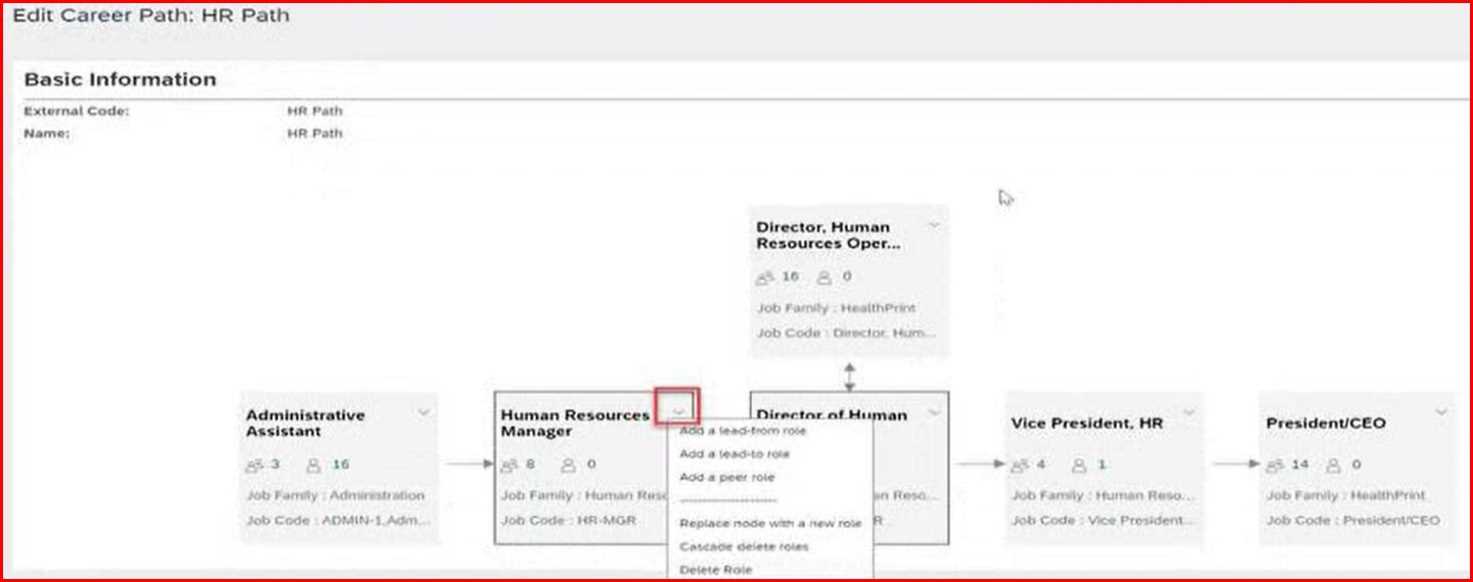
Based on this screenshot, if the user selects Cascade delete from the Human Resources Manager
role, how many roles will be deleted?


Options
Discussion
Seen similar on the practice exam and it lines up with D.
D , since cascade delete will remove not just the manager role but all roles nested under it in the hierarchy. SAP usually treats cascade as deleting the whole subtree. Pretty sure it's 6 here unless there's something odd in the screenshot I'm missing. Agree?
Option D but does "cascade" here mean all nested child roles too or just direct ones?
D, Similar question came up in the official practice exam and D matches. Guides also point to cascade deleting all dependent roles.
B not D
I saw a similar scenario on SAP's official practice test and it seemed like C (5) was right there, but I might be confusing direct vs full cascade. Anyone else notice that in the guides?
B tbh. If only direct children under Human Resources Manager are deleted, that would be 4 roles. Not sure if the screenshot really confirms full cascade all the way down. Open to being corrected but that's my first thought.
D , folks keep missing that cascade deletes EVERYTHING below, not just the first kids. So it's 6, not 4. Easy to trip on if you're used to just deleting direct child roles.
C/D? Screenshot isn't super clear to me, but I think it's between those two.
Probably D, since cascade delete takes out the whole hierarchy under Human Resources Manager. Screenshot backs that up.
Be respectful. No spam.
Question 11 of 20 · Page 2 / 2