
Q: 6
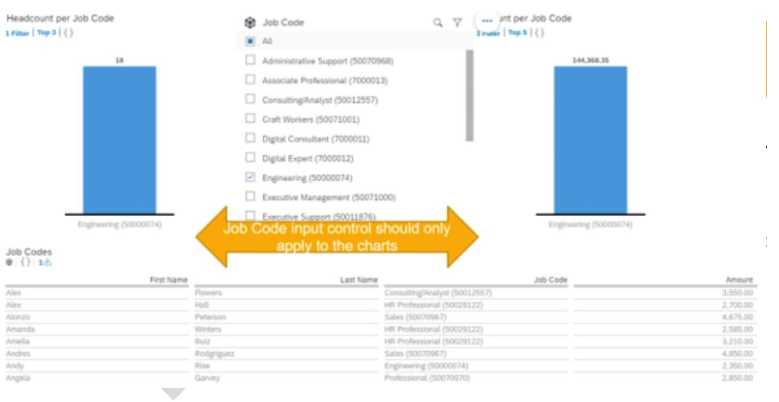
You are creating a Story report on Job Classifications. You have configured the chart, table, and input
control on the canvas, as displayed in the screenshot. How do you set the input control?

Options
Discussion
Option A
C or D
Had something like this in a mock, and I picked D because converting to a Story Filter seemed to connect everything by default. Not 100 percent, but pretty sure C (Cascading Effects) is also possible if you want filters to stack. Anyone else remember this setup?
Had something like this in a mock, and I picked D because converting to a Story Filter seemed to connect everything by default. Not 100 percent, but pretty sure C (Cascading Effects) is also possible if you want filters to stack. Anyone else remember this setup?
C or A, but I'd go A since Linked Analysis lets you connect the input control with both widgets on the same page. D trips people up because Story Filter sounds broader than needed for just one canvas. Agree?
Does their answer change if you put that input control outside the individual canvas and onto the story header area? That would make D correct, not A, because then you get filtering across all pages not just widgets.
A, D is tempting but it's for all pages, Linked Analysis (A) just connects chart and table here.
D . I thought Story Filter would handle this since it can push the filter across all pages, which sounds like what they might want here. Could be missing something, but pretty sure from the official guide. Disagree?
I don’t think it’s D. A fits because Linked Analysis ties the input control just to the chart and table on that canvas, not the whole story. As I understand it, Story Filters (D) push the filter across all report pages, which isn’t what they’re asking for here. Pretty sure about A but open if someone’s seen otherwise in practice.
A is the pick here.
A tbh, D is tempting but Linked Analysis is what actually connects the input control to multiple widgets, not Story Filter.
This one annoys me, SAP's wording is always unclear! A imo, since Linked Analysis is what links the input control to both chart and table widgets, not just page filtering. If anyone's set this up differently let me know-open to debate.
Be respectful. No spam.
