Resource groups are for organizing resources, not for providing high availability across datacenters. To get protection from a datacenter failure, you need to use Availability Zones, not just split things into different resource groups. Clear scenario, makes it easy to spot why B is right.
HOTSPOT To complete the sentence, select the appropriate option in the answer area.
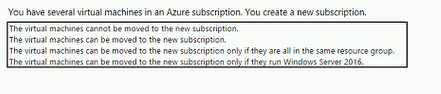
I picked this because I thought VMs are locked to the original subscription. There might be restrictions with certain resources, especially when dependencies exist or they're using specific services. Not entirely sure since Azure does let you move some things, but my understanding is that VMs themselves are stuck. Let me know if I missed something.
DRAG DROP Match the security components to the appropriate defense in depth layers. To answer, drag the appropriate service from the column on the left to its description on the right. Each service may be used once, more than once, or not at all. NOTE: Each correct match is worth one point
I thought MFA fits under Physical security since it controls access, software updates/patches should be Identity, and surveillance camera could go with Compute because of monitoring digital assets. That was my guess, saw a chart somewhere that paired them this way. Not 100 percent sure though, open to challenge if someone sees it differently.
- Multifactor authentication (MFA) -> Physical security
- Software updates and patches -> Identity
- Surveillance camera -> Compute
Pretty straightforward if you know the layers. MFA always goes with identity, software updates to compute, surveillance cameras are all about physical security. Would the answer change if "firewall" or "encryption" was listed in any of these buckets?
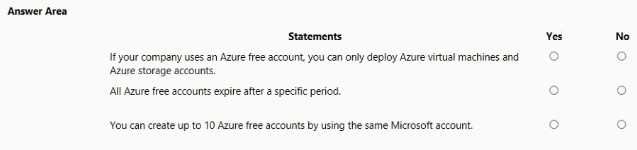
HOTSPOT For each of the following statements, select Yes if the statement is true. Otherwise, select No. NOTE Each correct selection is worth one point.
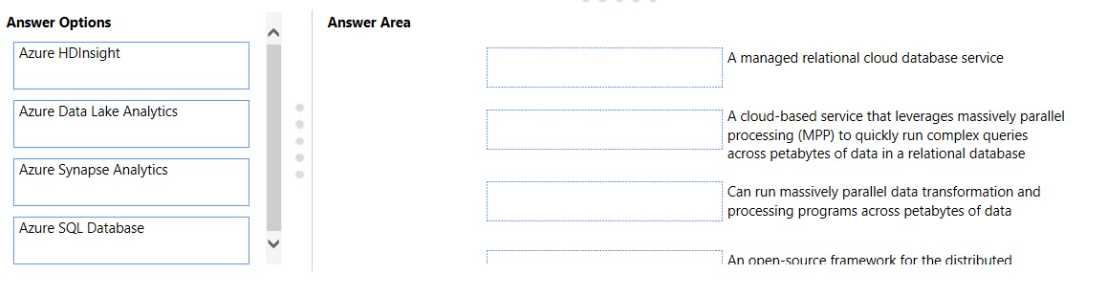
DRAG DROP Match the Azure service to the correct description. Instructions: To answer, drag the appropriate Azure service from the column on the left to its description on the right. Each service may be used once, more than once, or not at all NOTE: Each correct match is worth one point.
SQL Database to Bucket 1, Synapse to Bucket 2, Data Lake Analytics to Bucket 3, HDInsight to Bucket 4. Makes sense because SQL DB is for managed relational storage, Synapse covers analytics/warehousing, Data Lake Analytics was for big data processing (with U-SQL), HDInsight is open-source Hadoop/Spark. Pretty sure that's how the descriptions line up. If anyone saw different wording on buckets let me know!
Not sure running just Azure CLI on Linux will work for a PowerShell script. Az CLI is its own thing with different commands, it won't run PowerShell cmdlets. You'd need the PowerShell Az module installed. Agree with B here, but correct me if I missed something.
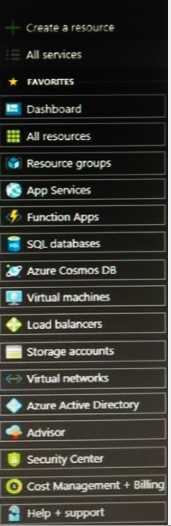
HOTSPOT You need to view a list of planned maintenance events that can affect the availability of an Azure subscription. Which blade should you use from the Azure portal? To answer, select the appropriate blade in the answer area.
HELP + SUPPORT. Had exactly similar question in my exam, the Help + support blade is where you can track planned maintenance events or issues that could impact resources. Pretty sure this is what they're looking for here.
Would it be Azure Monitor? I thought planned maintenance events were tracked in resource health under there, not Help + Support.
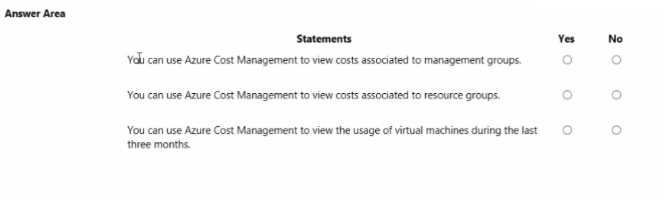
HOTSPOT For each of the following statements, select Yes if the statement is true. Otherwise, select No. NOTE: Each correct selection is worth one point.
I picked YES for all since, from what I remember in similar questions, Azure Cost Management really does cover those levels and usage tracking. Nice straightforward question format here.