1. Microsoft Learn. (2023). Manage app installation with Group Policy. This document details the "Configure App Install Control" Group Policy setting. It specifies that selecting "Allow apps from the Store only" restricts users to installing apps exclusively from the Microsoft Store.
Section: "Manage app installation with Group Policy"
Reference: The article describes the policy path Computer Configuration > Administrative Templates > Windows Components > Windows Defender SmartScreen > Explorer and the behavior of the "Allow apps from the Store only" option.
2. Microsoft Learn. (2023). Policy CSP - SmartScreen. This document describes the Mobile Device Management (MDM) policy equivalent to the GPO setting. The SmartScreenAppInstallControl policy with a value of msstore enforces the same restriction.
Section: "SmartScreenAppInstallControl"
Reference: The description for the msstore value states
"Allow apps from the Store only." This confirms the intended behavior of blocking apps from other sources like the internet or local shares.
3. Microsoft Learn. (2023). Windows Defender SmartScreen overview. This document provides context on how SmartScreen works to protect systems.
Section: "How Windows Defender SmartScreen helps to protect you"
Reference: The document explains that SmartScreen checks files downloaded from the internet against a list of reported malicious software sites and programs
and the "App Install Control" feature is an extension of this protection to control installation sources.

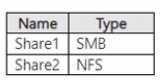
 You have the apps shown in the following table.
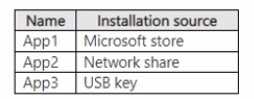 Which apps can you install on Served?
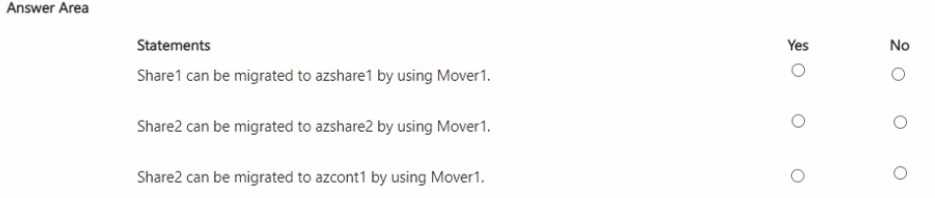
 You have an Azure subscription named Sub1 that contains an Azure Storage Mover resource named Mover1 and the storage accounts shown in the following table.
  The storage accounts contain the resources shown in the following table.
 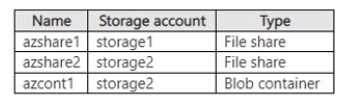 For each of the following statements, select Yes if the statement is true. Otherwise, select No. NOTE: Each correct selection is worth one point.