Q: 1
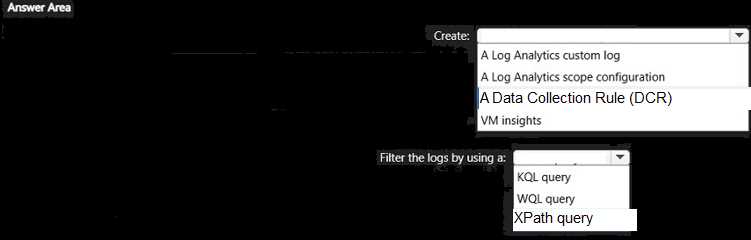
HOTSPOT
You have a Hyper-V failover cluster named Cluster1 at a main datacenter. Cluster1 contains two
nodes that have the Hyper-V server role installed. Cluster1 hosts 10 highly available virtual machines.
You have a cluster named Cluster2 in a disaster recovery site. Cluster2 contains two nodes that have
the Hyper-V server role installed.
You plan to use Hyper-V Replica to replicate the virtual machines from Cluster1 to Cluster2.
What should you do? To answer, select the appropriate options in the answer area.
NOTE: Each correct selection is worth one point.

Your Answer
Discussion
D imo, A is tempting but broker role is needed for cluster replication setup.
Its D, exam reports and official docs on Hyper-V Replica broker help for this kind of setup.
Be respectful. No spam.
Q: 2
You have two servers named Server1 and Server2 that run Windows Server. Both servers have the
Hyper-V server role installed.
Server1 hosts three virtual machines named VM1, VM2, and VM3. The virtual machines replicate to
Server2.
Server1 experiences a hardware failure.
You need to bring VM1, VM2, and VM3 back online as soon as possible.
From the Hyper-V Manager console on Server2, what should you run for each virtual machine?
Options
Discussion
Probably C, but is this asking for the quickest recovery or the most graceful failover with zero data loss?
C imo
Be respectful. No spam.
Q: 3
Note: This question is part of a series of questions that present the same scenario. Each question in
the series contains a unique solution that might meet the stated goals. Some question sets might
have more than one correct solution, while others might not have a correct solution.
After you answer a question in this section, you will NOT be able to return to it. As a result, these
questions will not appear in the review screen.
You have a failover cluster named Cluster1 that hosts an application named App1.
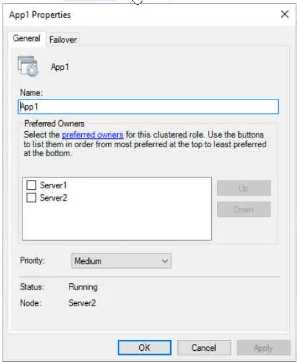
The General tab in App1 Properties is shown in the General exhibit. (Click the General tab.)
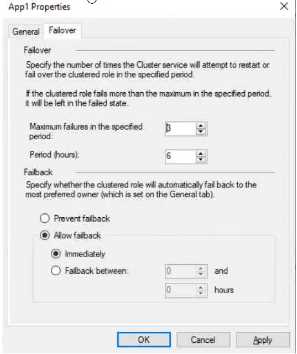
The Failover tab in App1 Properties is shown in the Failover exhibit. (Click the Failover tab.)
Server1 shuts down unexpectedly.
You need to ensure that when you start Server1, App1 continues to run on Server2.
Solution: From the Failover settings, you select Prevent failback.
Does this meet the goal?
The Failover tab in App1 Properties is shown in the Failover exhibit. (Click the Failover tab.)
Server1 shuts down unexpectedly.
You need to ensure that when you start Server1, App1 continues to run on Server2.
Solution: From the Failover settings, you select Prevent failback.
Does this meet the goal?Options
Discussion
Its A, seen similar questions in official practice tests and docs. Prevent failback leaves App1 running on Server2 after Server1 recovers.
Had something like this in a mock exam. It's A since choosing Prevent failback means App1 stays on Server2 even when Server1 comes back online. This avoids unnecessary movement of the resource and minimizes potential downtime or disruption. Pretty sure that's what they want here, but let me know if I'm missing anything.
Its A. Prevent failback keeps App1 on Server2 even after Server1 is back up.
Be respectful. No spam.
Q: 4
You have a failover cluster named Cluster1 that has the following configurations:
Number of nodes: 6
Quorum: Dynamic quorum
Witness: File share, Dynamic witness
What is the maximum number of nodes that can fail simultaneously while maintaining quorum?
Options
Discussion
Yeah, I'm going with C. With six nodes and the file share witness, you've got seven votes in the cluster. You need a majority which means four votes online, so losing three nodes still keeps you above quorum. If more than that fail at once, you can't keep quorum. Pretty sure that's it but open to debate if anyone disagrees.
Option C but this sort of question keeps changing each exam version. MS loves quorum tricks.
A is wrong, C. Saw similar numbers in the official guide and some practice tests.
Its C. But if the file share witness goes down first, you could actually lose just 2 nodes before losing quorum, right?
Be respectful. No spam.
Q: 5
You have an on-premises server named Server1 that runs Windows Server and has the Hyper-V
server role installed.
You have an Azure subscription.
You plan to back up Server1 to Azure by using Azure Backup.
Which two Azure Backup options require you to deploy Microsoft Azure Backup Server (MABS)? Each
correct answer presents a complete solution.
NOTE: Each correct selection is worth one point.
Options
Discussion
C or D, but pretty sure it's A and C. Bare Metal Recovery (A) and System State (C) are both things the Azure Backup Agent can't handle directly, so MABS is required. Option B is a trap since files/folders can be done with just the agent. Open to pushback if Azure updated anything lately.
Its A and C. B is a common trap here since files and folders can be backed up without needing MABS.
Option A and C. Saw a similar question in practice, both Bare Metal Recovery and System State need MABS for Azure Backup.
Be respectful. No spam.
Q: 6
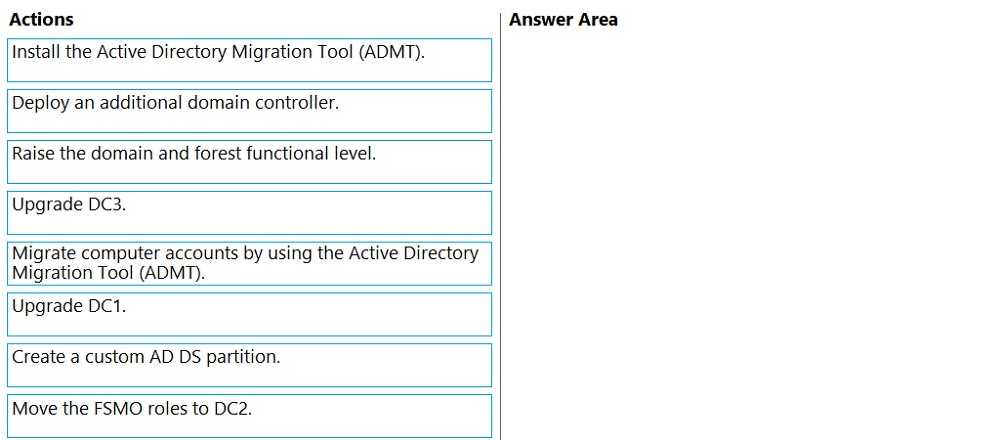
DRAG DROP
You manage 200 physical servers that run Windows Server.
You plan to migrate the servers to Azure.
You need to prepare for discovery of the servers by using Azure Migrate.
Which three actions should you perform in sequence on a physical server? To answer, move the
appropriate actions from the list of actions to the answer area and arrange them in the correct order.

Your Answer
Discussion
Probably D, pretty sure that's the right step order for prepping the physical server in Azure Migrate.
Be respectful. No spam.
Q: 7
DRAG DROP
You have a server that runs Windows Server.
You plan to back up the server to an Azure Recovery Services vault once per week starting on the
next Saturday.
You need to schedule the weekly backup and perform the initial backup as soon as possible.
In which order should you perform the actions? To answer, move all actions from the list of actions to
the answer are and arrange them in the correct order.

Your Answer
Discussion
C Setting the schedule first is tempting but you need to trigger the initial backup manually ASAP, so D is the move here.
Does the "initial backup ASAP" mean before the scheduled weekly backup kicks in? If so, order might change.
Be respectful. No spam.
Q: 8
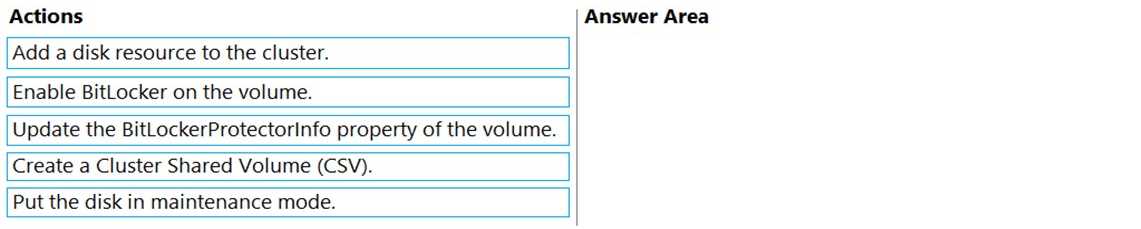
DRAG DROP
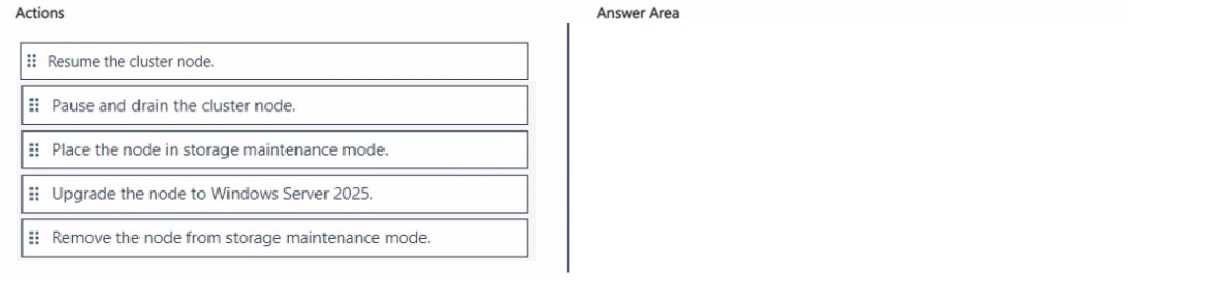
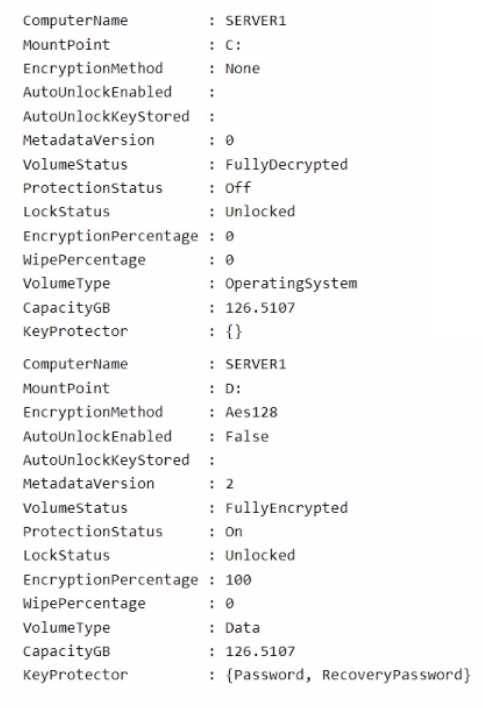
You are planning the implementation of Cluster2 to support the on-premises migration plan.
You need to ensure that the disks on Cluster2 meet the security requirements.
In which order should you perform the actions? To answer, move all actions from the list of actions to
the answer area and arrange them in the correct order.


Your Answer
Discussion
Really clear drag-and-drop for disk security on Cluster2, order matters a lot here. Option C
Be respectful. No spam.
Q: 9
HOTSPOT
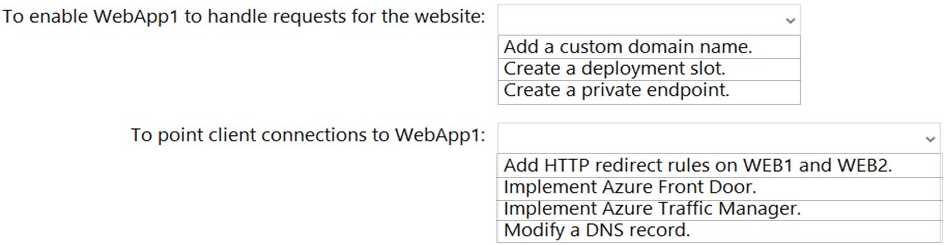
You are planning the www.fabrikam.com website migration to support the Azure migration plan.
How should you configure WebApp1? To answer, select the appropriate options in the answer area.
NOTE: Each correct selection is worth one point.


Your Answer
Discussion
Had something like this in a mock, it's just add the custom domain and change DNS.
C/D? I'm stuck between just adding the domain and using an HTTP redirect.
Call it add a custom domain and modify the DNS record. You need to tell Azure App Service about the domain, then point DNS to it so users reach the right site. I think that's all they're after here, unless they're testing for more advanced migration details.
Its add a custom domain and DNS record, but if the DNS TTL isn't lowered in advance, downtime risk is there. Saw a similar Azure question where missing that detail tripped folks up. Not sure if they want you to mention TTL for full credit here or just those 2 configs.
Its add a custom domain name and modify a DNS record. That's the standard way to move a site into Azure App Service, pretty sure.
Be respectful. No spam.
Q: 10
Note: This question is part of a series of questions that present the same scenario. Each question in
the series contains a unique solution that might meet the stated goals. Some question sets might
have more than one correct solution, while others might not have a correct solution.
After you answer a question in this section, you will NOT be able to return to it. As a result, these
questions will not appear in the review screen.
You have a server named Server1 that runs Windows Server.
You need to ensure that only specific applications can modify the data in protected folders on
Server1.
Solution: From Virus & threat protection, you configure Controlled folder access.
Does this meet the goal?
Options
Discussion
Official docs and labs cover this, so I'd go with A.
A
A not B. Controlled folder access does let you specify which apps can make changes, but it's easy to pick B if you miss that detail. Seen similar question in practice tests.
Be respectful. No spam.
Question 1 of 20 · Page 1 / 2