
Q: 1
You need to implement the planned changes for Microsoft Entra users to sign in to Server1.
Which PowerShell cmdlet should you run?
Options
Discussion
I don’t think it’s C. I’d actually pick B, since Set-AzVM is used for VM settings and it seems like a logical fit if you’re managing how users access the VM. Maybe I’m off but that’s my take here.
Probably A, but does it specify if these servers use FSRM or just standard shares? That info could flip it between A and B.
B here. File screens in FSRM are made for blocking specific file types like .mov, quick to set up and manage across Windows servers. DLP or DAC policies are overkill for just extension filtering. Pretty sure this is the most efficient, but shout if you disagree.
C/D? Pretty sure B is the best choice since file screens in FSRM directly block .mov uploads, but I get why someone might think D could work too with DLP. The trap here is thinking it needs full data loss prevention when only extension blocking is required. Correct me if you see it another way.
B
Did you check the official guide or MS practice labs for how file screens work with FSRM in this scenario?
I don't think it's A. B is right here since file screens are built to block extensions like .mov and much less effort than setting up DAC or DLP.
B imo, file screens with FSRM are quickest for blocking .mov uploads. Saw similar in some practice tests.
Be respectful. No spam.
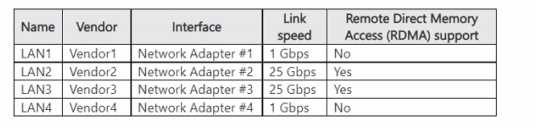 You need to configure NIC learning for LAN2 and LAN3. The solution must support Dynamic Virtual Machine Multi-Queue (d.VMMQ). What should you use?
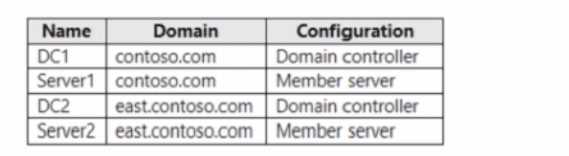 Contoso.com contains a user named User1. You add User1 to the built-in Backup Operators group in contoso.com. Which servers can User1 back up?
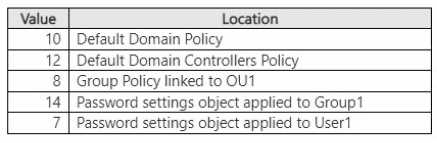 What is the minimum password length that User1 should use when changing to a new password?
 You need to ensure that names from fabrikam.com can be resolved from the on-premises network
Which two actions should you perform? Each correct answer presents part of the solution, NOTE:
Each correct selection Is worth one point
You need to ensure that names from fabrikam.com can be resolved from the on-premises network
Which two actions should you perform? Each correct answer presents part of the solution, NOTE:
Each correct selection Is worth one point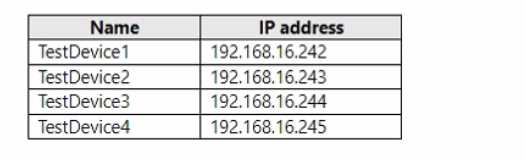 The test devices are turned on once a month. You need to prevent Server1 from assigning the IP addresses allocated to the test devices to other devices when the test devices are offline. The solution must minimize administrative effort. What should you do?