
HOTSPOT You have a server named Server1 that runs Windows Server. Server1 has a single network interface and the Hyper-V virtual switches shown in the following exhibit. 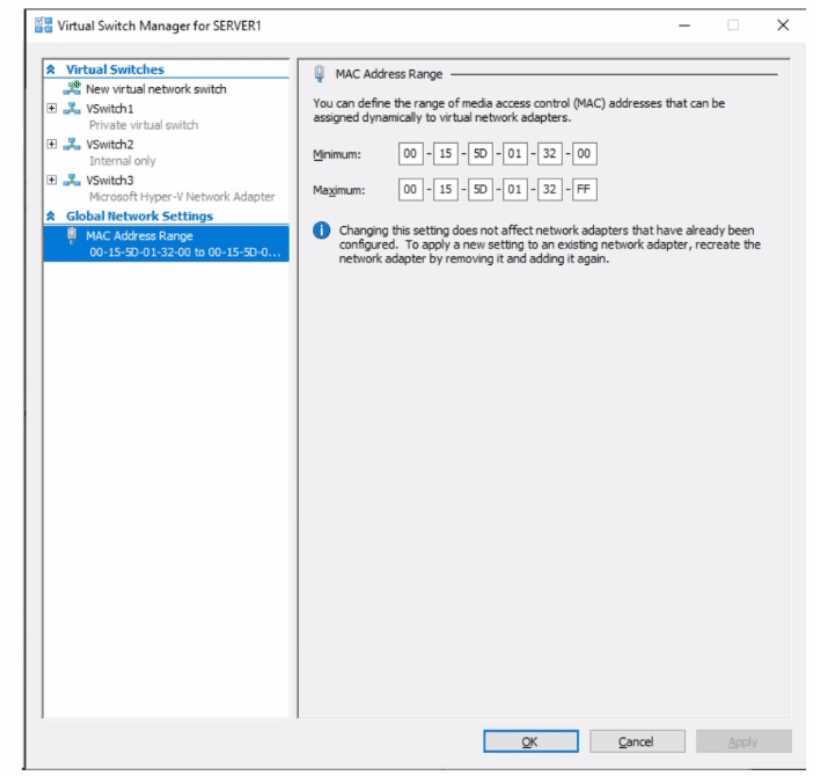 Use the drop-down menus to select the answer choice that completes each statement based on the information presented in the graphic. NOTE: Each correct selection is worth one point.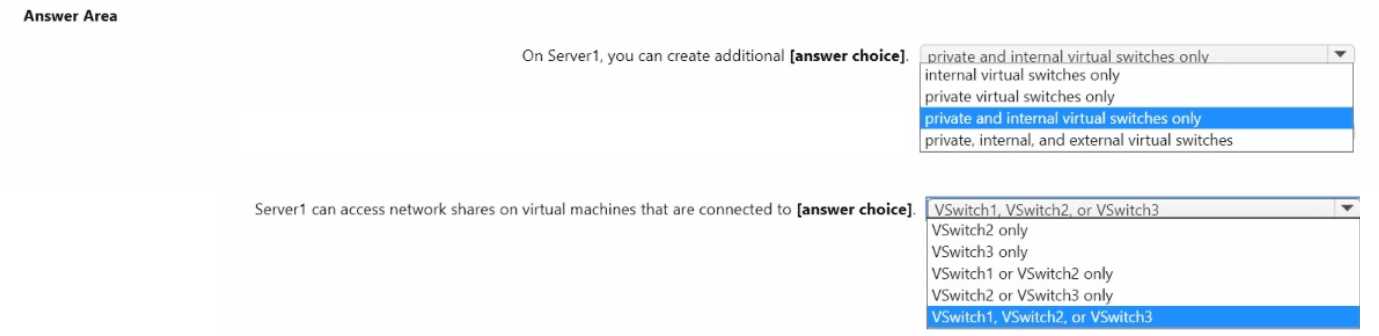
These sequencing questions always make me sigh. Anyway, it’s gotta be: Create Azure storage account → Create Azure file share → Create sync group. You can’t set up a sync group or server endpoint until the storage and share exist in the cloud side, pretty sure that’s how Microsoft wants it. Feel free to correct me if you see different in your lab.
Looks like the right sequence is: Create an Azure Storage account, then Azure file share, then sync group. That’s the order to prep Azure File Sync before you can add your local share as an endpoint. I think that matches what I’ve seen in docs, but feel free to double-check.
- Target 1: Create an Azure Storage account
- Target 2: Create an Azure file share
- Target 3: Create a sync group
