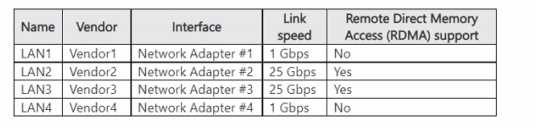
Does the question specify if Host1 has Hyper-V isolation enabled? That totally changes things, since Windows containers with lower base OS versions need Hyper-V to run on a newer host. If it's just process isolation, it probably won't start.
📖 About this Domain
This domain covers deploying and managing the core identity infrastructure using Active Directory Domain Services. It focuses on domain controller configuration, object management, and securing AD DS. The domain also introduces hybrid identity synchronization with Azure AD Connect.
🎓 What You Will Learn
- Deploy and configure AD DS domain controllers, including read-only domain controllers (RODCs) and global catalog servers.
- Manage AD DS objects, groups, and organizational units (OUs) using tools like Active Directory Users and Computers and PowerShell.
- Implement and manage Group Policy Objects (GPOs) for centralized configuration management of users and computers.
- Configure and manage hybrid identity by implementing and maintaining Azure AD Connect for directory synchronization.
🛠️ Skills You Will Build
- Proficiency in installing and configuring new AD DS forests and domains using both GUI and PowerShell.
- Competency in managing the AD DS schema, FSMO roles, and performing AD DS backups and restores.
- Ability to design and troubleshoot GPO application, including processing order, blocking inheritance, and enforcing policies.
- Expertise in configuring Azure AD Connect synchronization, including password hash synchronization (PHS) and pass-through authentication (PTA).
💡 Top Tips to Prepare
- Master PowerShell cmdlets for AD DS administration as automation is a key exam objective.
- Understand the function and placement strategy for all five FSMO roles in single and multi-domain environments.
- Build a hands-on lab to practice domain controller promotion, GPO linking, and replication troubleshooting.
- Review Azure AD Connect prerequisites and supported topologies for hybrid identity scenarios.
📖 About this Domain
This domain covers core Windows Server networking services and their integration into hybrid cloud infrastructures. You will manage IP addressing with DHCP and IPAM, name resolution with DNS, and secure network connectivity using VPNs and Azure networking components. Key technologies include Azure Arc, Azure Relay, and managing networking for Windows Server IaaS VMs.
🎓 What You Will Learn
- Deploy and configure DNS, including integrating on-premises DNS with Azure DNS private zones for hybrid name resolution.
- Implement and manage IP addressing using DHCP and IPAM for centralized address space management.
- Establish secure hybrid connectivity using VPNs, Azure Relay, and managing Azure Arc-enabled servers.
- Configure networking for Windows Server IaaS VMs, including VNet implementation and NSG rule management.
🛠️ Skills You Will Build
- Configure DNS zones, records, and forwarders to enable reliable name resolution across on-premises and Azure environments.
- Administer DHCP scopes and IPAM to automate and track IP address allocation within your network infrastructure.
- Implement and manage NPS policies and VPN connections to enforce network access control and secure remote connectivity.
- Manage Azure VNet peering, network security groups (NSGs), and Azure Network Adapter for IaaS VM connectivity.
💡 Top Tips to Prepare
- Practice DNS and DHCP configuration using PowerShell cmdlets and Windows Admin Center for hands-on experience.
- Build a lab environment to configure a site-to-site VPN connection between an on-premises network and an Azure VNet.
- Understand the role of Azure Arc in managing on-premises servers and how it facilitates hybrid network management.
- Master the creation and troubleshooting of Network Security Group (NSG) rules to control traffic flow to and from Azure VMs.
📖 About this Domain
This domain covers the administration of Windows Server IaaS workloads and on-premises servers using hybrid cloud technologies. It focuses on remote management, patching, and integrating on-premises infrastructure with Azure services like Azure Arc and Azure Monitor for unified operations.
🎓 What You Will Learn
- Configure remote management protocols and tools, including Windows Admin Center, PowerShell Remoting, and Just Enough Administration (JEA).
- Onboard on-premises servers to Azure Arc to enable centralized management, governance with Azure Policy, and extension deployment.
- Implement and manage Windows Server Update Services (WSUS) for on-premises patching and integrate with Azure Update Management for hybrid environments.
- Utilize Azure Monitor and Log Analytics workspaces to collect and analyze performance metrics and logs from hybrid server workloads.
🛠️ Skills You Will Build
- Managing a hybrid server fleet using Windows Admin Center gateways and Azure Arc-enabled server capabilities.
- Automating administrative tasks across on-premises and cloud servers using PowerShell Remoting and Azure Automation runbooks.
- Designing and implementing a comprehensive update compliance strategy using WSUS deployment rings and Azure Update Management schedules.
- Troubleshooting server performance and security issues by writing Kusto Query Language (KQL) queries against data in a Log Analytics workspace.
💡 Top Tips to Prepare
- Gain practical experience by deploying the Windows Admin Center gateway and connecting it to both on-premises servers and Azure.
- Practice the end-to-end process of installing the Azure Connected Machine agent on a server and managing it through the Azure portal.
- Set up a lab with a WSUS server, configure client-side targeting via Group Policy, and synchronize updates.
- Focus on writing KQL queries in a Log Analytics workspace to analyze data from the Azure Monitor Agent deployed on a hybrid machine.
📖 About this Domain
This domain focuses on managing Windows Server IaaS virtual machines and container workloads. You will handle deployment, configuration, and maintenance of Hyper-V VMs and Windows Server containers. It also covers hybrid management using Azure Arc for servers and Azure Stack HCI.
🎓 What You Will Learn
- Learn to create and configure Hyper-V VMs, including VHDs, VHDX, Generation 2 VMs, and dynamic memory.
- Learn to secure workloads with Shielded VMs and implement high availability using failover clustering and Hyper-V Replica.
- Learn to install Docker on Windows Server, manage Windows containers, and build container images using Dockerfiles.
- Learn to onboard on-premises servers to Azure Arc for centralized management through Azure Policy and Azure Monitor.
🛠️ Skills You Will Build
- Build skills to deploy and manage Hyper-V VMs using Hyper-V Manager, Windows Admin Center, and PowerShell cmdlets.
- Build skills to manage the container lifecycle, including pulling images, running containers, and creating custom images with Dockerfiles.
- Build skills to extend Azure management to on-premises Windows Server VMs using Azure Arc for servers.
- Build skills to implement live migration, storage migration, and configure Hyper-V Replica for disaster recovery.
💡 Top Tips to Prepare
- Gain hands-on experience creating VMs, virtual switches, and storage with Hyper-V Manager and PowerShell.
- Practice core Docker commands for image and container management on a Windows Server host.
- Onboard a local Windows Server to Azure Arc to understand the hybrid management workflow and capabilities.
- Study failover clustering concepts for Hyper-V, including quorum, Cluster Shared Volumes (CSVs), and live migration.
📖 About this Domain
This domain covers the configuration and management of Windows Server storage and file services. You will focus on implementing solutions like Storage Spaces, Data Deduplication, and Distributed File System (DFS). The domain also integrates on-premises infrastructure with cloud services through Azure File Sync.
🎓 What You Will Learn
- You will learn to configure disks and volumes, including implementing and managing Storage Spaces and Storage Spaces Direct.
- This domain teaches you to configure and manage Data Deduplication to optimize storage capacity.
- You will learn to implement and configure Distributed File System (DFS) for both Namespaces and Replication.
- You will learn to install and manage Azure File Sync, including deploying the agent and configuring cloud tiering.
🛠️ Skills You Will Build
- You will build skills to configure and manage SMB shares, including setting share permissions and enabling access-based enumeration.
- You will build the ability to implement and manage Storage Spaces, Storage Spaces Direct, and Data Deduplication for optimized storage.
- You will build proficiency in deploying and managing Distributed File System (DFS) Namespaces and Replication groups.
- You will build expertise in integrating on-premises file servers with Azure by deploying and configuring Azure File Sync and cloud tiering.
💡 Top Tips to Prepare
- Focus on PowerShell cmdlets for storage management, as many exam tasks require scripting knowledge for disks, volumes, and Storage Spaces.
- Gain hands-on experience configuring Storage Spaces, understanding the differences between resiliency types like mirror and parity.
- Master the components and deployment process of Azure File Sync, including the Storage Sync Service, sync groups, and cloud tiering policies.
- Practice configuring both DFS Namespaces and DFS Replication in a lab environment to understand their distinct functions and configurations.
Premium Access Includes
- ✓ Quiz Simulator
- ✓ Exam Mode
- ✓ Progress Tracking
- ✓ Question Saving
- ✓ Flash Cards
- ✓ Drag & Drops
- ✓ 3 Months Access
- ✓ PDF Downloads