Q: 11
You have an Azure subscription that contains an app named App1. App1 has the app registration
shown in the following table.
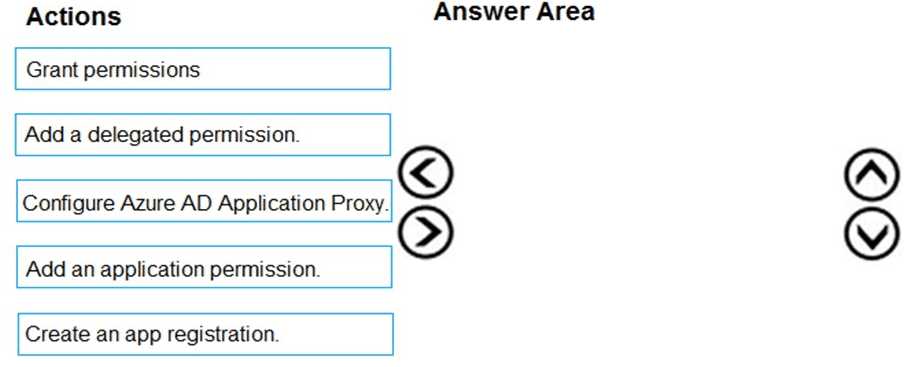
 You need to ensure that App1 can read all user calendars and create appointments. The solution
must use the principle of least privilege.
What should you do?
You need to ensure that App1 can read all user calendars and create appointments. The solution
must use the principle of least privilege.
What should you do?
 You need to ensure that App1 can read all user calendars and create appointments. The solution
must use the principle of least privilege.
What should you do?
You need to ensure that App1 can read all user calendars and create appointments. The solution
must use the principle of least privilege.
What should you do?Options
Discussion
Not A. It's B since you need Application permission for the app to access all user calendars, not just the signed-in user's. Delegated only works when a user is present, so that's a common trap here. I think B is correct but open to other opinions if I missed something.
B tbh, only Application permission gives that org-wide access for scheduling, so makes sense here.
B
B makes sense. Only Application permission gives the app access to all calendars directly, which fits what they're asking here.
Probably B, since Application permission is needed for background access to all user calendars. Not totally sure, can someone confirm?
Maybe A
A is wrong, I remember similar questions in the official practice test pointing to Application permission.
Be respectful. No spam.
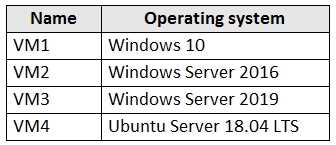 You create an MDM Security Baseline profile named Profile1.
You need to identify to which virtual machines Profile1 can be applied.
Which virtual machines should you identify?
You create an MDM Security Baseline profile named Profile1.
You need to identify to which virtual machines Profile1 can be applied.
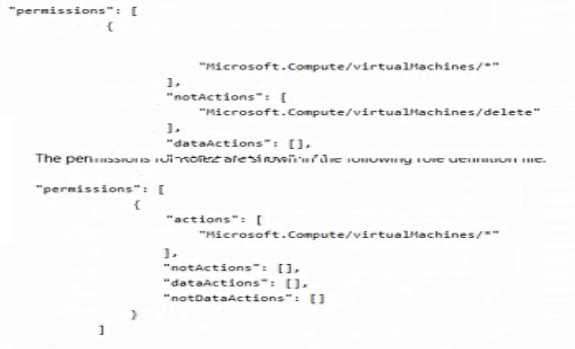
Which virtual machines should you identify?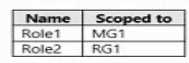 The permissions for Role1 are shown in the following role definition file.
  You assign the roles to the users shown in the following table.
 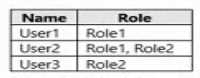 For each of the following statements, select Yes if the statement is true. Otherwise, select No