
Q: 12
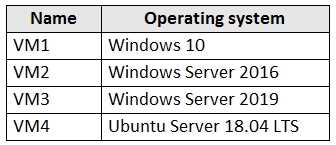
You have an Azure subscription that contains the Azure virtual machines shown in the following
table.
 You create an MDM Security Baseline profile named Profile1.
You need to identify to which virtual machines Profile1 can be applied.
Which virtual machines should you identify?
You create an MDM Security Baseline profile named Profile1.
You need to identify to which virtual machines Profile1 can be applied.
Which virtual machines should you identify?
 You create an MDM Security Baseline profile named Profile1.
You need to identify to which virtual machines Profile1 can be applied.
Which virtual machines should you identify?
You create an MDM Security Baseline profile named Profile1.
You need to identify to which virtual machines Profile1 can be applied.
Which virtual machines should you identify?Options
Discussion
Option A. Had something like this in a mock. Only VM1 can get the MDM Security Baseline because it's Windows 10 and Azure AD joined, which is what's required for Intune management. Pretty sure that's the intent but happy to hear other takes.
C is not it, has to be A. Only VM1 meets the requirements for MDM Security Baseline with Intune management here.
Probably D here. If Intune can manage all VM types, then the profile should push to every listed VM, right?
Call it D, if all VMs are in scope for Intune by default. Seems like a possible trap with the joining part.
B, If the baseline was allowed on non-Windows OS, would that make B correct?
Be respectful. No spam.
