
Q: 10
You have a Microsoft Entra tenant that uses Microsoft Entra Permissions Management and contains
the accounts shown in the following table:
 Which accounts will be listed as assigned to highly privileged roles on the Azure AD insights tab in
the Entra Permissions Management portal?
Which accounts will be listed as assigned to highly privileged roles on the Azure AD insights tab in
the Entra Permissions Management portal?
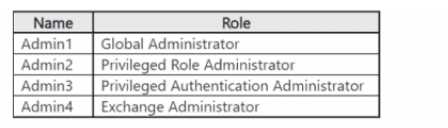 Which accounts will be listed as assigned to highly privileged roles on the Azure AD insights tab in
the Entra Permissions Management portal?
Which accounts will be listed as assigned to highly privileged roles on the Azure AD insights tab in
the Entra Permissions Management portal?Options
Discussion
D . User Admin isn't flagged as highly privileged in the Insights tab, so Admin4's out. Only Global Admin, Privileged Role Admin, and Security Admin show up from my experience. Pretty sure this matches how it works now, but open to corrections.
D , User Admin isn’t counted as "highly privileged" for this tab, so Admin4 gets excluded.
Option D, Only Admin1, Admin2, and Admin3 get counted as highly privileged here. User Administrator (Admin4) doesn't make the cut, pretty sure.
B or E for me, since Security Admin and Privileged Role Admin are always counted but I thought User Admin (Admin4) could also show up as highly privileged in some Azure reports. Not 100% sure though, open to other ideas.
D , matches what the official guide and portal UI show for highly privileged roles. User Admin doesn't count here, at least last I checked practice sets. Anyone spot something different in recent updates let me know.
D imo, always seen only Global Admin, Privileged Role Admin, and Security Admin get listed as highly privileged in the portal. User Admin doesn’t show up there per exam reports. If that’s changed recently, let me know.
D , only Global Admin, Security Admin, and Privileged Role Admin get flagged as highly privileged. User Admin (Admin4) doesn't show in that list per Entra docs, unless something changed recently.
Its D, User Administrator (Admin4) isn't tagged as highly privileged here. Entra docs list the other three roles only. Agree?
D imo, but Microsoft keeps changing what counts as 'highly privileged' so not 100 percent sure.
E but only if User Administrator counts as highly privileged which I think sometimes gets included depending on tenant config.
Be respectful. No spam.
