
Q: 18
HOTSPOT You plan to deploy an Azure web app named Appl that will use Azure Active Directory (Azure AD) authentication. App1 will be accessed from the internet by the users at your company. All the users have computers that run Windows 10 and are joined to Azure AD. You need to recommend a solution to ensure that the users can connect to App1 without being prompted for authentication and can access App1 only from company-owned computers. What should you recommend for each requirement? To answer, select the appropriate options in the answer area. NOTE: Each correct selection is worth one point. 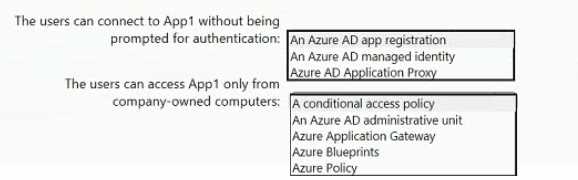
Your Answer
Discussion
Azure AD app registration for SSO, then Conditional Access policy to lock access to company devices. Pretty standard setup.
Yeah, Azure AD app registration gives you the SSO experience for Azure AD-joined Win10 devices. To restrict access to company-owned devices only, you'd use Conditional Access with a compliant device or Azure AD join requirement. Pretty sure that's what they're looking for here, but open to other interpretations.
Why not just combine Azure AD app registration for the SSO part with a Conditional Access policy for device restriction?
App registration for SSO, conditional access policy for device restriction, but only if devices are actually Azure AD joined. Seen practice questions trip up on that detail.
Makes sense: Azure AD app registration for seamless SSO, Conditional Access policy for device restriction.
App registration and conditional access look right, but this only works if the Windows 10 devices are Azure AD joined. If they were just registered or personal, conditional access wouldn't guarantee compliance. Have seen similar trip up folks on practice sets.
I don't think Azure AD App Proxy is right here. App registration for SSO, Conditional Access for company device restriction.
Be respectful. No spam.
