
DRAG DROP Fourth Coffee has an ASP.NET Core web app that runs in Docker. The app is mapped to the www.fourthcoffee.com domain. Fourth Coffee is migrating this application to Azure. You need to provision an App Service Web App to host this docker image and map the custom domain to the App Service web app. A resource group named FourthCoffeePublicWebResourceGroup has been created in the WestUS region that contains an App Service Plan named AppServiceLinuxDockerPlan. Which order should the CLI commands be used to develop the solution? To answer, move all of the Azure CLI command from the list of commands to the answer area and arrange them in the correct order. 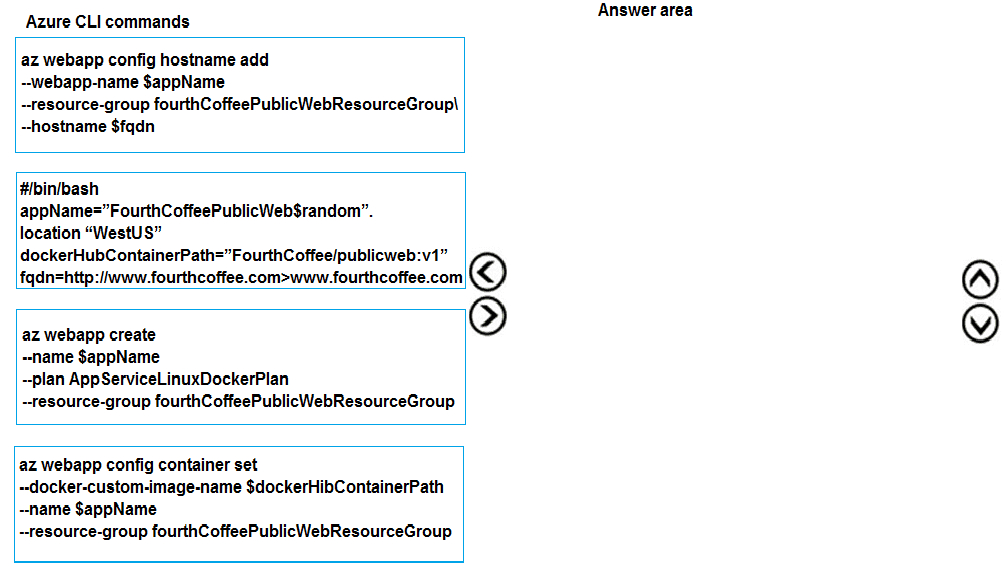
Had something like this in a mock, and that sequence works since you can't assign a domain before the app exists. Pretty sure that's the correct flow, but chime in if anyone did it differently.
The right flow is set vars first, then create web app, configure the Docker container, and finally add the custom hostname. So it's variables → create → container → hostname. Not 100% sure if you'd ever need to flip hostname before container but haven't seen that in Azure docs.
Not quite, the order should be variables first so the shell has what it needs, then web app creation, then container config, and finally adding the custom domain. So it's: initialize variables → create web app → set Docker image → add hostname. Pretty sure this matches the actual workflow in Azure and avoids issues with missing resources or references. Domain mapping too early is a common trap.
