
Q: 1
In Blue Prism, what is a stage Expression?
Options
Discussion
No comments yet. Be the first to comment.
Be respectful. No spam.
The password field in the Centrix Data Solutions business application can be spied successfully, however when using the Highlight feature in Application Modeller the following behaviour is encountered 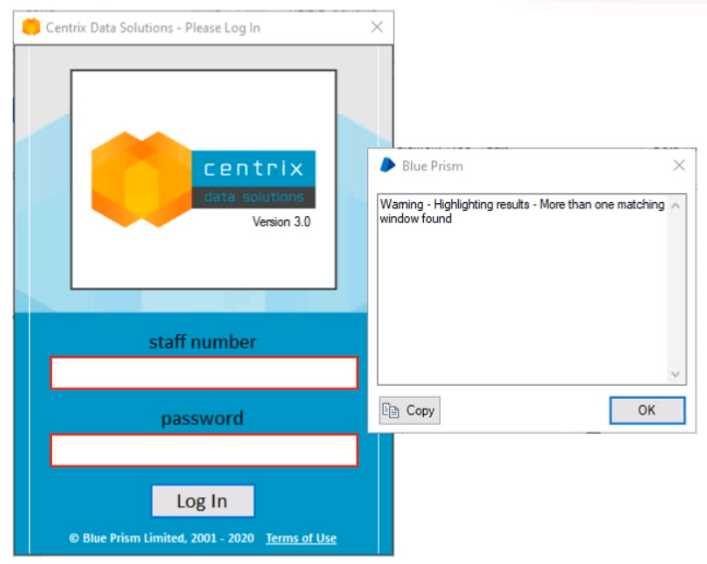 Which of the following Attributes would you use to help obtain a unique element match?
DRAG DROP Drag and drop the Blue Prism stage names on the left into the placement boxes (A - E) so that the dropped stage names correspond with the image of the Blue Prism stage beside it: 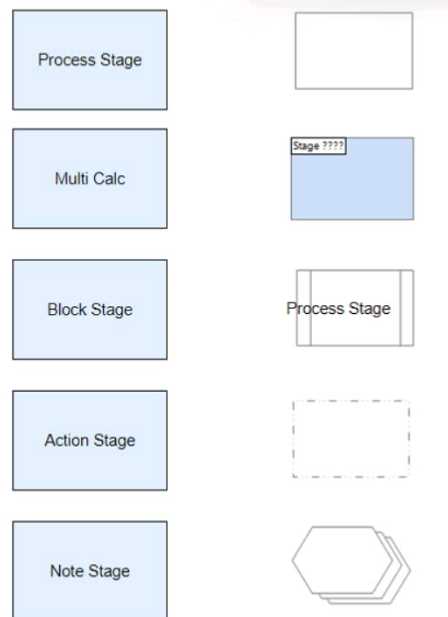
Examine the following recover flow taken from a Blue Prism Process 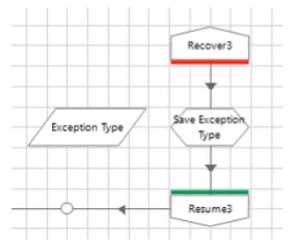 The 'Exception Type' data item has no initial value and has a data type of text The Calculation stage 'Save Exception Type' will output the current exception type to the "Exception Type' data item. What expression would you use in the 'Save Exception Type' stage to achieve this?
