
Q: 18
HOTSPOT
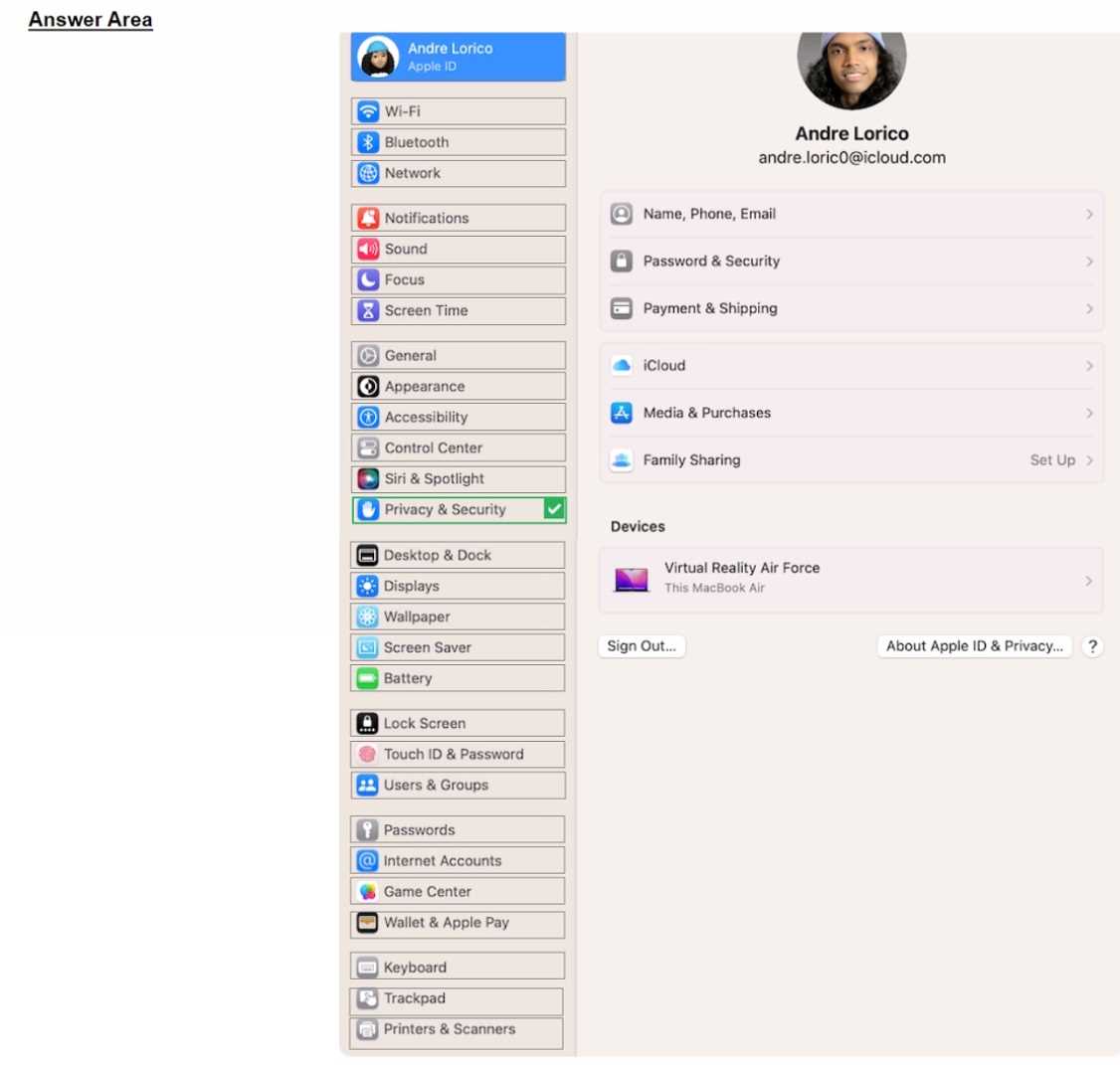
Select the setting in the sidebar that you should use to turn on FileVault.

Your Answer
Discussion
Privacy & Security in the sidebar. This is where FileVault can be enabled on newer macOS versions. Saw similar steps in recent exam reports, pretty sure this is right.
Privacy & Security in the sidebar is the one to use. The "General" section is a common trap, but on newer macOS versions FileVault moved under Privacy & Security. Saw this recent change in practice materials too, so I'd trust that over old habits.
General sidebar section for FileVault.
I'm pretty sure you go through General to access a lot of core system settings, including things like disk encryption. Unless they've moved it in the latest update, I'd pick General here. Could be wrong if Apple changed the layout lately. Anyone else seeing it this way?
I'm pretty sure you go through General to access a lot of core system settings, including things like disk encryption. Unless they've moved it in the latest update, I'd pick General here. Could be wrong if Apple changed the layout lately. Anyone else seeing it this way?
Isn't it under General in the sidebar for FileVault settings? I remember seeing it there in some macOS versions, though they keep moving stuff around. Could be wrong, but that's what I would check first.
Be respectful. No spam.
