
Q: 16
HOTSPOT
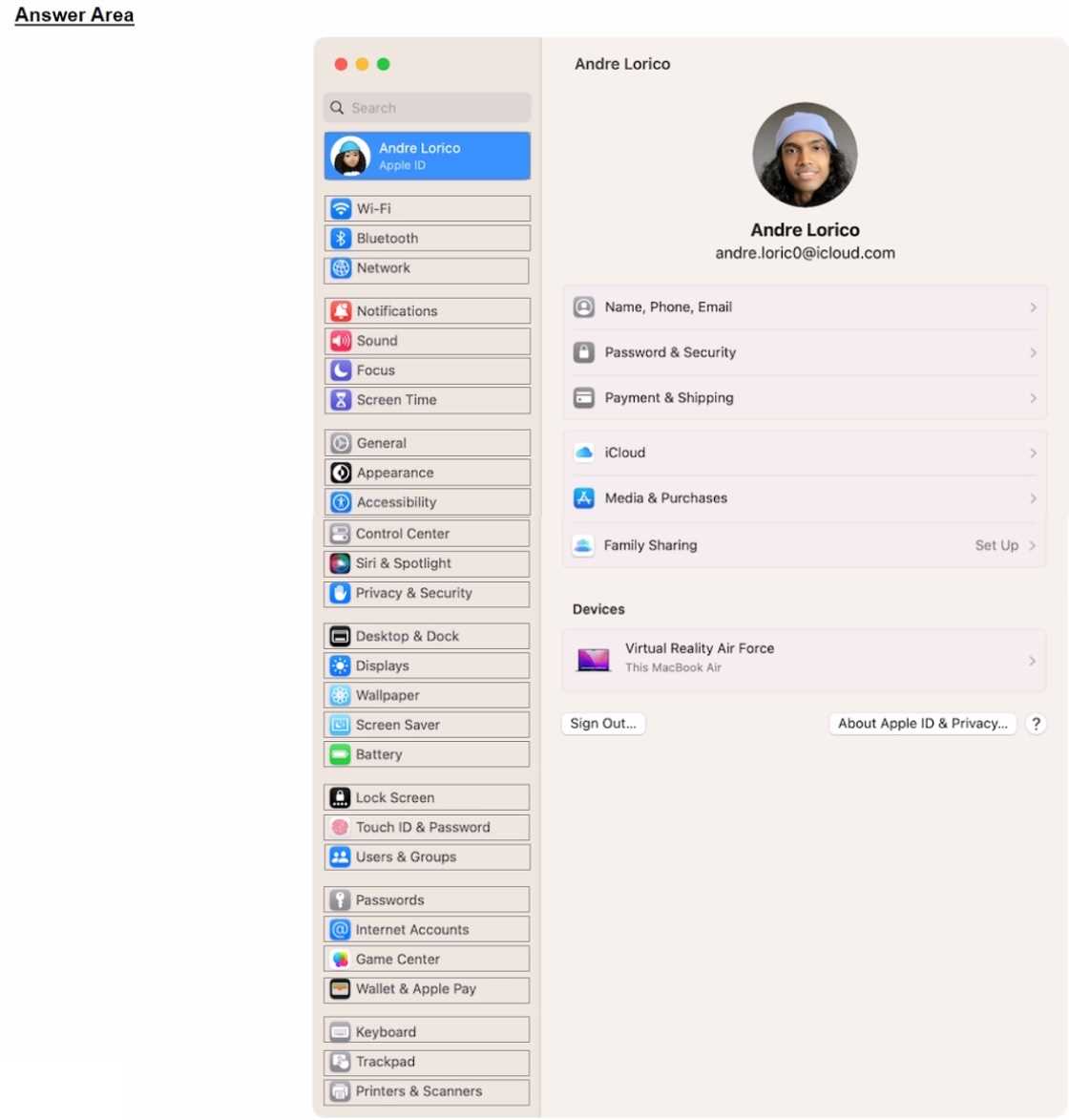
Select the setting in the sidebar that you should you use to copy the password of a known Wi-Fi
network.

Your Answer
Discussion
Network is the right choice here. You have to pick Network in the sidebar before you can access and copy Wi-Fi passwords.
Go with Network in the sidebar, that's where you manage Wi-Fi details. Confident that's the one.
Network in the sidebar is the way to go. You have to open Network first, then on the right pick Wi-Fi, hit Advanced, and that's when you see your saved networks with options like Copy Password. I always forget it’s not under just Wi-Fi in the sidebar. Anyone seen a different layout on other OS versions?
Not Wi-Fi in the sidebar since that's not always shown-pretty sure it's Network, the trap here is picking Wi-Fi directly.
Why is Apple still making this a multi-layer navigation pain? It's Network in the sidebar, then you dig for Advanced before you can copy the Wi-Fi password. Pretty sure that's it unless they changed it again.
Be respectful. No spam.
