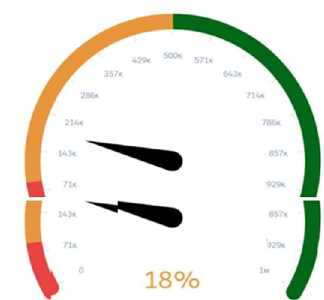
In the scenario described, the sales managers at Universal Containers require a Gauge chart that not
only shows the current percentage of opportunities in their pipeline but also indicates whether they
are below or beyond their set targets. The appropriate widget parameters to achieve this
visualization in Salesforce CRM Analytics (formerly known as Einstein Analytics) are:
Reference Line: This parameter is crucial for defining a specific target value on the gauge chart. It
visually marks a point that represents the target goal, providing an immediate visual cue as to
whether the current percentage is below or above this point.
Markers: Markers are used to represent and highlight specific values on the gauge chart. They can be
utilized to emphasize the current percentage level of the pipeline, making it instantly visible how
close or far the current value is from the reference line or target.
Conditional Formatting: This feature allows the chart to change color or style based on whether the
current values meet, exceed, or fall below the target. It is a critical visual tool for quickly
communicating performance against targets. Conditional formatting can be set to alter the
appearance of the gauge’s fill color based on whether the values are above, equal to, or below the
reference line, thereby providing an intuitive visual representation of performance relative to
targets.
The combination of these three parameters enables a highly effective visualization for sales
managers to monitor their performance against key metrics and targets directly on their dashboards.
This setup is aligned with Salesforce’s best practices for creating meaningful and actionable insights
within CRM dashboards, ensuring that users can easily interpret and react to the data presented.
For more details on configuring these parameters, you can refer to Salesforce documentation and
specific Trailhead modules that cover dashboard creation and customization:
Wave Analytics Explorer
Building Lenses, Dashboards, and Apps in CRM Analytics
These resources provide in-depth training and examples to help users effectively use Salesforce CRM
Analytics for a wide range of data visualization needs.

 Which widget parameters should a consultant use?
 Which widget parameters should a consultant use?